3 Diagnostics, Troubleshooting and Testing
16
WABCO Maintenance Manual MM-0112 (Revised 07-18)
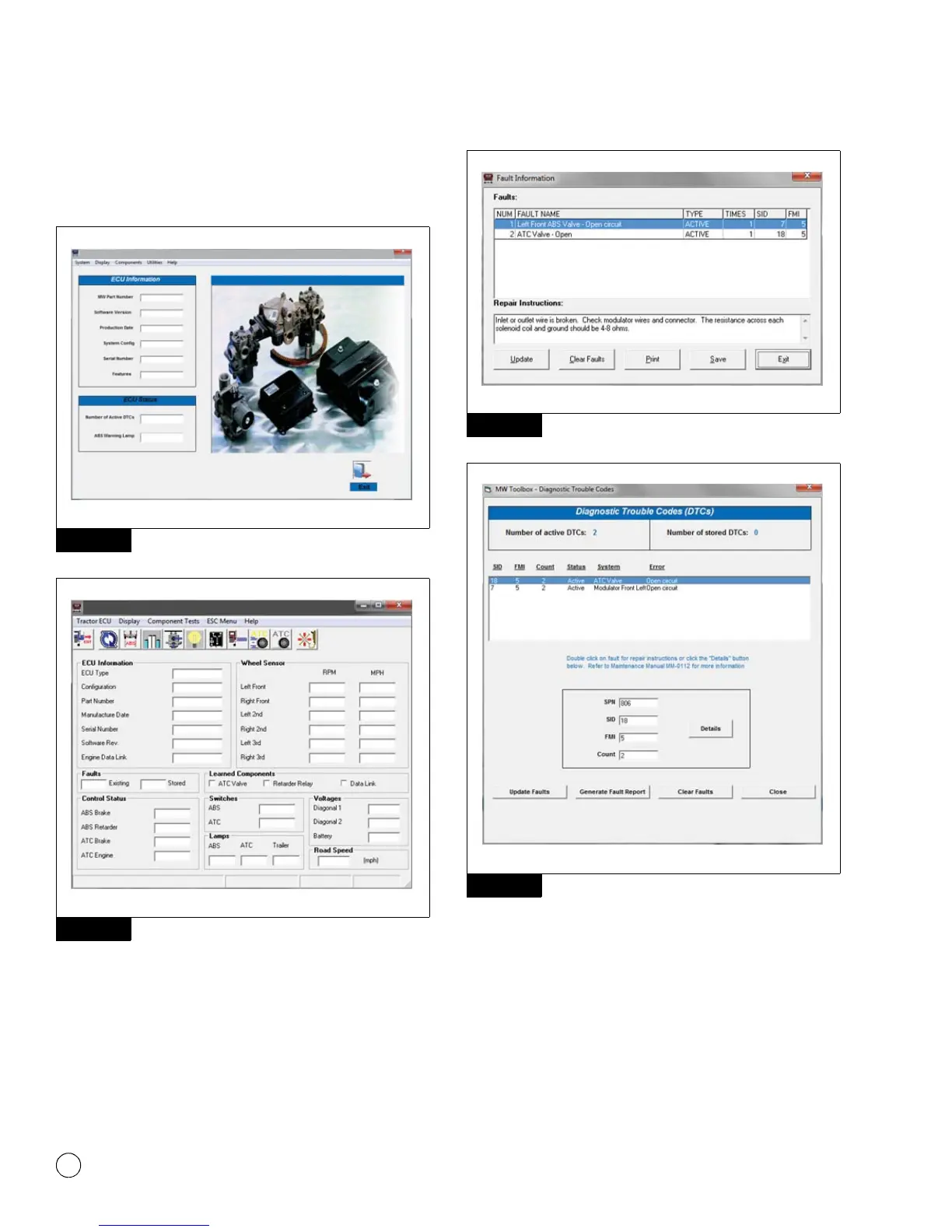
5. In the Main Menu, select J1939 Tractor ABS or J1708
TOOLBOX™, then Tractor ABS. The ABS Main Screen will
appear. Figure 3.7 and Figure 3.8.
Figure 3.7
Figure 3.8
6. Select Display from the top menu.
7. From the pull-down menu, select Faults or Diagnostic
Trouble Codes. This will open the Fault Information screen.
Figure 3.9 and Figure 3.10.
Figure 3.9
Figure 3.10
8. A description of the fault, the number of times the fault
occurred, the system identifier (SID), the failure mode (FMI) and
Suspect Parameter Number (SPN) are all displayed in the fault
information window. Basic repair instructions for each fault are
also provided. More detailed information about SID and FMI
troubleshooting and repair is provided in the following section
as well as the SID FMI table.
Figure 3.7
Figure 3.8
4010613a
WABCO Toolbox - Pneumatic ABS Diagnostics
WABCO Pneumatic ABS
Figure 3.9
Figure 3.10
4010615a
4010616a



 To Next Page