ExpressKeys™
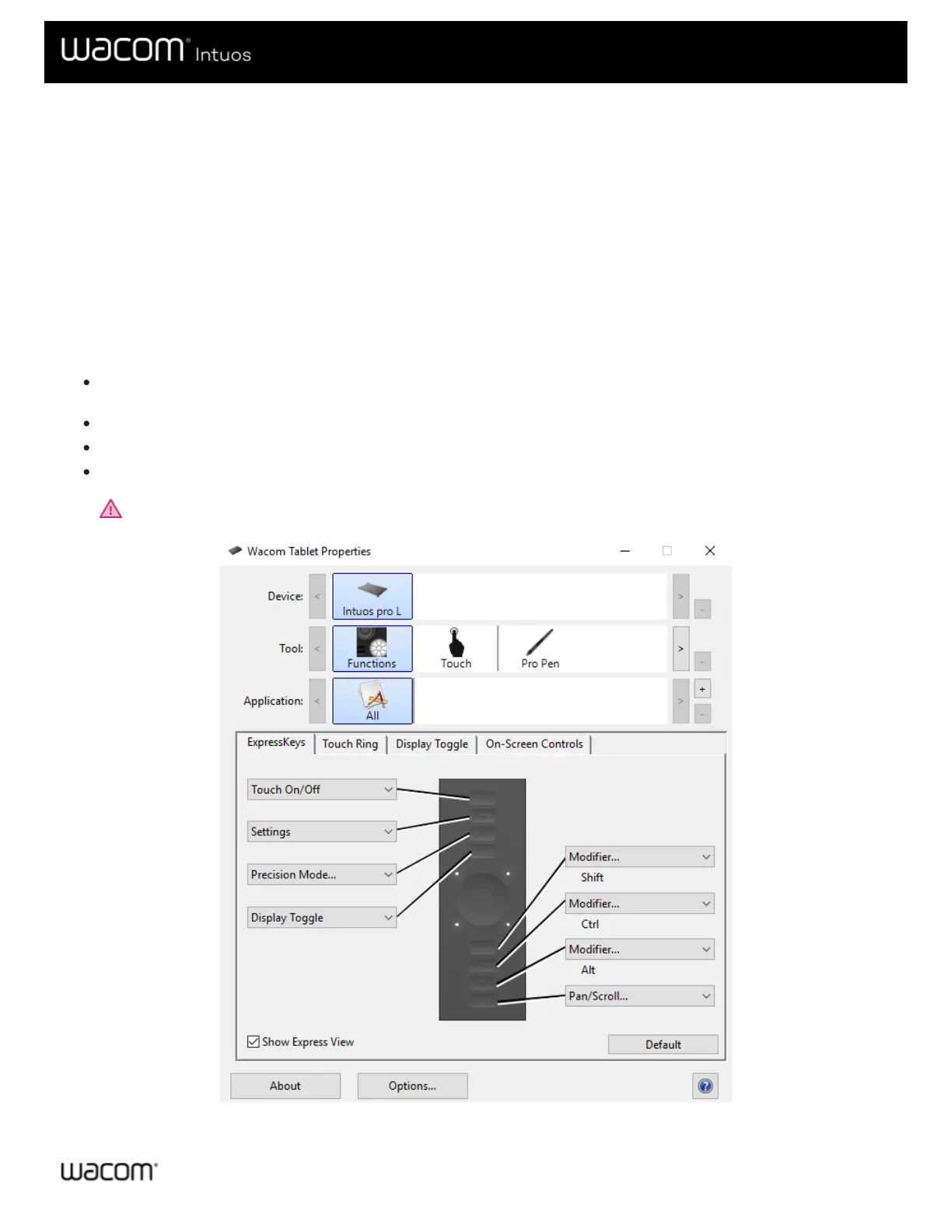
ExpressKeys™ are customizable buttons on your device. When you press an ExpressKey, you activate the assigned setting,
such as mouse clicks, modifiers, or navigation functions.
You can view and change which settings are assigned in Wacom Tablet Properties.
1. In Wacom Tablet Properties, if there are Device and Tool rows, select your device and then select Functions.
2. Click the ExpressKeys™ or Tablet tab, depending on your device.
3. Select the setting that you want for each ExpressKey from the drop-down.
Tips
You can use ExpressKeys™ in combination with one another. For example, assign Ctrl to one ExpressKey and Alt to
another. When you press both ExpressKeys™ at the same time, you activate a Ctrl+Alt function.
If your device has ExpressKeys™ on both sides, you can assign settings to the Left and Right sides individually.
You can enable Express View so that you can rest your finger on an ExpressKey to show the current settings.
Some applications override the ExpressKey settings.
Important: ExpressKeys™ will vary, depending on your device.











 To Next Page