Assign On-Screen Controls
After you create an On-Screen Control and assign settings to it, you need to assign the On-Screen Control to one of your device's
components so that you can open it. You can assign On-Screen Controls to ExpressKeys™, touch gestures, and pen buttons,
depending on the features available on your device.
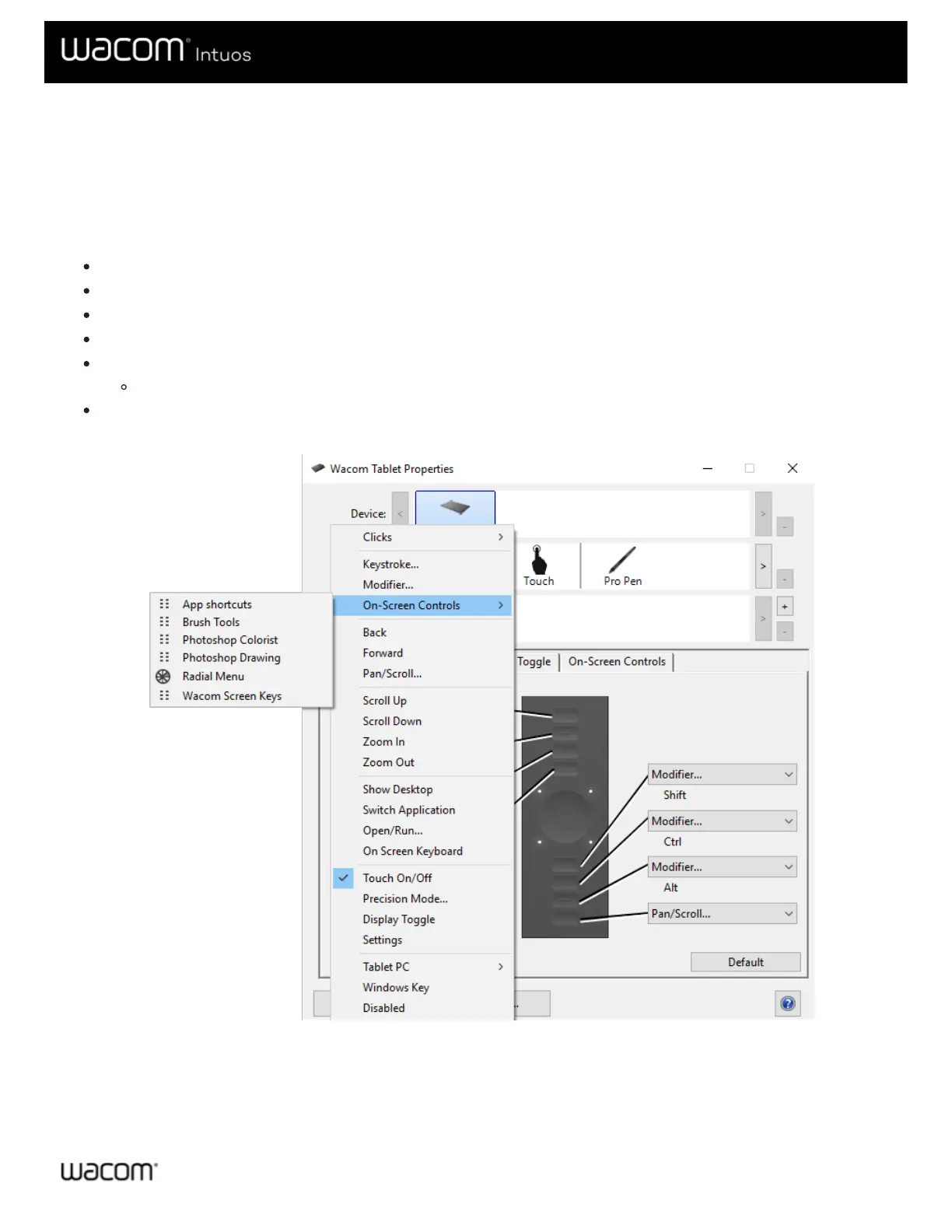
In this example, you can see how to assign an On-Screen Control to an ExpressKey™.
Open Wacom Tablet Properties and select your Device.
Select Functions.
Select the ExpressKeys™ tab.
From the drop-down next to one of the ExpressKeys™, select On-Screen Controls.
From the list that appears, select the name of an On-Screen Control.
The assignment takes effect immediately.
Press the ExpressKey™, and the On-Screen Control that you selected displays on your device or monitor. Click one of the
buttons in the On-Screen Control to activate the setting that you assigned to it.
The above screenshot is for descriptive purposes; it may not match your screen.











 To Next Page