6
Step 3
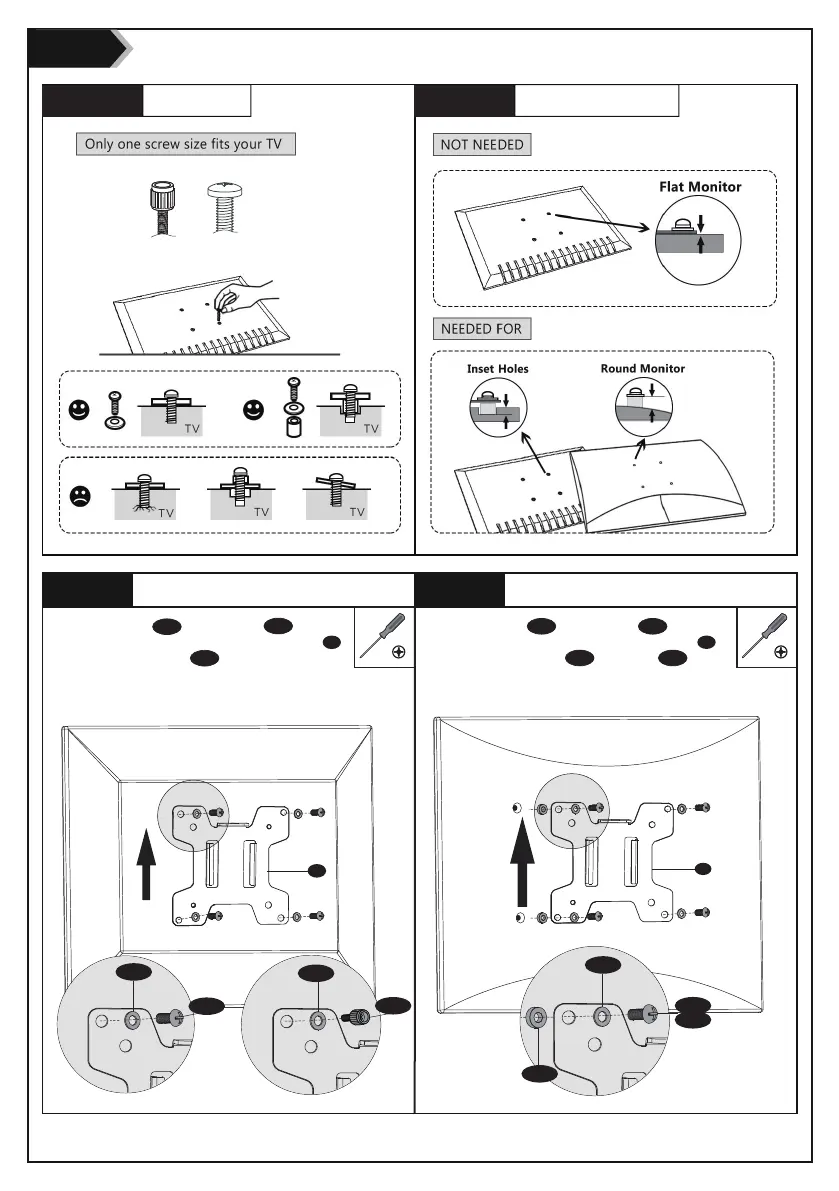
Step 3.3a
Flat Back Monitor
Step 3.3b
Curved Back Monitor
A
A
M-D
M-B
Step 3.1
Select TV Screws
Step 3.2
Select Spacers ( if needed )
Select M4x16 Bolt M-B or M5x16 Bolt M-D
according to your TV/Monitor, connect VESA Plate A
together with D5 Washer M-E and Spacer M-F into
the mounting holes on the back of TV/Monitor,
tighten with screwdriver. (Screwdriver needed but
not included)
M-E
M-F
M-E
M-E
M-A
M-C
Hand thread screws
into the threaded
inserts on the back of
your TV to determine
which screw diameter
(M4 or M5) to use.
M4
M5
Select M4x12 Bolt M-A or M5x12 Bolt M-C
according to your TV/Monitor, connect VESA Plate A
together with D5 Washer M-E into the mounting
holes on the back of TV/Monitor, tighten with
screwdriver. (Screwdriver needed but not included)


 To Next Page