EasyManua.ls Logo

Wali MF002XLS - User Manual

Wali MF002XLS
2 pages
Print Icon
To Next Page IconTo Next Page
Loading...
MF002XLS
WARNING
USE OF TIPOVER RESTRAINTS MAY ONLY REDUCE, BUT NOT ELIMINATE RISK OF TIP OVER.
SMALL PARTS- NOT FOR CHILDREN UNDER 3 YEARS. ADULT SUPERVISION IS REQUIRED.
If you do not understand these directions, or if you have any doubts about the safety of the installation, please call a
qualified technician. Check carefully to make sure there are no missing or defective parts. Improper installation may
cause damage or serious injury. Do not use this product for any purpose that is not explicitly specified in this manual.
Do not exceed weight capacity. We cannot be liable for damage or injury caused by improper mounting, incorrect
assembly or inappropriate use.
SERIOUS OR FATAL CRUSHING INJURIES CAN OCCUR FROM TIPOVER. TO HELP PREVENT TIPOVER:
Dual Monitor Desk Mount
INSTALLATION MANUAL
1-844-SATTLER (18447288537)
support@walielectric.com
www.walielectric.com
TIPOVER WARNING
● NEVER ALLOW CHILDREN TO CLIMB, STAND, HANG, OR PLAY ON ANY PART OF MONITOR OR STAND.
● USE TIPOVER RESTRAINT OR ANCHOR STAND TO WALL.
Supplied Parts List
Weighted Base
B (x1)
J1
A1
I
Install the Lower Pole a to the weighted Base b using 3pcs M5x14 Bolts e ,
and tighten with Allen key 3mm o .
2
A1
B
B
I
J1
1
A2
A2
A1
A1
A1
I
I
Option A : 31.5'' Pole Installation
Loosen the screw on the Lower Pole a1 with Allen key 3mm o . Connect
Lower Pole
a1 to Upper Pole a2 and tighten the screw with Allen key
3mm o to fix the two poles.
A1
A1
Pre-Assembly
I
A2
I
I
3
Put the Wire Clips k and Monitor Arms d through the Upper Pole a , adjust the preferred
height and tighten using Allen Key 5mm o .
C
C
K
A2
I
A2
K
K (x2)
Wire Clip
Nut
E (x2)
M5x14 Bolt
J1 (x3)
Allen Key
I (x1)
M4x30 Bolt
G (x8)
M4x12 Bolt
F (x8)
H (x8)
M4~M6 Spacer
VESA Plate
D (x2)
Lower Pole
A1 (x1)
Upper Pole
A2 (x1)
Monitor Arm
C (x2)
Question and Answer IconNeed help?

Do you have a question about the Wali MF002XLS and is the answer not in the manual?

Summary

Safety Information

General Installation Warnings

Covers safe installation practices, potential damage, and misuse warnings.

Tipover Prevention

Details risks of tipping and preventive measures like anchoring.

Supplied Parts List

Installation Steps

Pole and Base Assembly

Instructions for connecting the monitor poles and attaching to the weighted base.

Monitor Attachment and Adjustment

Steps for mounting monitors, securing them, and adjusting viewing angles.

Overview

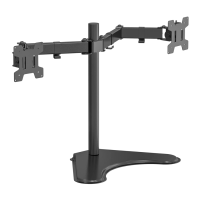
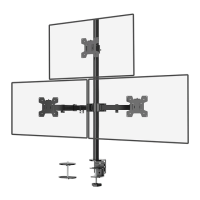
This document describes the WALI Dual Monitor Desk Mount, model MF002XLS, a versatile mounting solution designed to hold two monitors on a desk.

Function Description:

The WALI Dual Monitor Desk Mount MF002XLS is engineered to provide an ergonomic and space-saving solution for users with multiple monitors. It allows for the secure attachment of two VESA-compatible monitors to a desk, offering a wide range of adjustability to optimize viewing angles and reduce strain. The mount consists of a weighted base or a desk clamp option (not detailed in the provided pages but implied by the "Option A: 31.5" Pole Installation" which suggests an alternative to a clamp), a central pole, and two independent monitor arms. Each arm can support a monitor, allowing for individual positioning and orientation. The system is designed for easy assembly and installation, with clear instructions and all necessary hardware included. It aims to free up valuable desk space by elevating monitors and providing flexibility in screen arrangement, catering to various work setups and user preferences.

Important Technical Specifications:

While specific weight capacities and maximum screen sizes are not explicitly stated in the provided pages, the inclusion of M4x12 and M4x30 bolts suggests compatibility with a range of VESA-compliant monitors. The VESA plate (D) is a standard component for attaching monitors. The pole installation option allows for a height of 31.5 inches, indicating a substantial vertical reach for monitor placement. The monitor arms (C) are designed to articulate, supporting the movement and positioning of the attached displays. The weighted base (B) provides stability for the entire setup, ensuring the monitors remain secure on the desk. The use of Allen keys (I) for tightening connections implies a robust and secure assembly.

Usage Features:

The MF002XLS offers extensive adjustability to enhance the user experience:

  • Height Adjustment: The monitor arms can be positioned at preferred heights along the central pole (A2), allowing users to set their monitors at an ergonomic eye level. This adjustment is secured using an Allen key.
  • Swivel: Monitors can be manually swiveled ±90 degrees, enabling users to share their screen with others or adjust the viewing angle for different tasks.
  • Tilt: The tilt angle of the monitors can be adjusted from +45 degrees to -45 degrees. This feature helps in reducing glare and finding the most comfortable viewing angle, and it is adjusted using a 5mm Allen key.
  • Rotation: Monitors can be rotated 360 degrees, allowing for quick switching between landscape and portrait orientations without removing the monitor from the mount. This is particularly useful for tasks like coding or document review.
  • Cable Management: Integrated wire clips (K) are provided to guide and organize cables along the monitor arms and pole, contributing to a tidy and clutter-free workspace.
  • Monitor Compatibility: The mount supports VESA-compatible monitors, with instructions for selecting appropriate M4x12 or M4x30 bolts and optional spacers (H) for flat, curved, or recessed back monitors. This ensures broad compatibility with various monitor designs.
  • Easy Assembly: The installation process is straightforward, involving connecting pole sections, attaching the base, securing monitor arms, and then mounting the monitors. All necessary tools (Allen keys) are included, though a screwdriver for VESA plate attachment is required but not supplied.

Maintenance Features:

The design of the WALI Dual Monitor Desk Mount suggests minimal maintenance requirements, primarily focusing on ensuring secure connections and proper cable management:

  • Secure Connections: Regular checks of the tightened bolts, especially those securing the pole to the base and the monitor arms to the pole, are recommended to maintain stability. The instructions emphasize tightening connections with Allen keys.
  • Cable Organization: The wire clips (K) facilitate ongoing cable management, allowing users to easily add, remove, or re-route cables as needed, keeping the setup neat and preventing cable damage.
  • Adjustability: The ability to easily adjust swivel, tilt, and rotation means that users can periodically fine-tune their monitor positions to adapt to changing ergonomic needs or task requirements.
  • Durability: The use of metal components for the pole, base, and arms, along with robust bolt connections, indicates a durable construction designed for long-term use.

Safety Information (from the manual):

The manual includes critical safety warnings, emphasizing the importance of correct installation to prevent damage or serious injury. It highlights a "TIPOVER WARNING," advising against allowing children to climb, stand, hang, or play on the monitor or stand, and recommending the use of tipover restraints or anchoring the stand to a wall. It also warns that small parts are not suitable for children under 3 years old and requires adult supervision. Users are advised not to exceed the weight capacity (though not specified in the provided pages) and to contact a qualified technician if they have doubts about installation safety.

Wali MF002XLS Specifications

General IconGeneral
BrandWali
ModelMF002XLS
CategoryRacks & Stands
LanguageEnglish

Related product manuals