EasyManua.ls Logo

Wali MF003 - User Manual

Wali MF003
2 pages
Print Icon
To Next Page IconTo Next Page
Loading...
MF003
WARNING
USE OF TIPOVER RESTRAINTS MAY ONLY REDUCE, BUT NOT ELIMINATE RISK OF TIP OVER.
SMALL PARTS- NOT FOR CHILDREN UNDER 3 YEARS. ADULT SUPERVISION IS REQUIRED.
If you do not understand these directions, or if you have any doubts about the safety of the installation, please call a
qualified technician. Check carefully to make sure there are no missing or defective parts. Improper installation may
cause damage or serious injury. Do not use this product for any purpose that is not explicitly specified in this manual.
Do not exceed weight capacity. We cannot be liable for damage or injury caused by improper mounting, incorrect
assembly or inappropriate use.
SERIOUS OR FATAL CRUSHING INJURIES CAN OCCUR FROM TIPOVER. TO HELP PREVENT TIPOVER:
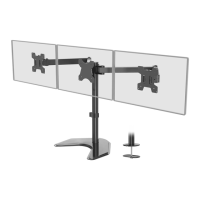
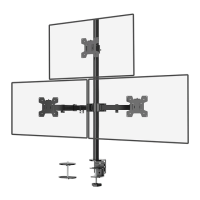
Triple Monitor Desk Mount
75x75\100x100
INSTALLATION MANUAL
1-844-SATTLER (18447288537)
support@walielectric.com
www.walielectric.com
(10kg/22lbs)x3
RATED
MAX 27”
TIPOVER WARNING
● NEVER ALLOW CHILDREN TO CLIMB, STAND, HANG, OR PLAY ON ANY PART OF MONITOR OR STAND.
● USE TIPOVER RESTRAINT OR ANCHOR STAND TO WALL.
Supplied Parts List
VESA Plate
d (x3)
Nut
h (x3)
M5x14 Bolt
e (x3)
Support Plate
j (x1)
Spring Washer
l (x1)
M10 Washer
k (x1)
M10 Bolt
i (x1)
Grommet Base Plate
m (x1)
Wire Clip
n1 (x2)
Wire Clip
n2 (x4)
M4 Spacer
s (x12)
M4x30 Bolt
r (x12)
Wrench
p (x1)
M4x12 Bolt
q (x12)
Monitor Arm
c2 (x1)
Lower Pole
a (x1)
Allen Key
o (x1)
Weighted Base
b (x1)
e
a1
o
Install the Pole a to the weighted Base b using 3pcs M5x14 Bolts e , and tighten with the Allen key 3mm o .
1
This step is depending on your personal preference
To provide stability for a heavier monitor, we may recommend install the mount to the hole in your desk.
i
k
j
p
l
a1
b
b
o
e
0.4‘’-3’’
b: Self-drilled Hole Installation
Option A: Free Standing Installation (Using V-vase)
a: Existing Grommet Hole Installation
i
k
j
p
l
ø 10m
0.4‘’-3”
m
") 3/8
OR
Swivel Arm
c1 (x1)
Question and Answer IconNeed help?

Do you have a question about the Wali MF003 and is the answer not in the manual?

Summary

Safety Information

General Warning

General safety instructions and liability disclaimers for installation.

Tipover Warning

Crucial safety advice to prevent tipover accidents and child safety.

Installation Options

Option A: Free Standing Installation

Instructions for setting up the mount using the free-standing base.

Option B: Grommet Base Installation

Instructions for installing the mount using a grommet hole.

Monitor Attachment and Adjustment

Step 3: Attach VESA Plate

Selecting screws and spacers to attach VESA plate to monitor.

Step 4: Mount Monitor

Securing the monitor assembly onto the mount arms.

Step 5: Monitor Height Adjustment

Adjusting individual monitor height using Allen key.

Step 6: Cable Management

Guiding cables through clips and storing Allen keys.

Step 7: Final Safety Check

Advice on arm extension limits and ensuring balance.

Overview

The Wali Triple Monitor Desk Mount (MF003) is a robust and versatile mounting solution designed to support up to three monitors, enhancing workspace ergonomics and organization. This desk mount is engineered to provide a stable and adjustable platform for multiple displays, catering to various user preferences and professional needs.

Function Description:

The primary function of the MF003 is to elevate and position three monitors above a desk surface, freeing up valuable desk space and allowing for customized viewing angles. It achieves this through a central pole, a weighted base (for free-standing installation), or a grommet base (for desk-clamped installation), and multiple swivel arms that attach to the monitors via VESA plates. The design allows for independent adjustment of each monitor, including height, tilt, swivel, and rotation, ensuring optimal ergonomic positioning for users. The integrated cable management system helps keep the workspace tidy by routing cables along the arms and pole.

Important Technical Specifications:

  • Model: MF003
  • Monitor Capacity: Supports three monitors.
  • Weight Capacity: Rated for 10kg (22lbs) per monitor. It is crucial not to exceed this weight capacity to prevent damage or injury.
  • VESA Compatibility: Supports VESA patterns of 75x75mm and 100x100mm. This ensures compatibility with a wide range of monitors.
  • Maximum Monitor Size: Up to 27 inches per monitor.
  • Installation Options:
    • Option A: Free Standing Installation (Using V-vase): Utilizes a weighted base for stability on the desk surface.
    • Option B: Grommet Base Installation (For saving more space): Allows for clamping the mount to a desk through an existing grommet hole or a self-drilled hole. This option is ideal for maximizing desk space.
  • Adjustability:
    • Height Adjustment: Monitors can be raised or lowered along the central pole.
    • Tilt: Adjustable tilt angles of +90° to -90° (vertical tilt).
    • Swivel: Adjustable swivel angles of +15° to -15° (horizontal swivel).
    • Rotation: Full 360° rotation for portrait or landscape orientation.
  • Material: The components appear to be constructed from durable materials, likely steel and aluminum, to support the weight of multiple monitors securely.
  • Included Hardware: The package includes all necessary bolts (M5x14, M10, M4x12, M4x30), nuts, washers, spacers, Allen keys, and a wrench for assembly.

Usage Features:

  • Ergonomic Design: The multi-axis adjustability allows users to customize monitor positions to reduce eye, neck, and back strain, promoting a healthier posture during extended use.
  • Space Saving: Both installation options contribute to a clutter-free desk. The grommet base option is particularly effective in maximizing usable desk surface area.
  • Cable Management: Integrated wire clips (n1, n2) are provided to route and conceal cables along the monitor arms and central pole, contributing to a neat and professional workspace.
  • Easy Installation: The manual provides clear, step-by-step instructions for both free-standing and grommet base installations. Tools like Allen keys and a wrench are included, simplifying the assembly process.
  • Monitor Compatibility: The VESA plate design and included various bolt sizes (M4x12, M4x30) ensure broad compatibility with different monitor brands and models. Users are guided to select the correct screw size by hand-threading them into the monitor's threaded inserts.
  • Independent Monitor Adjustment: Each monitor arm can be adjusted independently, allowing for precise alignment and positioning of individual displays.
  • Security Features: The manual emphasizes the importance of installing the security nut before rotating the monitor and warns against extending arms too far forward or backward to prevent instability and tip-over.

Maintenance Features:

  • Regular Tightening: The manual implicitly suggests that users may need to periodically check and tighten bolts, especially after initial adjustments, to maintain stability. For instance, after adjusting a monitor's height, the VESA plate should be re-tightened with the nut for stability.
  • Allen Key Storage: A dedicated feature allows for storing the Allen keys in the wire clip, ensuring they are readily available for future adjustments or maintenance.
  • Tip-Over Warning: The product includes a prominent "TIPOVER WARNING" to educate users about the risks and preventive measures, such as never allowing children to climb or play on the stand and using tip-over restraints or anchoring the stand to the wall. This highlights a critical safety aspect that users should be aware of for ongoing maintenance of a safe environment.
  • Part Replacement/Support: While not explicitly detailed as a maintenance feature, the provision of contact information (www.walielectric.com, support@walielectric.com, 1-844-SATTLER) implies that users can seek assistance for missing or defective parts, which is a form of product support that contributes to its longevity and usability.
  • Careful Assembly: The warning about checking for missing or defective parts before assembly and the emphasis on proper installation are crucial for preventing future issues and ensuring the long-term integrity of the mount.

In summary, the Wali Triple Monitor Desk Mount MF003 is a comprehensive solution for multi-monitor setups, prioritizing ergonomics, space efficiency, and user safety through its thoughtful design and clear instructions.

Wali MF003 Specifications

General IconGeneral
BrandWali
ModelMF003
CategoryRacks & Stands
LanguageEnglish

Related product manuals