10
EN
Always use standard cables that can drive the current that has been setup in the current
selector.
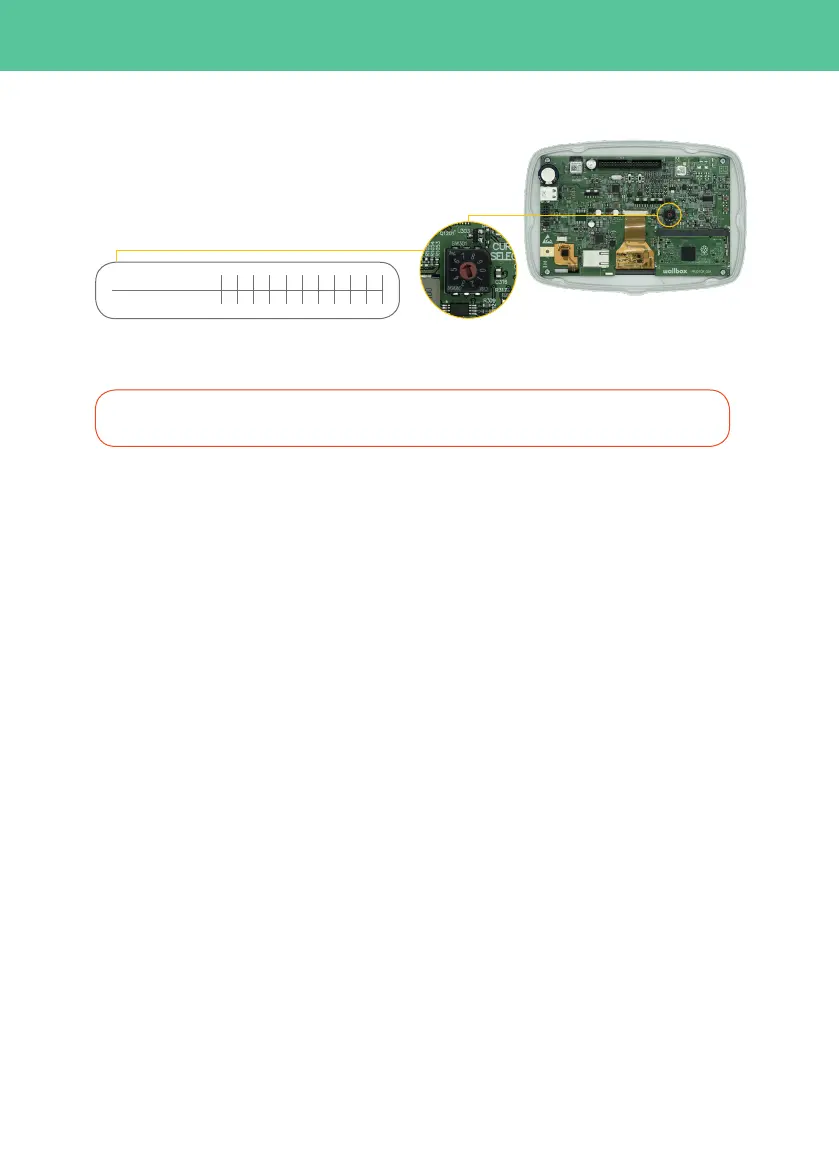
2. Current selector (I-4)
Use the selector to select the maximum input
current of the device. Positions 0, 8 and 9 are
reserved for the Power Sharing Smart feature.
3. Electrical connection
3-A. Rear connection
Step 3-A.1: In the back of your Wallbox an area with a thinner wall can be found; use a cutter or any sharp
tool and make an incision for entry of the cable.
Step 3-A.2: Carefully and firmly insert the power cable through the board. The board has been designed
so cables from 11 to 15mm can pass through it, which is the standard for cables that can drive up to 22kw.
Step 3-A.3: Proceed to fix the charger to the wall. Insert the screws in the marked positions, starting at the
top and following a clockwise direction (I-5.1). Check that your Wallbox Commander 2 is firmly fixed to the wall.
Step 3-A.4: Make sure the previous steps have been completed correctly.
3-B. Lower connection
Step 3-B.1: Proceed to fix the charger to the wall. Insert the screws in the marked positions, starting at the top
and following a clockwise direction (I-5.1). Check that your Wallbox Commander 2 is firmly fixed to the wall.
Step 3-B.2: Insert the power supply cables through the cable connector (I-5.2, I-5.3).
Step 3-B.3: Make sure the previous steps have been completed correctly.
I-4: Current selector
Connect the neutral and earth power lines to the terminal according to the supply configuration (I-5.2, I-5.3).
CURRENT (A) 0 13 326 16 010 2520 0
0 3 71 4 82 65 9
POSITION
In the case that your Wallbox uses the rear input follow the steps in section 3-A. Otherwise go to section 3-B.



 To Next Page