10 Pump operation
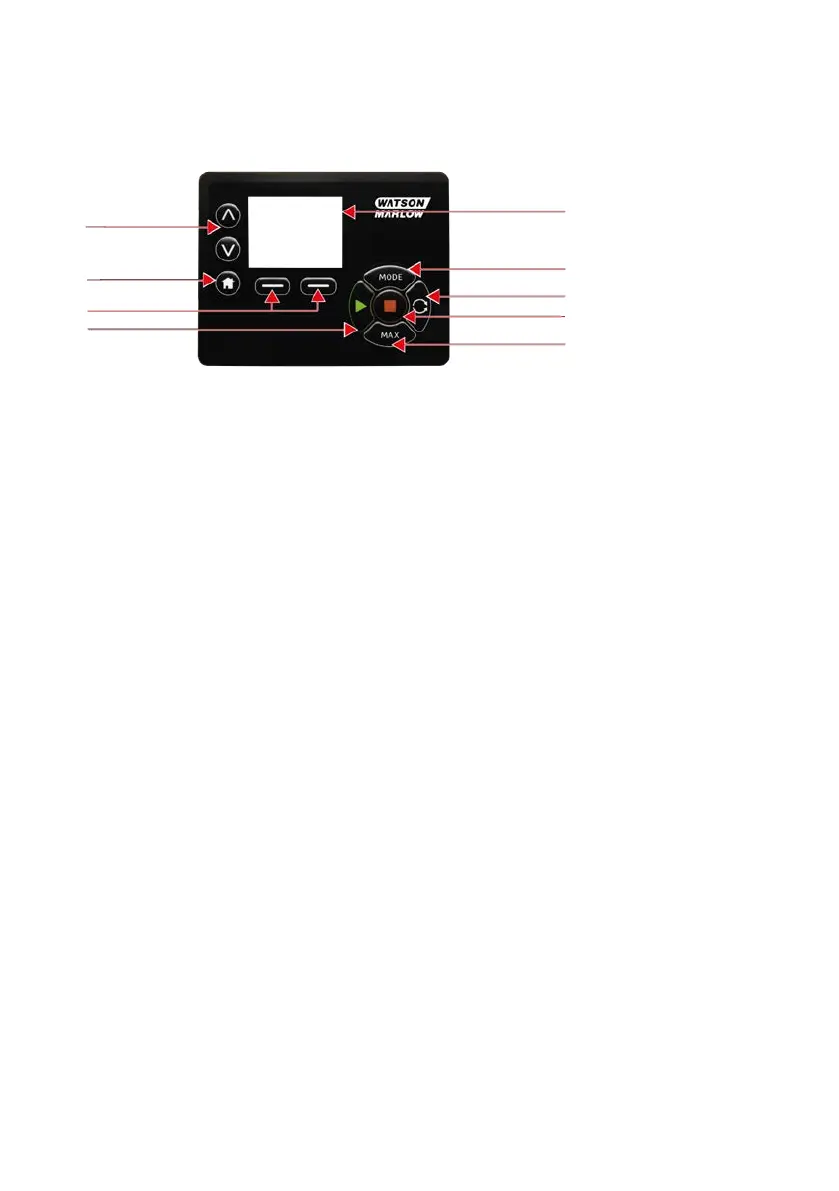
10.1 Keypad Layout and Key IDs
Change value /
move selection bar
Home
Colour TFT display
Mode
Direction of ow
Stop
Max
Function keys
Start
HOME key
When the HOME key is pressed it will return the user to the last known operating mode. If modifying
pump settings when the HOME key is pressed, it will disregard any setting changes and return you to the
last known operating mode.
FUNCTION keys
FUNCTION keys, when pressed, will perform the function displayed on the screen directly above the
relevant function key.
∧ and ∨ keys
These keys are used to change the programmable values within the pump. These keys are also used to
move the selection bar up and down in the menus.
MODE key
To change modes or mode settings, press the MODE key. The MODE key can be pressed at any time to
enter the mode menu. If modifying pump settings when the MODE key is pressed, it will disregard any
setting changes and return you to the MODE menu.
m-730un-en-08.1 17








 To Next Page