20 MemoDose mode
Each time the pump is started by pressing START, it records the number of pumphead revolutions which
occur until STOP is pressed. The number of revolutions is proportional to the volume of fluid which has
been dispensed: the dose. MemoDose mode allows the user to repeat-dose a precise volume of fluid.
This can be achieved by dispensing a master dose, or entering a dose volume manually using the
keypad. MemoDose can repeat this dose exactly or proportionately.
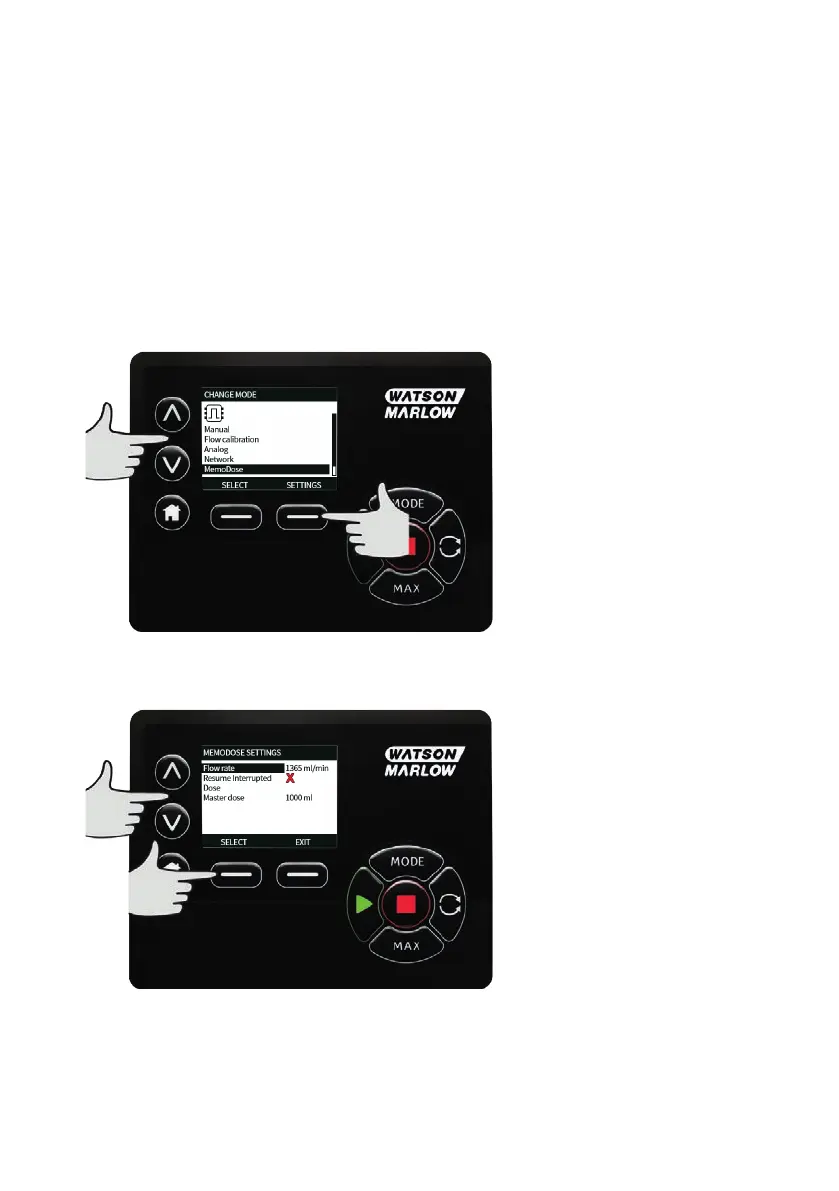
20.1 To configure MemoDose
o
Select MODE
o
Using the ∧ /∨ keys, scroll to MemoDose and press SETTINGS
Note: the pump must be stopped to enter MemoDose Settings.
20.2 Set flow rate
Using the ∧ /∨ keys, scroll to Flow rate and press SELECT.
Using the ∧ /∨ keys, enter the dose flow rate and press SELECT.
m-730un-en-08.1 67








 To Next Page