Form: AZ2-OE217-02-03-EBUS-DRS-1D.doc Page 1 of 1
Description
The OE217 series of Touch Screen E-BUS Digital
Room Sensors are used to sense Space Temperature
only or Space Temperature & Space Humidity. The
Space Temperature Sensor only model (OE217-02) is
used with the AZ 2 Main Controller, GPC-XP Controller
or the Zone/VAV Controller. The (OE217-03) model
senses both Space Temperature & Humidity and is
only used with the AZ 2 Main Controller or GPC-XP
Controller.
Besides sensing Temperature & Humidity, the E-BUS
Digital Room Sensors also provide these other useful
features:
• User Friendly Graphical LCD Display with LED
Backlight
• Display the Current Space and Outdoor Air
Temperature
• Display the Current Space Humidity and
Outdoor Air Relative Humidity (OE217-03 Model
Only)
• Display the current Zone Setpoint Temperature
• Equipped With Push Buttons for Changing the
Zone Setpoint Temperature
• Equipped With an Override Button for Forcing
the AZ 2 Main Controller into Occupied
Operation from Unoccupied Operation
•
Provides graphics to indicate the mode of
operation
• Provides LEDs to indicate Schedule Override,
Button Push, and Alarms
The sensors connect to the AZ 2 Main Controller,
GPC-XP Controller or, Zone/VAV Controllers using E-
BUS cables connected between the controller and the
sensor or to the wire terminals using (4) conductor
cable. The E-BUS cables are available in multiple lengths to fit your job requirements. The E-BUS cables or (4) conductor
cable should not run in conduit with other AC line voltage wiring or with any conductors carrying highly inductive loads.
Mounting
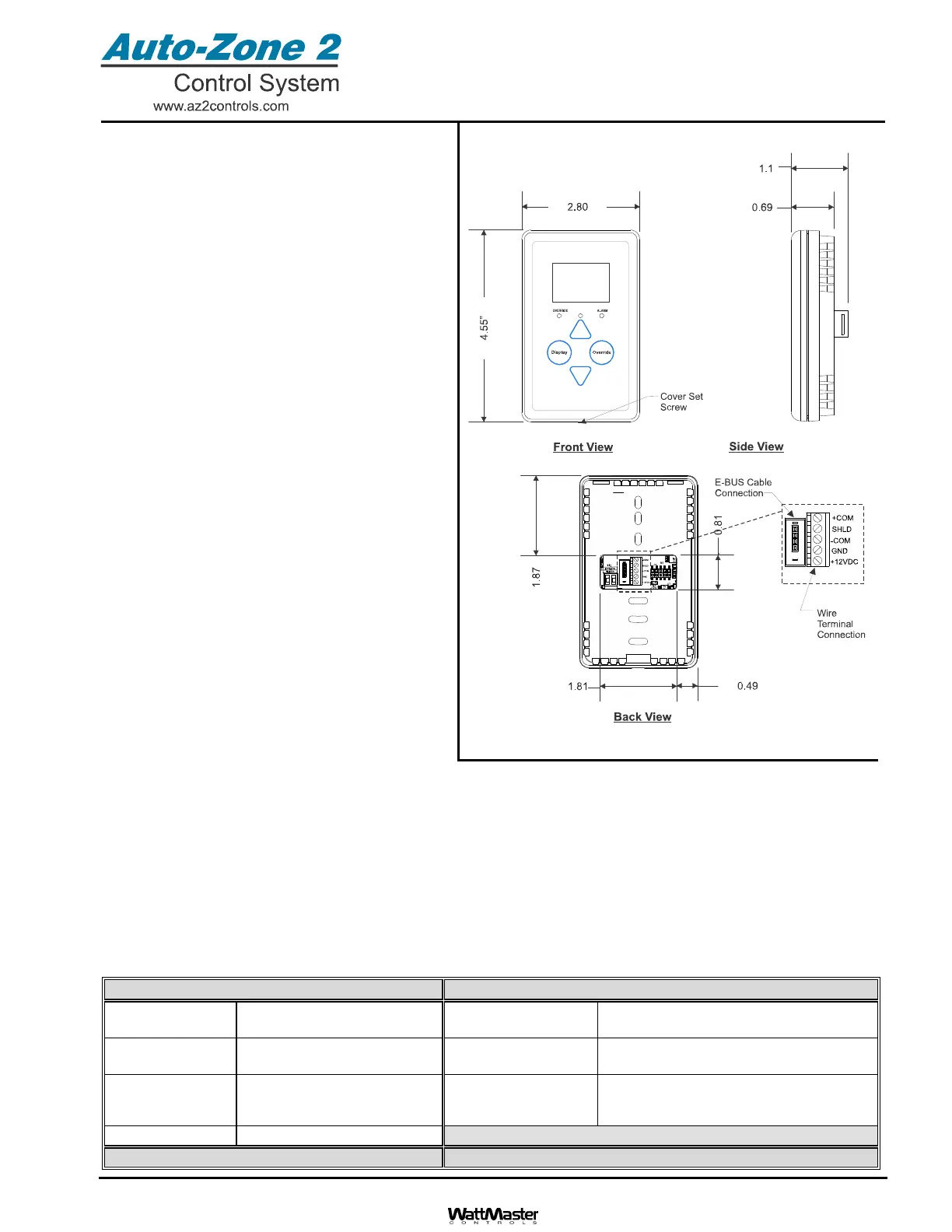
The Digital Room Sensor is designed to be mounted to a vertical, 2” x 4” electrical box recessed in the wall. If the wall
cannot be penetrated, a plastic surface mount box such as those made by Wiremold
TM
, may be used to mount the
sensor to the wall surface. The Sensor is mounted by removing the front cover and fastening the housing base to the
electrical box using the supplied (2) 6/32” x 1” machine screws. The E-BUS cable is then plugged into the E-BUS
connector or the or (4) conductor cable is wired to the wire terminals. The cover is then placed onto the housing base
and the Allen Screw on the bottom of the base is adjusted to hold the cover in place.
OE217-02 & OE217-03 E-BUS
Digital Room Sensor
Technical Data OE217-02 & OE217-03 E-BUS Digital Room Sensor
Sensor Element Type III Thermistor 10k ohm
@ 77 F or Sensirion Device
Display 112 x 64 Monochrome Graphical LCD
w/LED Backlight
Sensor Reading
Range
40F to 120F
RH = 0-100%
Connection
E-BUS Connector or
Wire Terminals
Ambient
Temperature
Limits
-40F to 180F
Weight
3.2 oz.
Accuracy
RH +/-3%, Temp +/- .8F
Three Year Warranty WattMaster reserves the right to change specifications without notice



 To Next Page