Wavecom Instruments Fully Integrated Test N Print Unit - User Manual
27
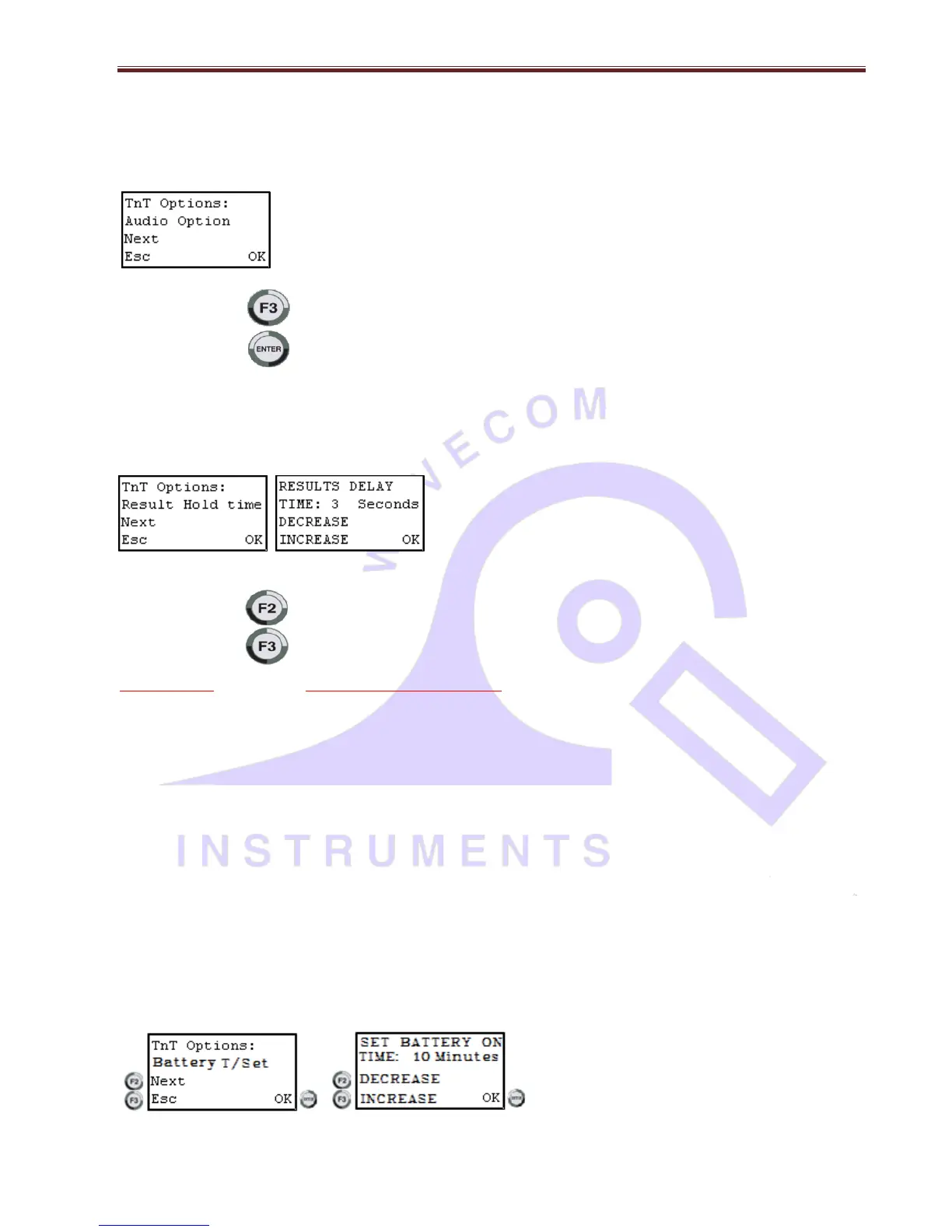
Change Audio Settings
Enabling the audio option will make the TnP use a sound to indicate a pass or a fail at the end of a test. If the TnP unit has
never been altered, then the audio beep is disabled.
Press the key to disable.
Press the key to enable.
Change Result hold time
Press Enter and F2 to enable options then F2 until you get to result hold time this allows you to change the time that the
results values are showed on the TnP display screen
Press the key to increase time.
Press the key to decrease time
Note Carefully: This setting will change the default display times and will remain until user re-sets to another preferred
value.
The feature enables the user to change the displayed time of the Test Result from approx. 1 – 90 seconds.
To enable Result Hold time option, from Main menu A, hold ENTER key and press F2 key. Release ENTER key. Further
pressing F2 key four times cycles you to the Result Hold setting screen. Pressing ENTER key (OK) will display the settings
page. Select your preferred timing by pressing F2 or F3 buttons (Increase or Decrease) as observed on the LCD screen.
Once the required result is shown on the LCD screen, press the ENTER key to lock new Result Hold time. The TnP-500 will
return to Main menu A.
Please note: as a further convenience, if Result Hold time during normal testing needs to be reduced, simply press the
ENTER key to rapidly move to the next test sequence. Alternative, is to re-set the Result Hold setting again, as above.
Change Battery Time-out settings – Only in TnPB series
Press Enter and F2 to enable options then F2 until you get to Battery T/set. Press enter / OK to change the battery time out
settings. This is the time for which unit will stay on while under battery operation if not used for that long time. This is to
save the battery power when unit is idle. User can set the battery time-out settings up to 60 Minutes from 1 minute.


 To Next Page