Appendix I Weights and Measures Mode - Category 2 or 3
136 WU017834 Rev. 05 July 2023 Wayne Fueling Systems | Dover Fueling Solutions
APPENDIX I WEIGHTS AND MEASURES MODE - CATEGORY 2 OR 3
The following Appendix covers dispensers that are available as Category 2 or 3 devices and have iGEM
software version 80 or higher. For the unit to be able to operate as a Category 3 device allowing remote
downloads, the dispenser must have an operating internal printer. See Appendix H
on page 124 for iGEM
software versions 79 and lower.
I.1 CATEGORY 2 AND 3 IDENTIFICATION
● Category 2: Units that are running in a Category 2 mode must have changes made to the metrologi-
cally significant parameters locally. These changes can be made with the Infrared Remote Control
(IRC) or through the servTerm application run on a local PC. Remote downloads are not permitted.
● Category 3: Units that are running in a Category 3 mode can have changes made to the metrologically
significant parameters locally or remotely. These changes can be made with the Infrared Remote Con-
trol (IRC), through the servTerm application run on a local PC, or remotely through the Payment Termi-
nal. For a dispenser to be run in the Category 3 mode, there must be a Payment Terminal installed in
the dispenser that is equipped with a printer.
I.2 GENERAL INFORMATION
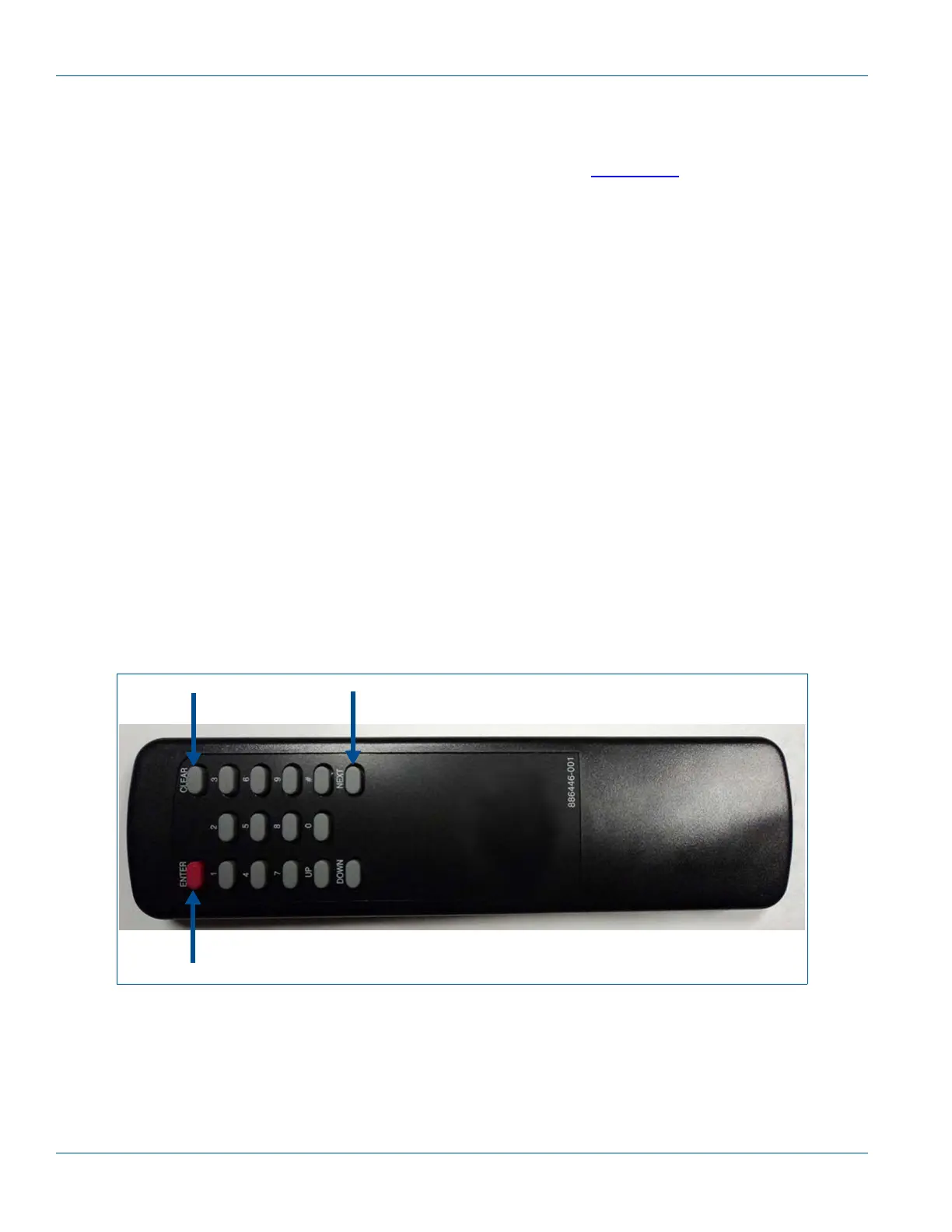
● Weights and Measures mode is accessed using the handheld Infrared remote control (IRC). To use the
IRC, point it at the volume display within a distance of 12 to 18 inches.
● The Weights and Measures mode is comprised of multiple level menus. The upper level menu allows
you to scan through the various choices that are available. When you reach a category where you
want more information, you can choose that menu to view the additional information. You do not need
a security code to access or obtain information through the Weights and Measures mode. The cabinet
does not need to be opened to access this mode.
● If the dispenser is operating in a Category 3 mode, pressing “4” on the remote keypad will cause the
existing menu to print on the Payment Terminal printer.
Figure I-1 Infrared (IR) Remote Control PN WM002290


 To Next Page