5Startup
WU017834 Rev. 05 July 2023 Wayne Fueling Systems | Dover Fueling Solutions 45
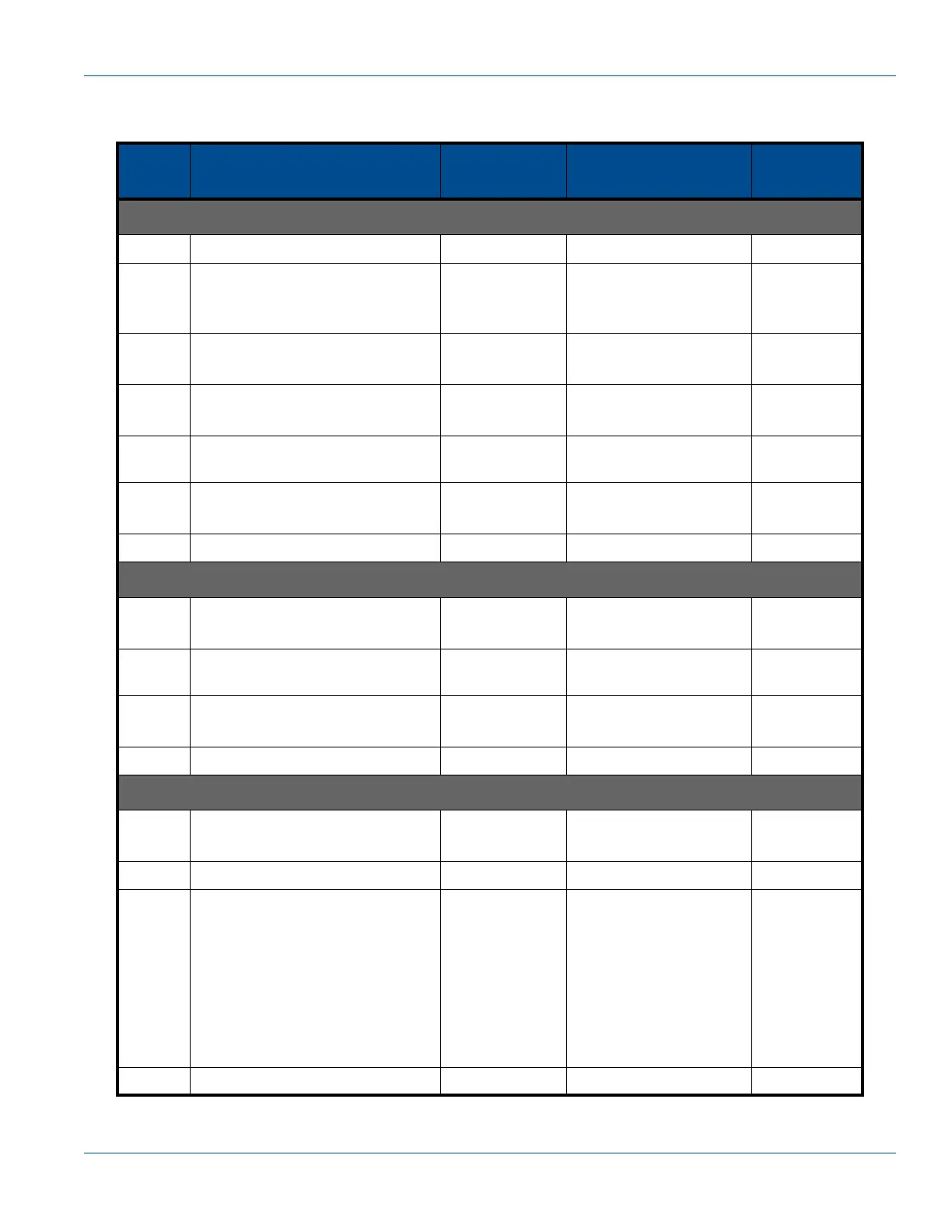
To set Fueling Point IDs for a dispenser:
Table 5-6 Setting the FPID
Step
IRC
Command
Sales
Display
Volume
Display
Unit Price
Display
Set Fueling Point Address Side A (Serial Filling Mode Only):
1 ENTER PASS 1
2
Type the corresponding PASS-
WORD
Press ENTER
PASS 2
3
Type the PASSWORD again
Press ENTER
iGEM software
version
[date] F - -
4
Type 5
Press ENTER
- - - - - - F 05
5Press ENTER - - - - - -
Fuel point address for
Side A format
F 05
6
Type desired FPID #
Press ENTER
- - - - - -
New fuel point address
for Side A
5.00
7Press ENTER - - - - - - F 05
Set Fueling Point Address Side B (Serial Filling Mode Only):
8
Type 6
Press ENTER
- - - - - - F 06
9Press ENTER - - - - - -
Fuel point address for
Side A format
6.00
10
Type desired FPID #
Press ENTER
- - - - - -
New fuel point address
for Side A
6.00
11 Press ENTER - - - - - - F 06
Save Changes:
12
Type 0
Press ENTER
- - - - - - F 00
13 Press ENTER - - - - - - 1 0.00
14
Press UP key to exit (example
shown is 3, exit and save)
*1 = Do not exit and do not save
changes
*2 = Exit and do not save
changes
*3 = Exit and save changes
Press ENTER
- - - - - - 3 0.00
15 Press ENTER CHAnGE StorEd Current Price


 To Next Page