OPERATION
ATTACHMENTS
This unit can use many different attachments. See the attachment
page in this book. This unit can pull attachments like a lawn
sweeper, a lawn aerator, a hopper spreader, or a small trailer. This
unit cannot use attachments that engage the ground like a plow, a
disk harrow, or a cultivator.
For all pull-behind attachments or trailers, the maximum gross
ELECTRICAL SAFETY SYSTEM
The electrical system has two primary components, an Operator
Presence System and a Select Reverse system.
Operator Presence System (Seat)
The Seat has an Operator Presence System to shut off the engine
when the operator leaves the seat. This system is not intended for
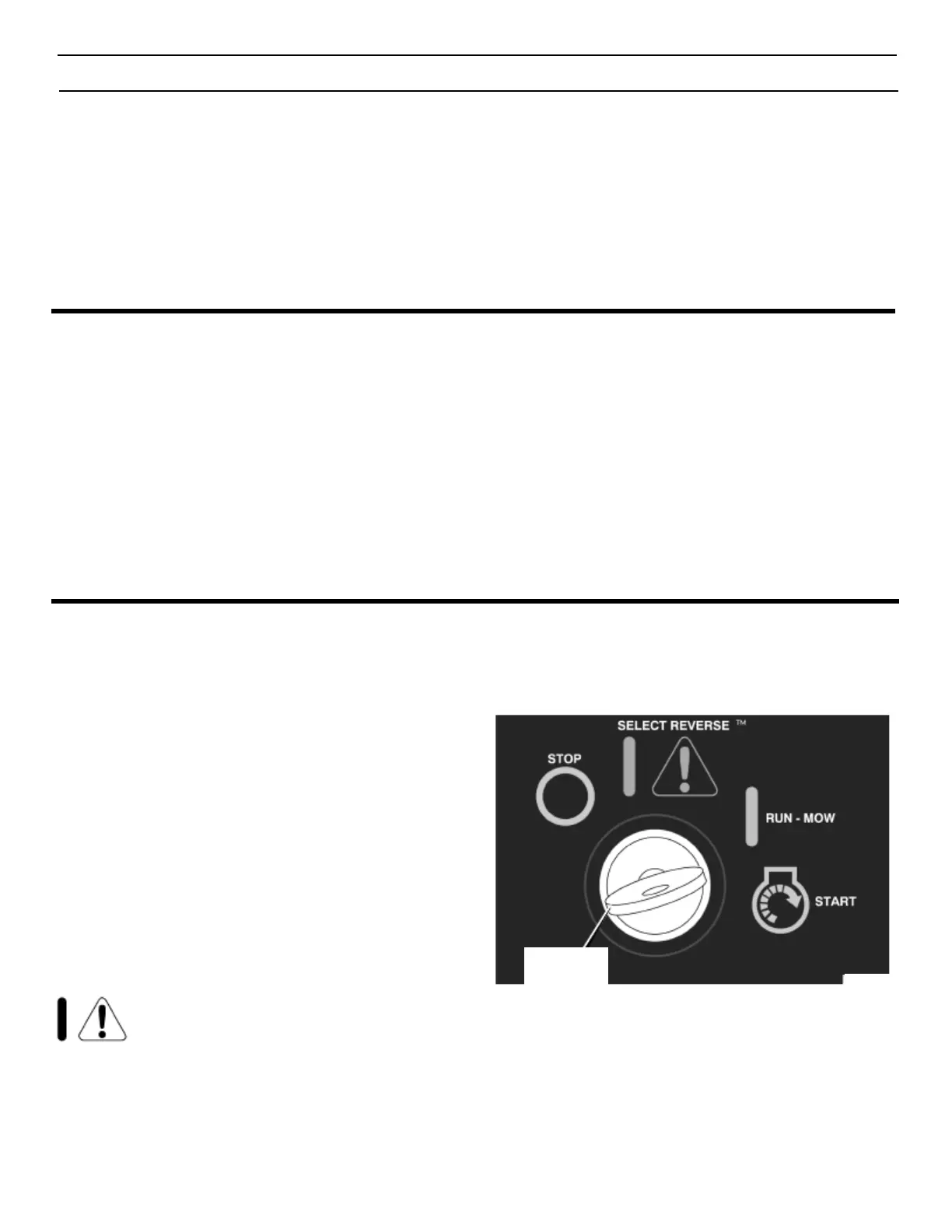
HOW TO OPERATE THE IGNITION KEY SWITCH
Use the ignition key switch to start and stop the engine. When you
start the engine and release the ignition key, the ignition key switch
will automatically default to the recommended RUN-MOW position for
normal mowing.
START - Use this position to start the engine.
RUN-MOW - When you start the engine and release the ignition
key, the ignition key switch will automatically default to the
recommended RUN-MOW position for normal mowing. In the
RUN-MOW position, the system will stop the engine and the
blade when the speed control pedal/shift lever is put in the
reverse position.
weight is 200 pounds. Gross weight is the weight of the attachment
or trailer and any load that might be on or in it.
Do not operate on a slope that is greater than 10 degrees when
using a pull-behind attachment or trailer. We have included a slope
guide in this book to help you check which slopes are safe to work
on. Never allow someone to stand or ride on or in an attachment or
trailer.
regular use in stopping the engine or the blade(s). Before leaving the
seat, move the blade rotation control to the DISENGAGE position,
shift to neutral, set the parking brake and stop the engine.
Select Reverse System
The Select Reverse system will allow the mower blade(s) to
continue to rotate when traveling in reverse. See “How To Operate
The Ignition Key Switch” and “How To Start The Engine” for further
details.
SELECT REVERSE - The optional Select Reverse
Position will allow the mower blade to continue to rotate when
traveling in reverse. Always go back to the recommended
RUN-MOW position for normal mowing when operating in
Select
Reverse is not absolutely necessary. NEVER use the
Select
Reverse option if children are on or near the property.
WARNING: Operators are strongly discouraged
from using this option unless the operator
decides such operation is absolutely necessary
and that safe precautions are taken. Never use the Select
Reverse option if children are on or near the property.
Always look down and behind before and while backing.
After using the Select Reverse position, move the ignition
key back to the RUN-MOW position.
STOP - Use this position to stop the engine.
Figure 5
Ignition
Key Switch


 To Next Page