FUNCTION SHIFT LEVER
5-6 SPEEDS
Trimming 1
Snow Thrower
Bagging Grass 1 or 2
Mulching Grass 1 or 2
Normal Mowing 2 or 3
Easy Mowing
Snow Blade
3 or 4
Transport 5 or 6
Attachments *
OPERATION
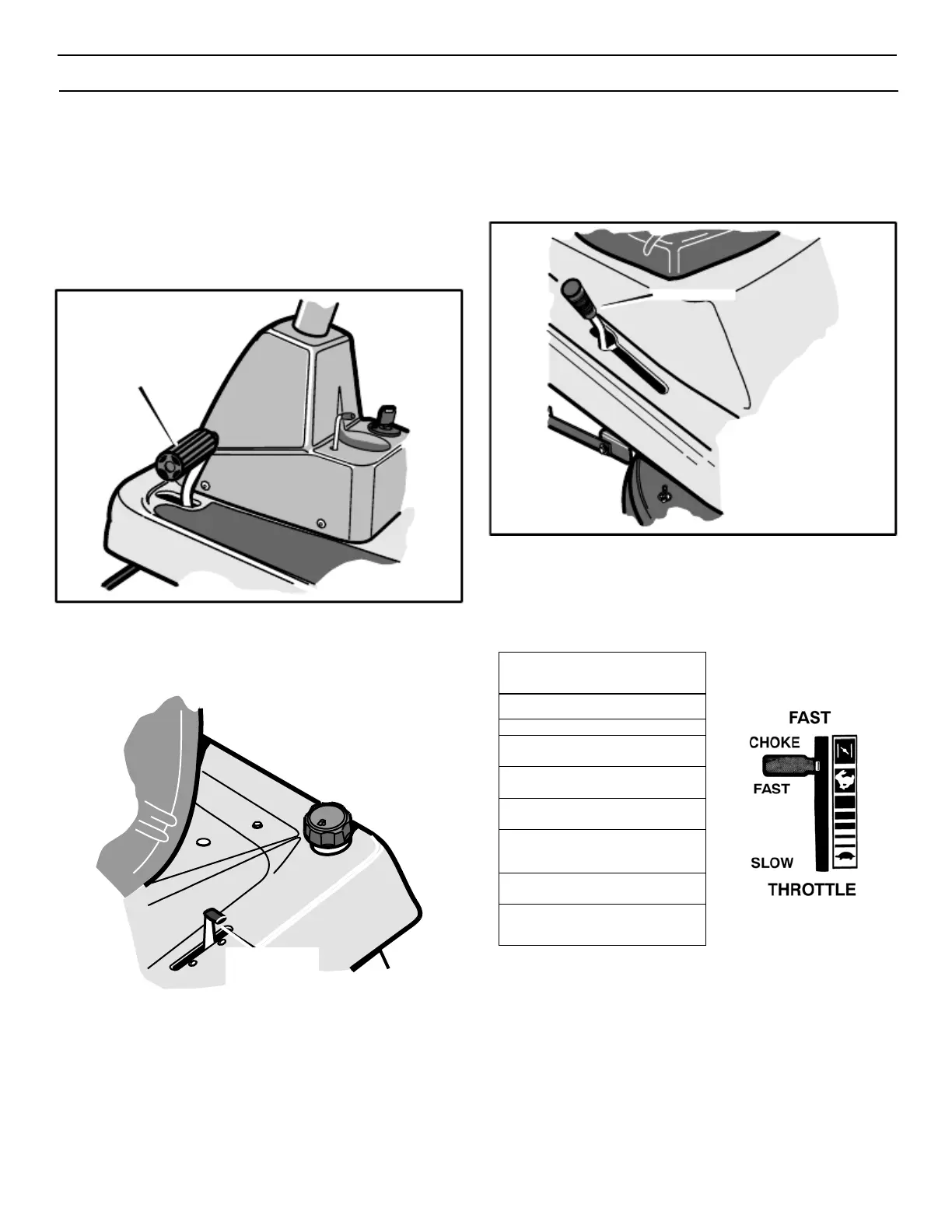
HOW TO USE THE SHIFT LEVER
To change the forward speed or the direction of the unit, follow the
steps below.
CAUTION: Before you move the shift lever, completely push
the clutch/brake pedal forward to stop the unit. If the unit is not
stopped, the gearbox can be damaged.
1. Completely push the clutch/brake pedal forward to stop the
unit. Keep your foot on the pedal (see Figure 8).
3.
4.
To go forward, move the shift lever to a forward speed setting.
To go backward, move the shift lever to reverse. Always
Disengage the blades and look down and behind before and while
backing.
Shift Lever
Clutch/Brake
Pedal
Figure 10
2.
Figure 8
Move the throttle control lever to the SLOW position (see
Figure 9).
5.
6.
Slowly release the clutch/brake pedal. Do not keep your foot
on the pedal.
Move the throttle control to the FAST position.
Figure 9
* See the Instruction Book for the Attachment.
Throttle
Control
Lever


 To Next Page