39
instructions for the user
ENGLISH
11 Replacing the tank cartridge
lter
The ma-
chine per-
forms a
count of the
liters of water
consumed
during coee dispensing.
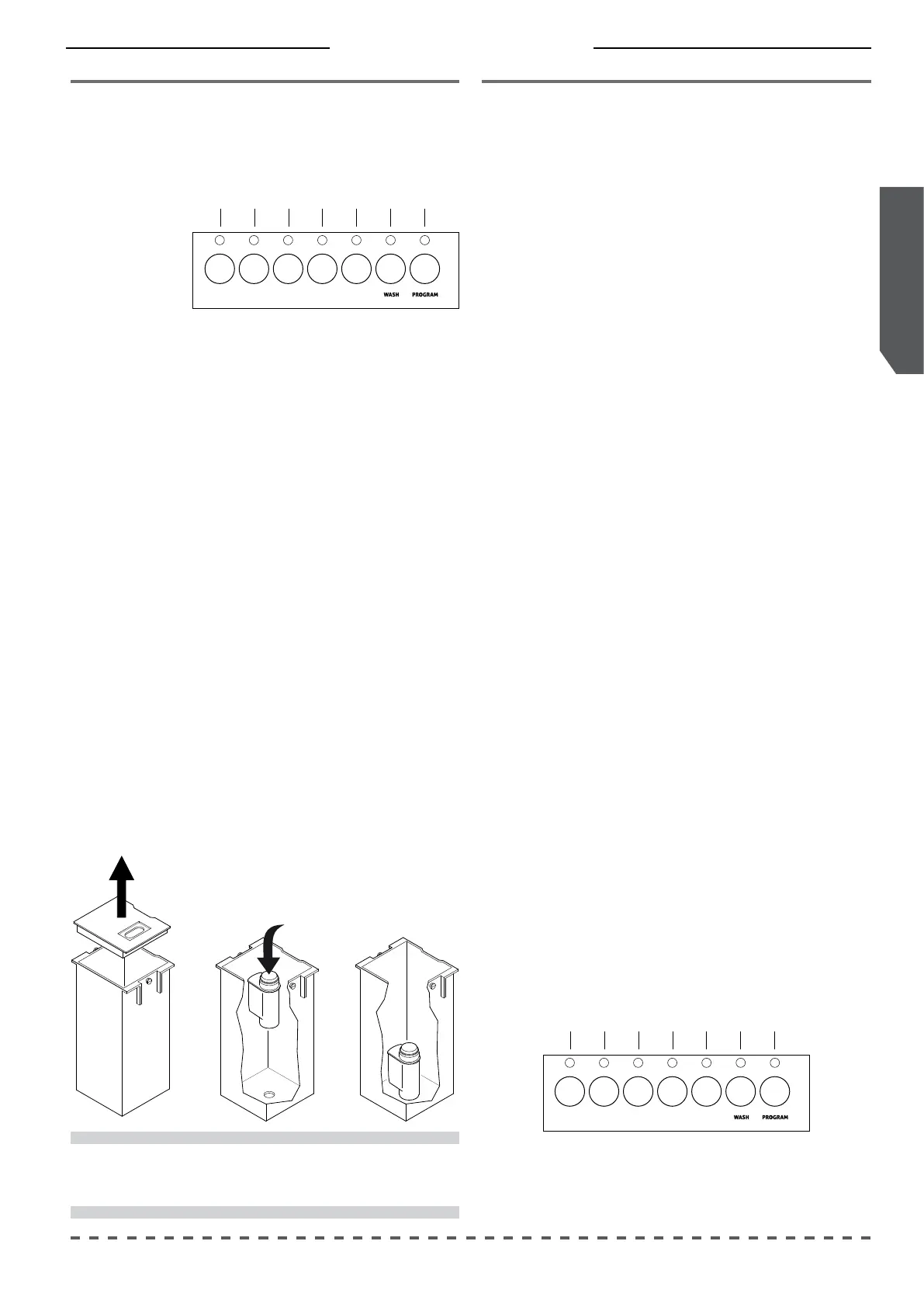
The request for replacing the cartridge lter ap-
pears after using 150 liters and it is indicated by the
slow ashing of button (7) of both panels.
Replace the lter as follows:
• Extract the tank from its housing;
• remove the used lter;
• carefully wash the tank with lukewarm water;
• install the new lter.
• ll the tank with potable water;
• place the tank correctly in place.
After replacing the lter, reset the water liter
count by following this procedure:
• turn on the machine by pressing button (1) of
the right hand panel;
• the rapid ashing for 3 seconds of the corres-
ponding LED signals the reset.
i
Install the filter at the bottom of the tank
according to the manufacturer's instructions.
12 Water replacement
If the machine remains inactive longer than 1
week, it is necessary to perform the changing of the
100% of the water contained in the hydraulic circuit
of the machine.
Proceed as follows:
• Extract the tank from its housing;
• empty the tank;
• remove the used lter;
• carefully wash the tank with warm water.
• install the new lter;
• ll the tank with potable water;
• place the tank correctly in place.
After replacing the lter, reset the water liter
count and lower the unit lever by following this
procedure:
• turn on the machine by pressing button (1) of
the right hand panel;
• the rapid ashing for 3 seconds of the corres-
ponding LED signals the reset.
Continue the water renewal procedure as follows:
• place a jug under each dispensing unit;
• raise and lower the levers of the right and left
units;
• continues to dispense, without pod, pressing
button (7) of both panels up to the "Time Out";
• open the water tap and dispense at least 2 liters.
2 3 4 75 61
2 3 4 75 61



 To Next Page