10
18
15
16
17
21
50
7
6
7
48
47
47
23
50
21
6
3
23
21
12
Bracket
15
20
66
68
15
66
23
21
12
57
55
23
42
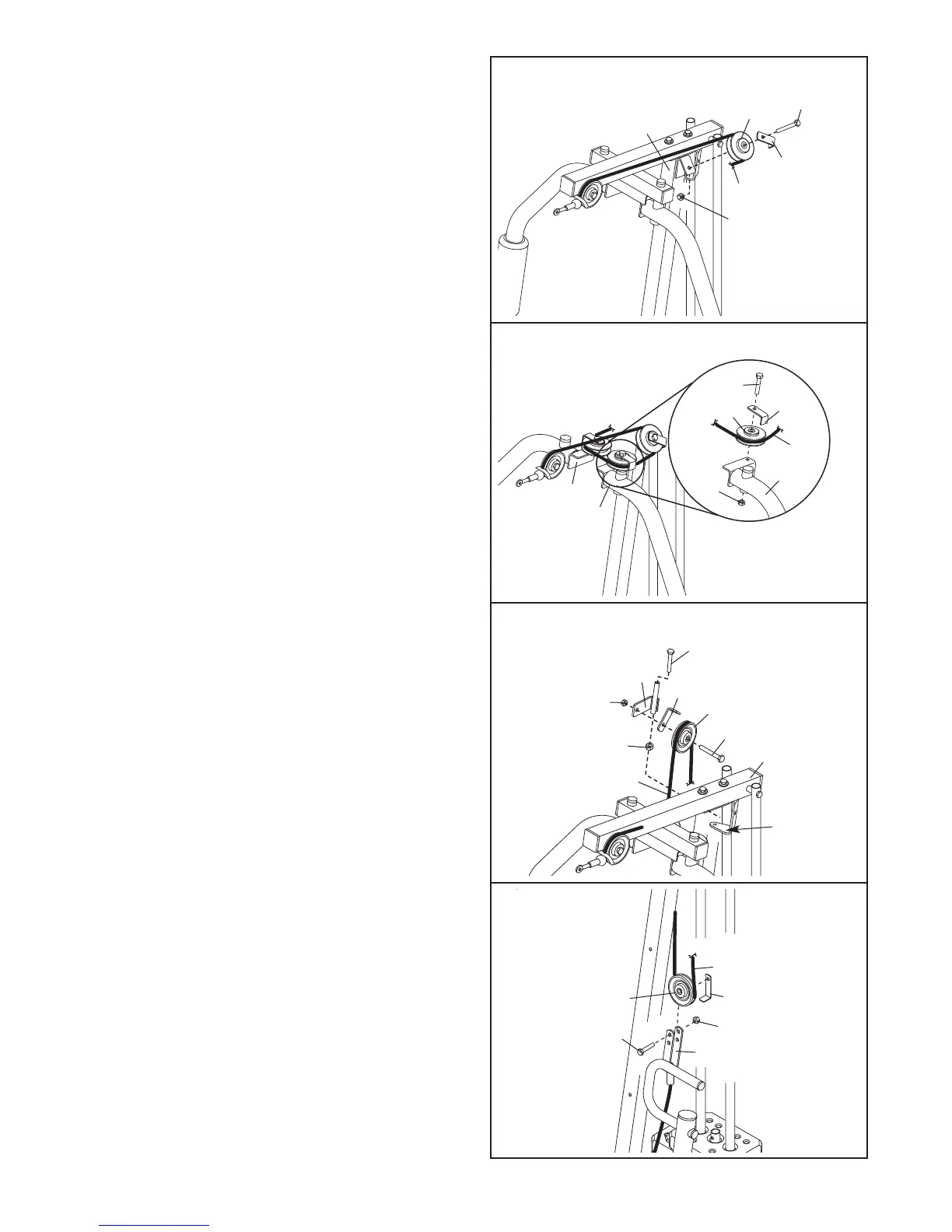
15. Wrap the Long Cable (23) over a “V”-pulley (6).
Attach the “V”-pulley and a Long Cable Trap (50)
to the Front Upright (42) with a 3/8” x 2 1/2” Bolt
(7) and a 3/8” Nylon Locknut (21). Make sure
that the Long Cable Trap is positioned to hold
the Cable in the groove of the “V”-pulley.
16. Route the Long Cable (23) around a “V”-pulley
(6). Attach the “V”-pulley and a Long Cable Trap
(50) to the Left Arm (47) with a 3/8” x 2 1/2” Bolt
(7) and a 3/8” Nylon Locknuts (21). Make sure
that the Long Cable Trap is positioned to hold
the Cable in the groove of the “V”-pulley.
Repeat this step with the Right Arm (48).
17. Note: The parts used in this step have been
preassembled. They are shown exploded in
this drawing for clarity.
Route the Long Cable (23) over the 3 1/2” Pulley
(15) attached to the Pulley Bracket (20). Make
sure that the Cable Trap (66) is oriented to
hold the Cable in the groove of the Pulley.
Tighten the 3/8” x 2” Bolt (12) and the 3/8” Nylon
Locknut (21).
Properly tighten the 5/16” x 5” Bolt (68) and a
5/16” Nylon Locknut (3) attaching the Pulley
Bracket (20) to the bracket on the Top Frame
(55). Do not overtighten the Locknut; the
Pulley Bracket must be able to pivot easily.
18. Wrap the Long Cable (23) under a 3 1/2” Pulley
(15). Attach the Pulley and a Cable Trap (66) to
the indicated hole in the Long “U”-bracket (57)
with a 3/8” x 2” Bolt (12) and a 3/8” Nylon
Locknut (21). Make sure that the Cable Trap is
oriented to hold the Cable in the groove of the
Pulley.


 To Next Page