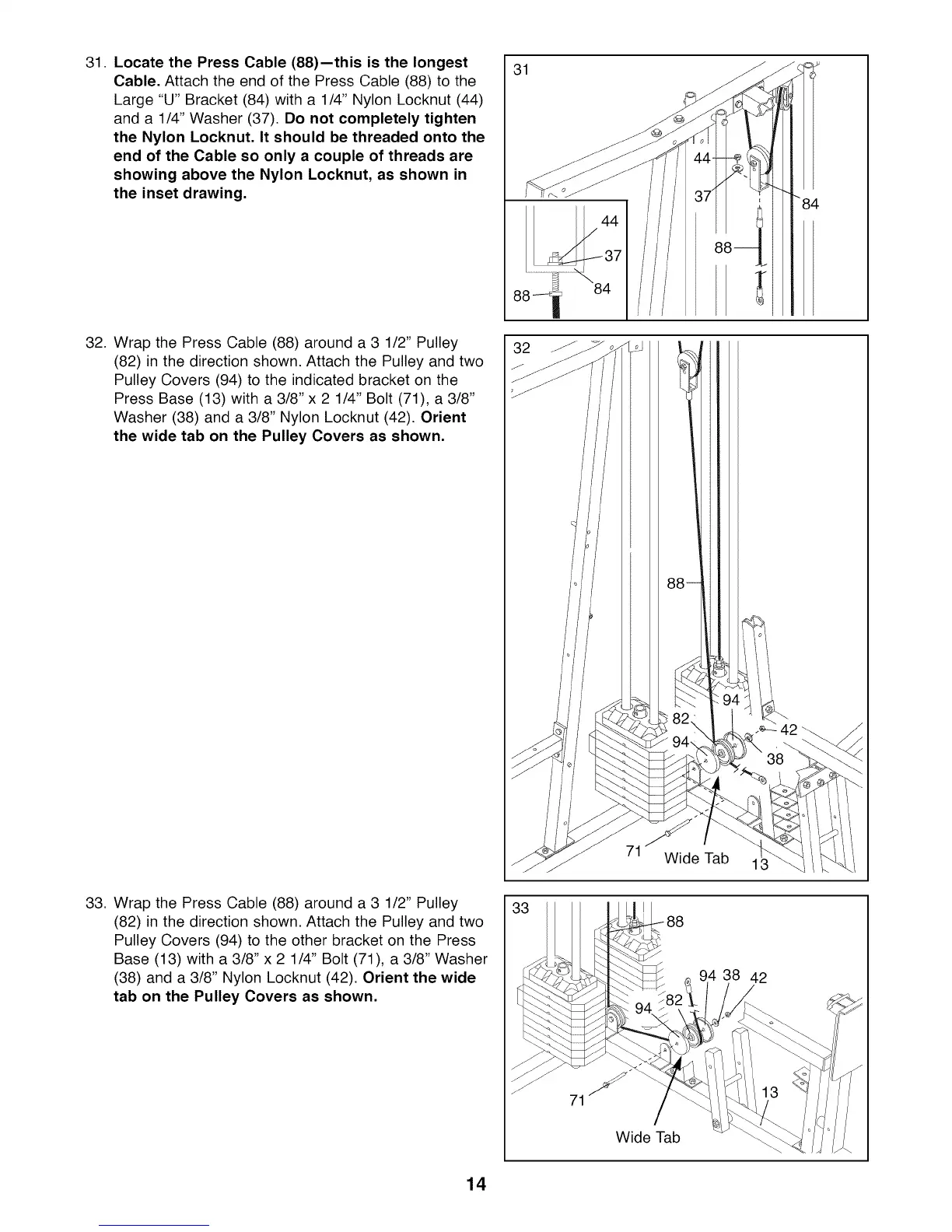
31. Locate the Press Cable (88)--this is the longest
Cable. Attach the end of the Press Cable (88) to the
Large "U" Bracket (84) with a 1/4" Nylon Locknut (44)
and a 1/4" Washer (37). Do not completely tighten
the Nylon Locknut. It should be threaded onto the
end of the Cable so only a couple of threads are
showing above the Nylon Locknut, as shown in
the inset drawing.
32. Wrap the Press Cable (88) around a 3 1/2" Pulley
(82) in the direction shown. Attach the Pulley and two
Pulley Covers (94) to the indicated bracket on the
Press Base (13) with a 3/8" x 2 1/4" Bolt (71), a 3/8"
Washer (38) and a 3/8" Nylon Locknut (42). Orient
the wide tab on the Pulley Covers as shown.
33. Wrap the Press Cable (88) around a 3 1/2" Pulley
(82) in the direction shown. Attach the Pulley and two
Pulley Covers (94) to the other bracket on the Press
Base (13) with a 3/8" x 2 1/4" Bolt (71), a 3/8" Washer
(38) and a 3/8" Nylon Locknut (42). Orient the wide
tab on the Pulley Covers as shown.
31
32
Wide Tab 1
88
94 38 42
Wide Tab
14








 To Next Page