Merrychef eikon
®
e2s service and repair manual
_______________________________________________________________________________________________________________________________
_______________________________________________________________________________________________________________________________
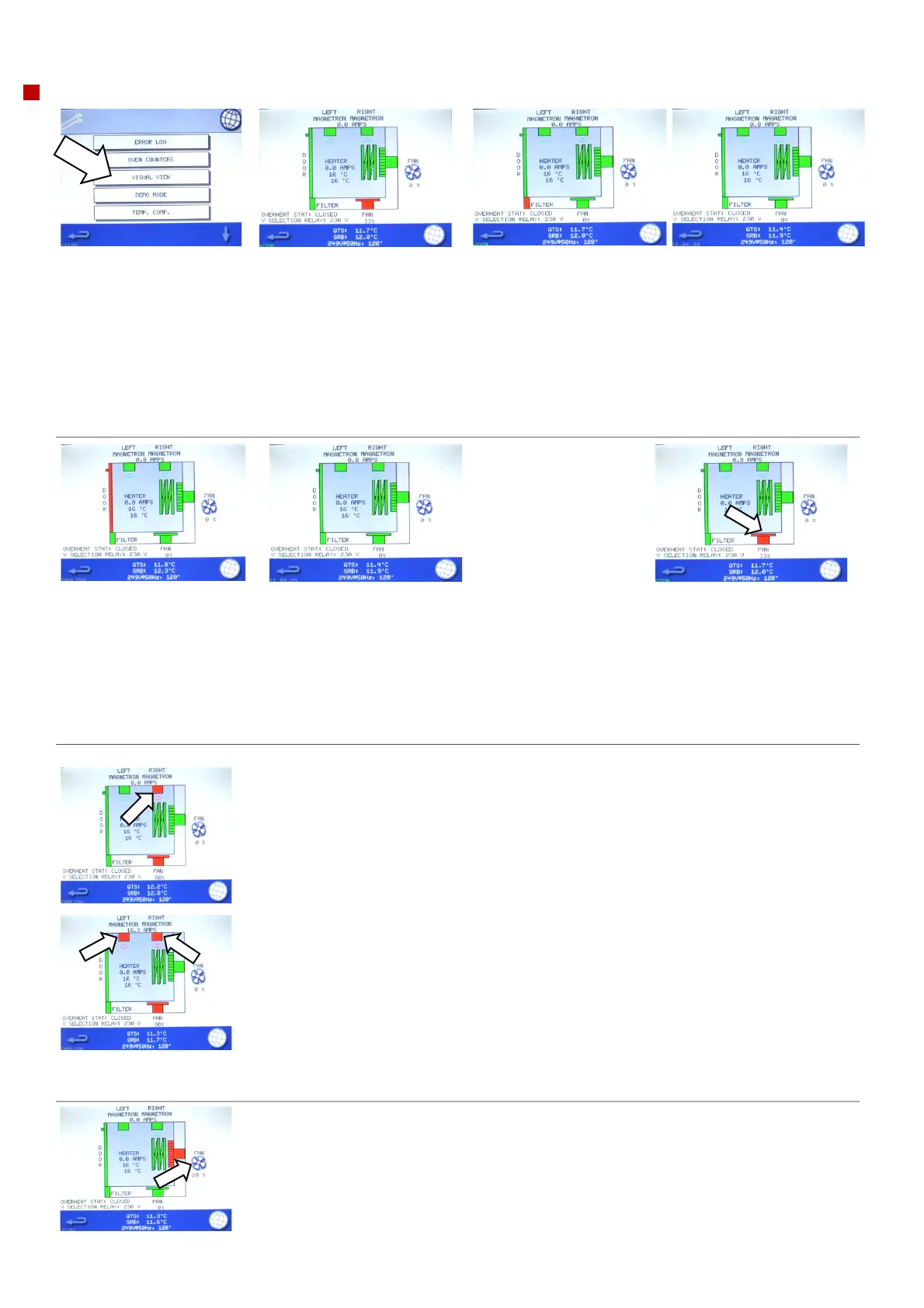
Visual view
1. Select 'visual view' to
check the main
components of the
appliance. If an error is
present the selection is
greyed out and cannot be
selected without first
turning the oven off and
back on again.
2. Select a component symbol
to switch on (red).
Select again to increase the
level (remains red) or turn off
(green). With the exception of
the magnetron(s), all the
component tests will work
with the door open or closed.
3. Remove the air filter at the front of the oven.
The colour of the air filter symbol on the display
should change from green to red indicating that the
microswitch circuit for the air filter is operating
correctly.
Replace the air filter and the colour should change
back to green.
4. Open the oven door.
Check the colour of the door symbol changes from green to red on the display to check
the door microswitch / interlock circuit is operating.
Place door spacers onto the oven door (refer to "Adjusting the door microswitches /
interlocks" in the “Replacing components” within section 6.11 for details), to confirm the
door switches are adjusted correctly. Close the door and check the colour of the door
symbol on the display.
5. Select the cooling fan and
check if it is operating correctly.
Repeated presses will increase
the fan speed, noticed by an
increase in the fan noise
volume and air flow through the
filter (off / 30%, 50%, 85% /
100% / off).
6. Place a microwave safe container of water into the cavity and close the oven door.
Select a magnetron to test operation and display the current draw at maximum output. This
will time-out after 30 seconds (the cooling fan will automatically run at 80% during the test).
Individual magnetron test:
If during the magnetron test the displayed current is 0 A and the E101 error occurs after 12
seconds, then the failure can be found in the 230V circuit. Refer to the schematics to find the
fault for repair (SRB, connections, HV primary winding).
If during the magnetron test a low current draw is seen (around 3A) and the E101 error
occurs after 12 seconds, then the failure can be found in the high voltage circuit. Isolate the
power supply and test the high voltage components (HV transformer, diode, capacitor,
magnetron and connections) to find the fault for repair. Never measure in the high voltage
circuit live. See "Replacing components" within section 6 of this manual.
Dual magnetron model (2000W e2s variant):
Test the magnetrons individually and together.
Selecting the magnetrons again at any point will turn them off.
Using heat proof gloves, remove the container and close the oven door.
7. Select the convection fan and check if it is
operating correctly.
When increasing the fan power gradually, in 10%
increments, to 100% the fan noise should become
louder.



 To Next Page