Merrychef eikon
®
e2s service and repair manual
_______________________________________________________________________________________________________________________________
_______________________________________________________________________________________________________________________________
3. Release the adjusting M7 nut and move the backplate until microswitch SW3 just activates (closes).
Then tighten both nuts.
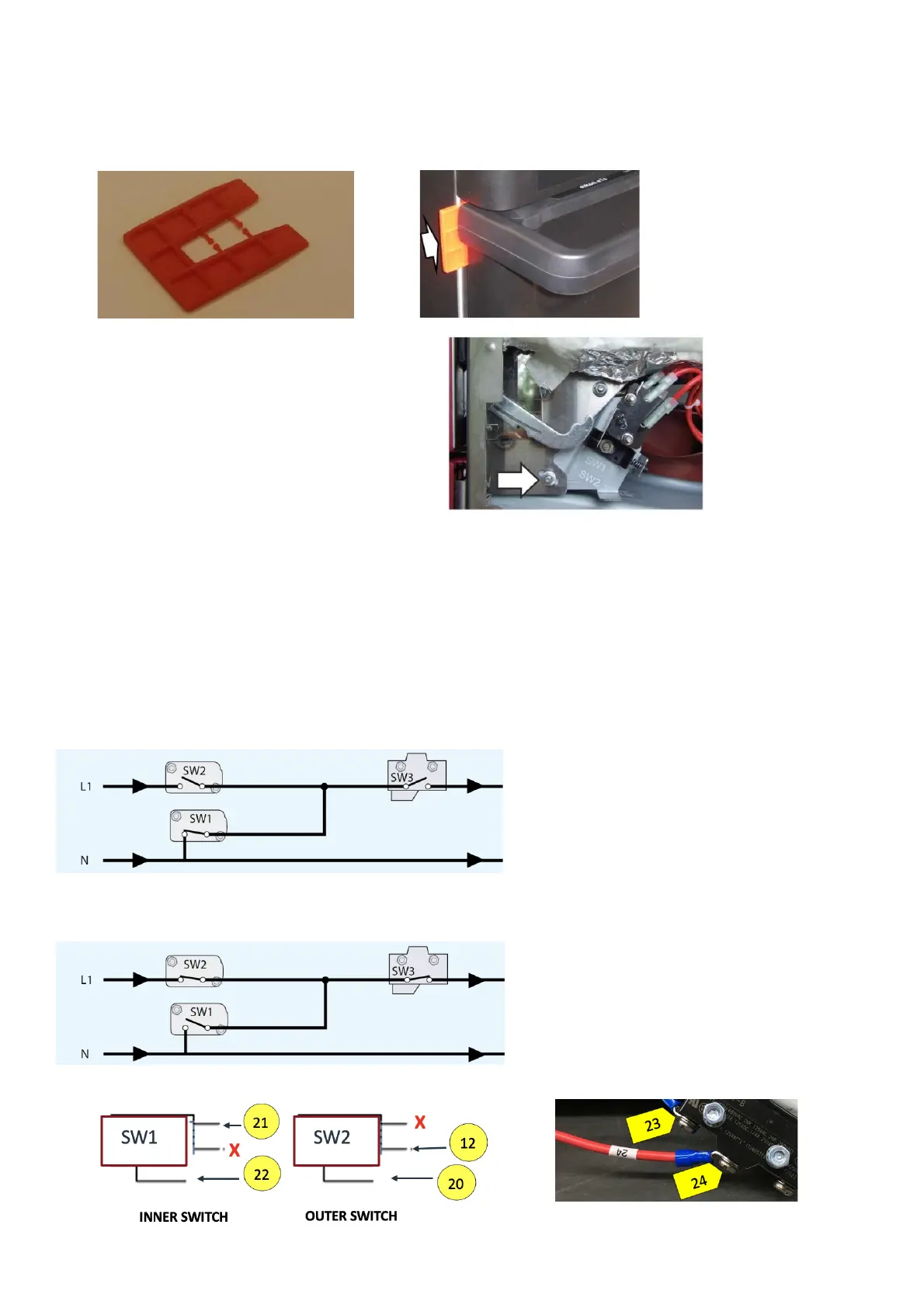
4. Open the appliance door to replace the green 2mm spacers with the two red 4mm spacers.
Then carefully close the door ensuring the spacers are still in position.
5. Slacken the pivot nut using a M7 hex socket wrench.
6. Release the adjusting M7 nut and move the backplate until microswitch SW2 just activates (closes).
Then tighten both nuts.
7. Remove the spacers, then open and close the appliance door 5-10 times, ensuring the door switches operate correctly.
IMPORTANT:
Check if the switches operate in the following sequence as microswitch SW3 must switch the load current.
Oven door open
Oven door closed
Closing the door:
§ SW1 opens first
§ SW2 closes second
§ SW3 closes third
Opening the door:
§ SW3 opens first
§ SW2 opens second
§ SW1 closes third



 To Next Page