Merrychef eikon
®
e2s service and repair manual
_______________________________________________________________________________________________________________________________
_______________________________________________________________________________________________________________________________
7 Circuit boards and diagrams
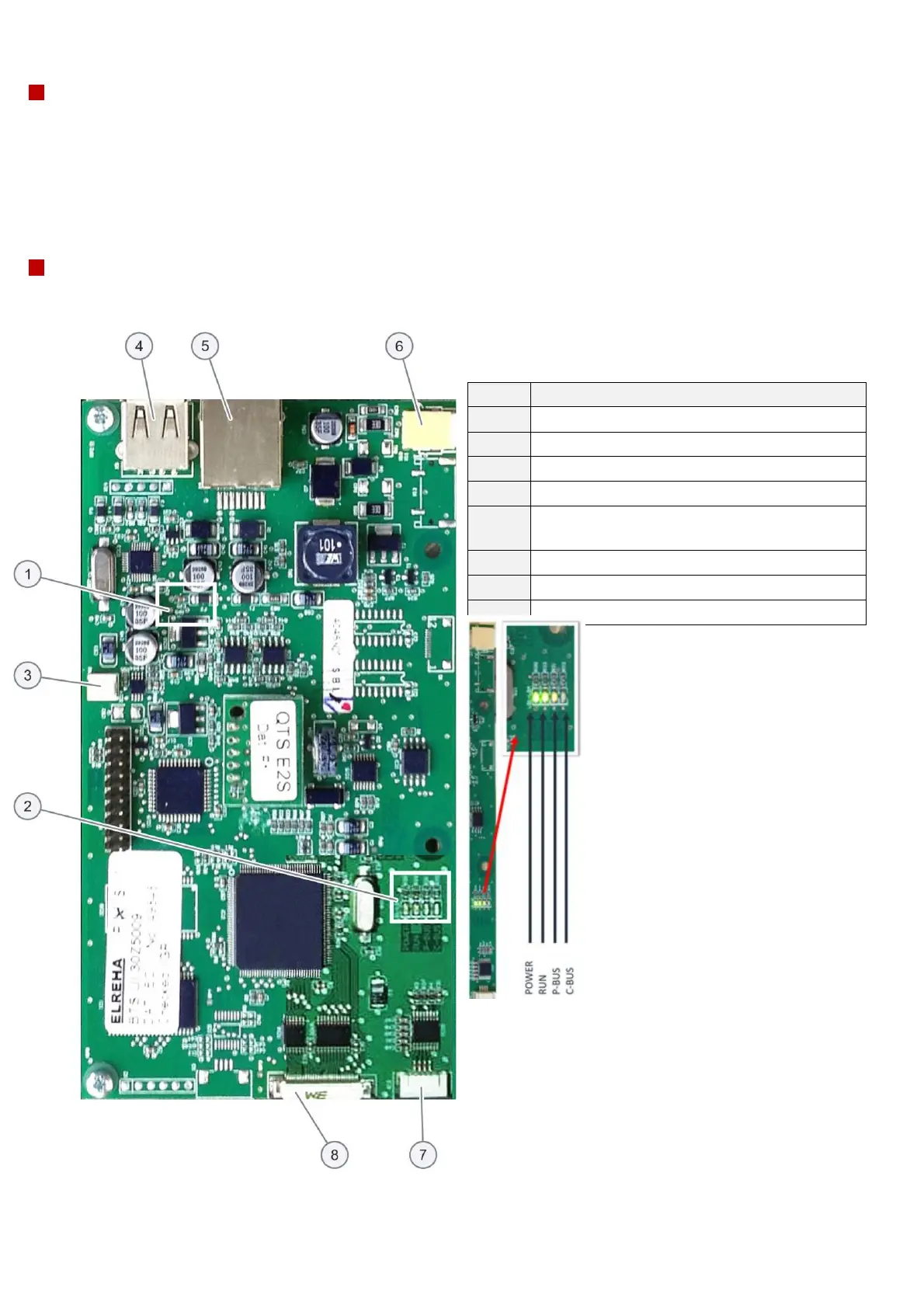
QTS LEDs
§ Power – Green LED lit to show that there is a power supply from the SRB.
§ Run – Green pulsing 1 second flash, indicating that the board has booted up.
§ P-Bus – Yellow LED irregular flashing, indicating data communication with SRB.
§ C-Bus – Yellow LED pulsing 0.5 second flash lit to show data being loaded from the Personality Module (PM) onto
the QTS. Note: Bus LED operation alters during download and uploading from a USB memory stick.
§ LD5 – Yellow LED lit to show the QTS is reading the USB port or that a USB memory stick is fitted.
QTS terminal & LED locations
Power, Run, P-Bus, C-Bus LEDs
X5 - USB socket / connection
X4 - RJ45 communication cable connection to
SRB
X11 - screen backlight connection
X13 - touch pad connection
X9 - display screen PCB connection



 To Next Page