4850 / 4860 Master Clock
Operating and Installation Instructions
Issue 2.0 9-5
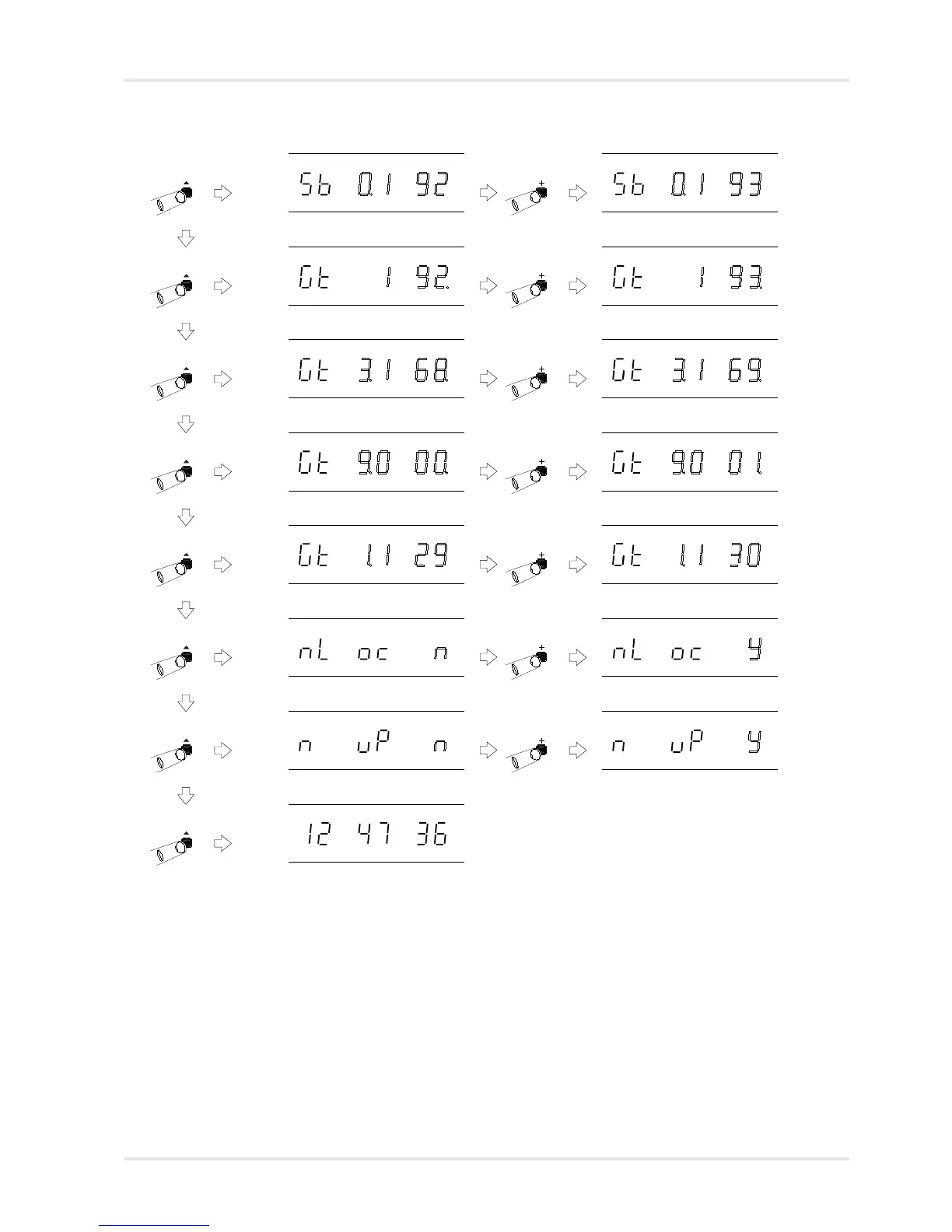
Network Setting Mode, with Subnet
mask 4th byte flashing.
Use ‘+’ and ‘-’ to change setting.
Network Setting Mode, with Gateway
address 1st byte flashing.
Use ‘+’ and ‘-’ to change setting.
Network Setting Mode, with Gateway
address 2nd byte flashing.
Use ‘+’ and ‘-’ to change setting.
Network Setting Mode, with Gateway
address 3rd byte flashing.
Use ‘+’ and ‘-’ to change setting.
Network Setting Mode, with Gateway
address 4th byte flashing.
Use ‘+’ and ‘-’ to change setting.
Network Setting Mode, with
Network update flashing.
Use ‘+’ and ‘-’ to change setting. When
set to ‘y’ the netUpdate software on the
4850 / 4860 CDROM can be used to
install a software upgrade into the 4850
/ 4860. (Available on future versions)
Normal time display
Use ‘+’ and ‘-’ to change setting.
Network Setting Mode, with
synchronisation alarm status flashing.



 To Next Page