Issue 2.0
4850 / 4860 Master Clock
Operating and Installation Instructions
D-3
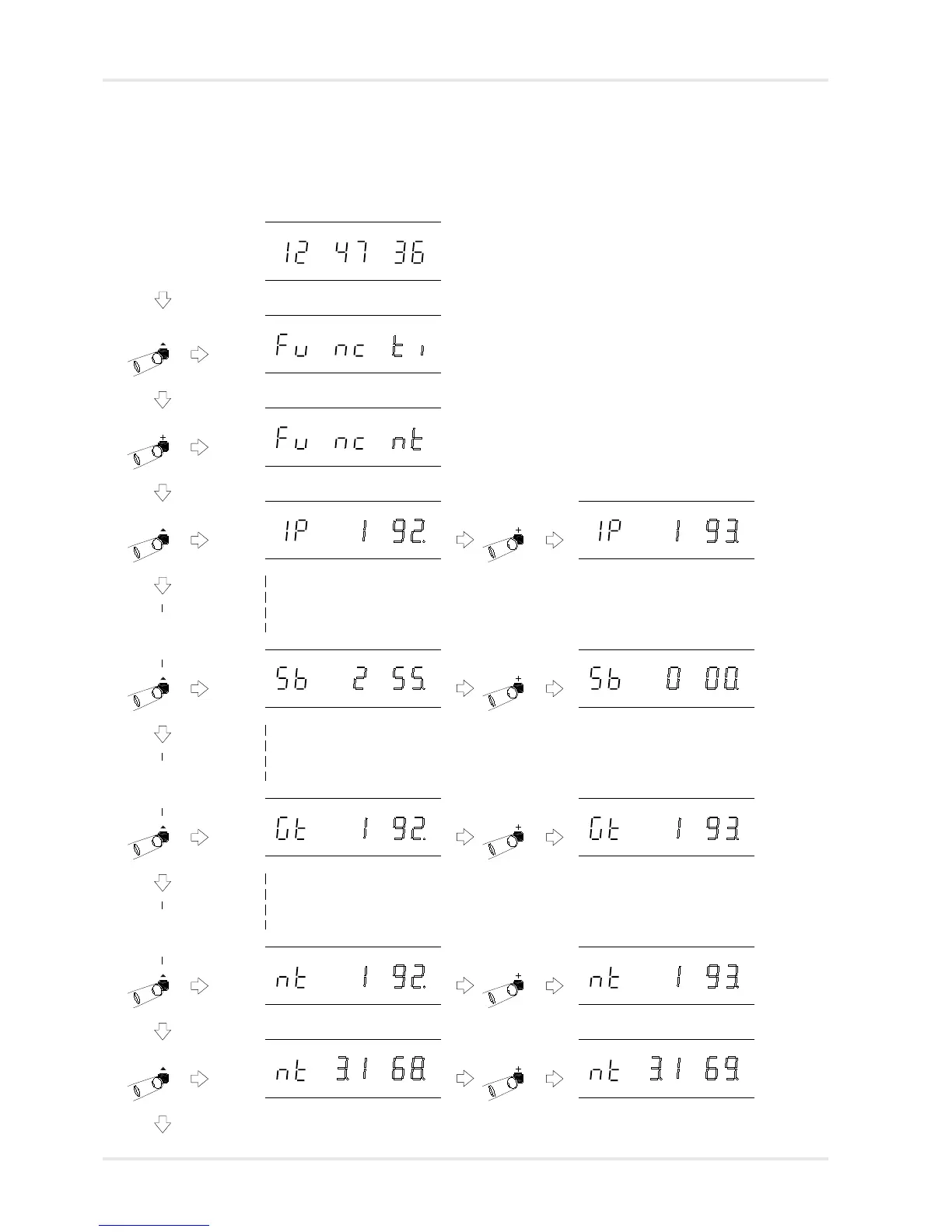
When the 4860 master clock is programmed to synchronise
from an NTP time source, the network setting menu will be
replaced by the following netclient setup menu.
Normal time display
Function ‘Time Setting Mode’. Press ‘+’ three
times to move to Netclient setting mode.
Function ‘Netclient Setting Mode’. Press
‘^’ to select.
Netclient Setting Mode, with IP address
1st byte flashing.
Netclient Setting Mode, with Subnet
mask 1st byte flashing.
Use ‘+’ and ‘-’ to change setting.
Use ‘+’ and ‘-’ to change setting.
Netclient Setting Mode, with Gateway
address 1st byte flashing.
Use ‘+’ and ‘-’ to change setting.
Netclient Setting Mode, with NTP Server
IP Address 1st byte flashing.
Use ‘+’ and ‘-’ to change setting.
Use ‘+’ and ‘-’ to change setting.Netclient Setting Mode, with NTP Server
IP Address 2nd byte flashing.
The 2nd, 3rd and 4th bytes of the
IP address will apear before the
Subnet mask setting.
The 2nd, 3rd and 4th bytes of the
Subnet mask will apear before
the Gateway address setting.
The 2nd, 3rd and 4th bytes of the
Gateway address will apear before
the NTP Server IP address setting.



 To Next Page