10
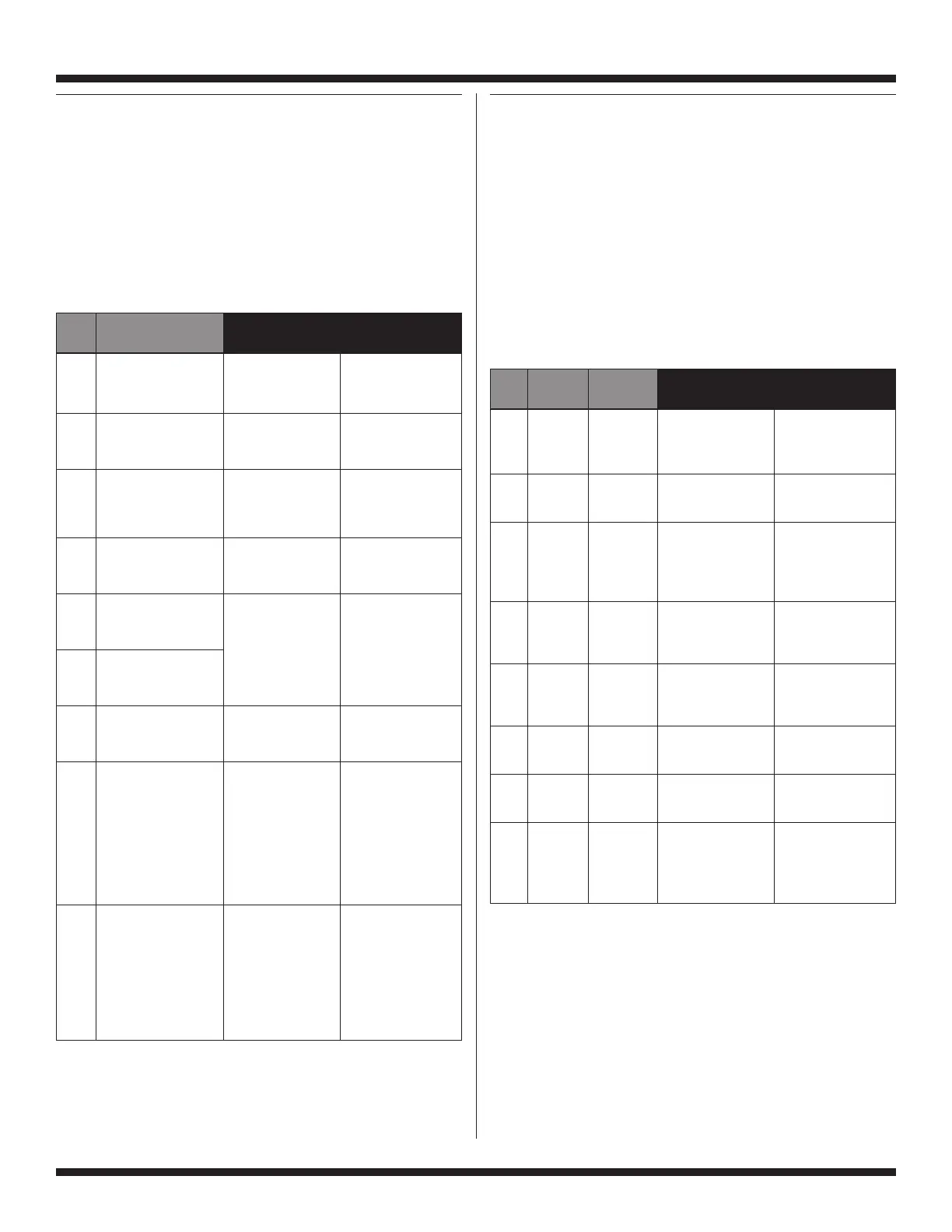
FOR SERVICE TECHNICIAN ONLY - DO NOT REMOVE OR DESTROY
DISPLAY
Step INDICATION
Control
Actuators
Action to be Checked
1 DELICATES Door locks, drum
n
Door lock system
turns 1/2 revolution,
n
Child safety routine
then door unlocks
n
Motor control (MCU)
and relocks.
2 PREWASH Accelerometer tests
n
Accelerometer
Note: Prewash flashes are performed.
on the display and is
very easy to miss.
3 CCU Fill by both cold water
n
Cold water inlet valves
EEPROM Version inlet valves (4 liters)
n
#2 and #3
(EC xx) into BLEACH
n
Pressure sensor:
& KNITS compartment.
n
Suds Level
4 CCU Fill by hot water inlet
n
Hot water inlet
Software Version valve to Wash Level
n
valve #1
(SC xx) into MAIN WASH
n
Pressure sensor:
WOOLENS compartment.
n
Wash Level
5 MCU
Software Version
(S
n
xx)
Drum executes
WHITES
tumbling at
n Motor
6 MCU
wash speed
n Motor control (MCU)
Hardware Version
(30 sec).
(H
n
xx)
BRIGHT
7 UIC Drain pump is ON.
n
Drain pump
EEPROM Version
n
Pressure sensor*
(EU xx)
COLORS
8 UIC Drum rotates
n
Motor
Software Version counter-clockwise
n
Motor control (MCU)
(SU xx) and ramps up.
n
Drain pump on
PERM PRESS Performs unbalance
procedure before and
after spinning. If not
interrupted, the drum
will slow and stop;
after reaching 0 rpm,
the door unlocks and
Step 9 will be skipped.
9 DELICATES This Step is only
n
Drain pump
apparent if Step 8 is
n
(if water is present)
MANUALLY ADVANCED
n
Door unlock
prior to the drum
reaching 0 rpm
(washer pumps out
if needed) and door
unlocks (washer
returns to flashing
mode).
QUICK OVERVIEW TEST
n
This cycle consists of 9 steps. In each step, the washer will
perform a Control Action as described in the table below. Once
the action is completed, the cycle will advance to the next step.
n
Each step can be differentiated from the others by looking at the
display indication. Each step has a different message displayed.
Steps can be advanced if the test requires it.
n
Press WARM to enter the Quick Overview Test.
n
To advance to the next step before the control action is completed,
press any button except COLD.
n
To exit from the Quick Overview Test, press the COLD button.
MANUAL OVERVIEW TEST
Be sure to perform the Diagnostic Test before replacing the
system components.
n
This cycle consists of 8 steps. In each step, the washer will
perform a Control Action as described in the table below. Once
the action is completed, the cycle will advance to the next step.
n
Each step can be differentiated from the others by looking at the
display indication. Each step has a different message displayed.
n
Press COTTON/WHITES to enter the Manual Overview Test.
n
To advance to the next step before the control action is completed,
press any button except COLD (only when the option is available).
n
To exit the Manual Overview Test, press the COLD button.
n
This test will restart on its own once the final step is completed,
or until the COLD button is pressed.
Exit
Step DISPLAY Condition
Control
To be
Action Checked
1 DELICATES On Door locks, drum
n
Door lock system
completion turns 1/2 revolution,
n
Child safety routine
only then door unlocks
and relocks.
2 PREWASH On Accelerometer tests
n
Accelerometer
completion are performed.
only
3 & KNITS On Filling with both
n
Both Cold Inlet
key press cold inlet valves.
g
Valves #2 and #3
or if overfill
n
Overfill level
level is
detected
4 WOOLENS On key Drum executes
n
Motor
press or reversing movement
n
Motor Control (MCU)
completion at wash speed
(10 min.).
5 WHITES On key Drain pump is on
n
Drain Pump
press or (4 min.).
completion
6 BRIGHTS On Drain pump is on
n
Drain Pump
completion (reach Suds Level
only plus 10 sec.).
7 COLORS On key Drum rotates counter-
n
Motor
press or clockwise and ramps
n
Motor Control (MCU)
completion up to maximum speed.
8 PERM On key press Slows motor to 0 rpm.
n
Motor
PRESS only. After Door unlocks.
n
Motor Control (MCU)
rpm = 0,
n
Door lock system
door
unlocks
The drain pump may be running in any of the last 3 steps, depending
on the water level in the washer and position of the pressure sensor.
* The washer will drain until pressure sensor reaches lowest level
for 10 seconds, then moves to next step.
The drain pump may be running in any of the last 3 steps, depending
on the water level in the washer and position of the pressure sensor.




 To Next Page