12
FOR SERVICE TECHNICIAN ONLY - DO NOT REMOVE OR DESTROY
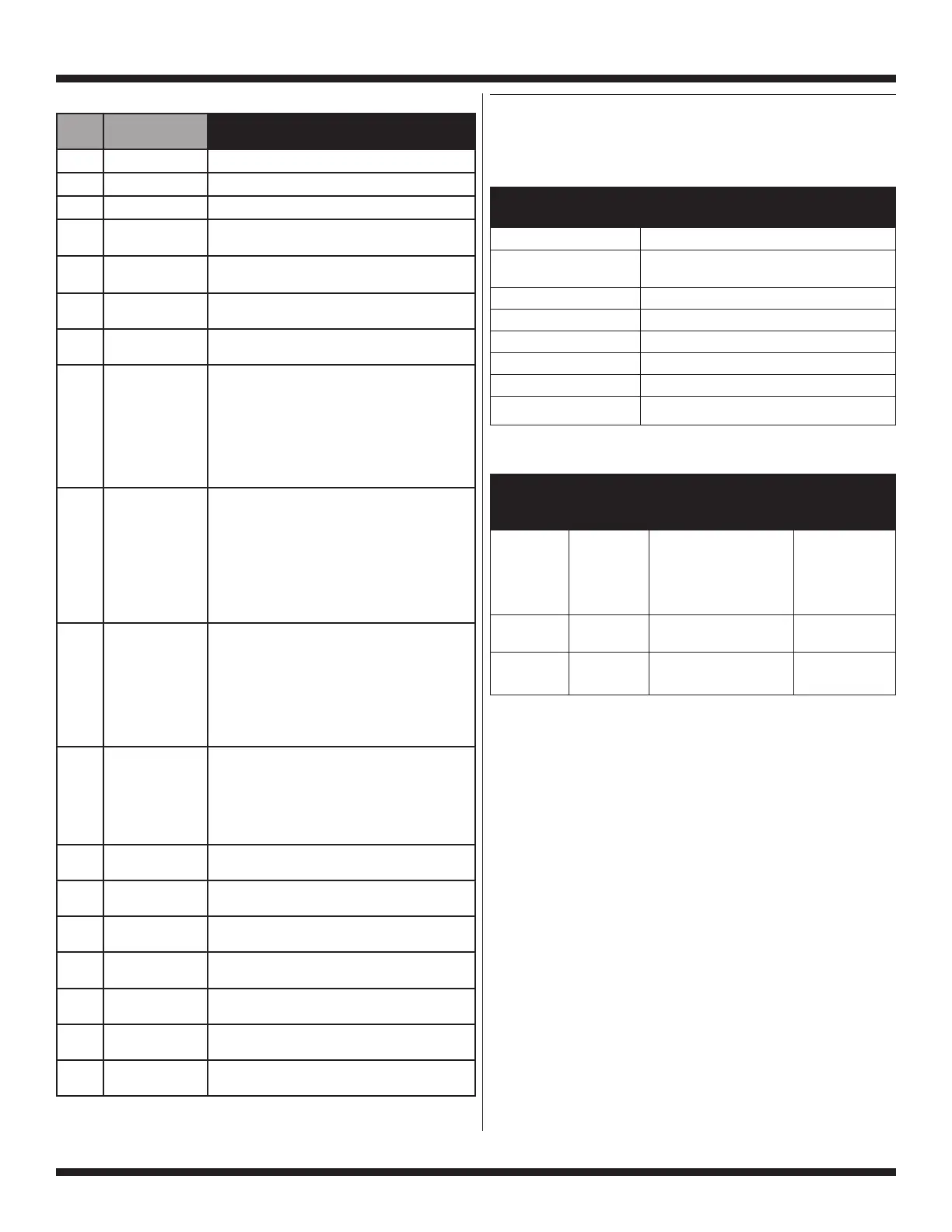
HELP MODE SYMBOLS AND ELEMENTS
Along with the 18 steps of the help mode, symbols and elements
are mapped, at all times, to reflect the state of various inputs
and outputs.
Display
Symbol Description
WASH Water sensed at wash level.
* Low voltage present (below about
90 VAC).
° (Circle above digit) Door closed.
DOOR LOCKED Door sensed locked.
COLD Cold water relay on.
HOT Hot water relay on.
OR Door unlock.
AVAILABLE Drain pump ON.
Help Mode Keypad Function Table
Result While In
Button Name Generic Software Version; Result While Help
on Interface Button Function Spins, Motor Power Code Displays
HOT Step/ Exits help code and Exits help code
Increment returns to set-up mode— and returns to
either dAS displayed set-up mode—
or Set-up Code 2.XX. either dAS displayed
or Set-up Code 2.XX.
COLD Mode Inactive—no result. Clears all three
Select help codes.
WARM Mode Advances through Advances through
Advance help sub-mode. each help code.
Help Mode Submenu
* To erase the 3 help codes, press COLD button.
** The Errors displayed in this section are the history errors that have occurred in the washer (not necessarily an error that
is in progress). The current error is displayed in the MANUAL KEY FUNCTION IN DIAGNOSTIC SUB-MODE.
*** The values 255 and 254 are reserved numbers for specific cases. (255 = unbalance has not been calculated yet,
254 = unbalance could not be calculated).
Step Display
Indication
Explanation
1 1h.XX Help Code 1, where XX is the help code number.*
2 2h.XX Help Code 2, where XX is the help code number.*
3 3h.XX Help Code 3, where XX is the help code number.*
4 1.X## Error history code 1, where X is the F or d code,
and ## is the code number.**
5 2.X## Error history code 2, where X is the F or d code,
and ## is the code number.**
6 3.X## Error history code 3, where X is the F or d code,
and ## is the code number.**
7 4.X## Error history code 4, where X is the F or d code,
and ## is the code number.**
8 hE.ES Energy Saving Mode. Default setting (hE.ES)
is to use a medium set of water levels and
temperatures.
• Pressing the upper right button once will toggle
to a higher set of water levels and temperatures
(hE.--).
• Pressing the upper right button again will
change to a lower set of water levels and
temperatures (hE.LE).
9 Sr.0N Suds routine selection. Default setting for the
washer is to have the suds routine on; standard
time is added to the cycle and communicates
to the end user via the UI display if suds is
detected during the first two drain/ spins and
the final spin. If turned off, “Sr.--”, gain the
ability to reduce suds routine time with the next
programming option.
• Pressing the upper right key pad will toggle the
“Sr” setting from “0n” to “--”.
10 SL.05 Suds routine time selection; can only change
the setting if “Sr.--” is selected. Default setting
for the washer is “05” minutes of suds/kill
foam routine during the first two drain/spins.
Allowable programming range is 0–5 minutes.
• Pressing the upper left key pad will toggle
the “SL” setting. For proper suds handling, it
is recommended to keep the setting at “05”
minutes.
11 rE.10 Maximum final spin rebalance attempts. Default
setting for the washer is “10” rebalance attempts
before the cycle is cancelled. For out-of-balance
load, allowable programming range is 4–10
attempts.
• Pressing the upper left key pad will toggle the
“rE” setting.
12 SC.XX CCU software revision, where XX is the software
revision number.
13 EC.XX CCU EEPROM revision, where XX is the EEPROM
revision number.
14 SU.XX UI software revision, where XX is the software
number.
15 EU.XX UI EEPROM revision, where XX is the EEPROM
number.
16 SPIN XXX XXX is the current speed of the drum, displayed
in rpm.
17 P.XXX The relative amount of power requested by the
motor, where XXX is the value.
18 U.XXX The unbalance in the system, where XXX is the
unbalance value.***




 To Next Page