2. Activate Bluetooth on your smartphone/device.
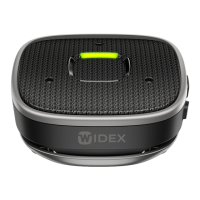
3. Press the volume up button (+) and the power/mode button (1.6)
simultaneously for 3 seconds until the in-use light indicators (1.5) are
glowing blue.
4. Make sure that Sound Assist and your phone/device are within 1 metre
range of each other.
5. Go to the Bluetooth menu on your smartphone/device and pair by
selecting Sound Assist from the list of available devices.
6. The in-use light indicators (1.5) will briefly flash green, when the
pairing is successfully completed.
Sound Assist can be paired with up to 8 Bluetooth devices and actively
connected to 1 Bluetooth device.
To reset hearing aid and phone/device pairings:
1. Turn o your Sound Assist.
2. Press the volume down button (-) and the power/mode button (1.6)
simultaneously for 5 seconds.
3. When the pairing list is resetting, the in-use indicators (1.5) will start
flashing yellow.
4. When the reset is completed, the Sound Assist will turn o.
Range
Function Max ranges
Remote microphone 8 m from hearing aid to the device
Bluetooth streaming 10-15 m from Bluetooth device to the device
11


 To Next Page
 Loading...