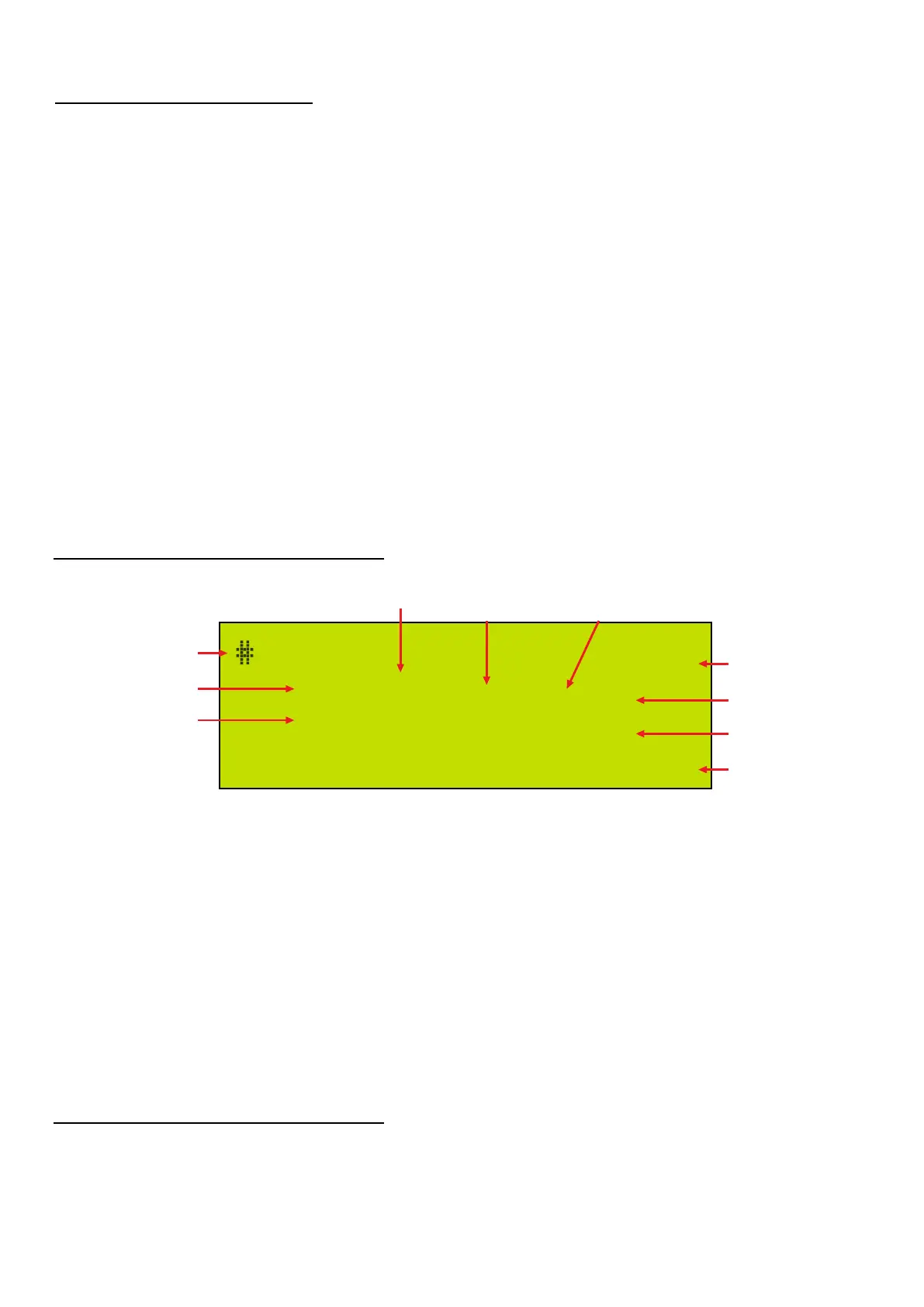
00600 Input Info
Moisture Cnt= 14.6%
19
09:36 19/04/23
01 3050 231
IMPORTANT NOTE:
Lab Mode operates the same as Field Mode, except that the Moisture Reading takes up to 32 seconds and the
results are more accurate. See SECTION 6 and the APPENDIXES for details on Data Storage etc.
NOTE: The meter is supplied in Field Mode as the Default Mode.
Press KEY 8 to change between modes
Fuel selection indicates which fuel in the numbered list (from 1 to 8) stored in the ME2100 memory was
selected for the test. This number is not related to fuel types in the fuel list found on the flash drive or in
ME2100 Manager software.
When downloading saved test results to a PC, Fuel Type data is also downloaded and should be saved to the
same file with the test results for future use. See Section 6 Pages 13-15
It is important that the user make a note of which fuel specifically was used since if the fuel parameters
in the ME2100 are changed or modified then the fuel selection number (as indicated in the diagram above)
may no longer refer to the fuel parameters that were used in the test.
1.4 Display Layout
1.5 Lab Mode
List of Functions
Region
Block
Comp
Coupe
Date
Time
PgUp
PgDn
Sample
Type
Reset
Test
Enter
commands the meter to accept the next two digits as the code for the region location
commands the meter to accept the next three digits as the code for the block location
commands the meter to accept the next three digits as the code for the compartment location
commands the meter to accept the next two digits as the code for the coupe location
commands the meter to accept a new date setting entered from the keyboard
commands the meter to accept a new time setting entered from the keyboard
scrolls back through the stored moisture measurements one record at a time
scrolls forward through the stored moisture records one at a time
commands the meter to measure the moisture content of the current sample
select from a list of fuel types so that parameters used match the sample being measured
clears all stored measurements and resets the counter to one
same as Sample, but the data is stored with an E prefix to signify it is a test not a fuel sample
signifies to the meter that a command is complete and ready for execution
Wiltronics Research Pty Ltd 8
561 DC1V1
Number of samples
stored in memory
Command
Prompt
Region
Fuel Selection
Time
Date
Moisture
Content
Block Compartment
Coupe


 To Next Page