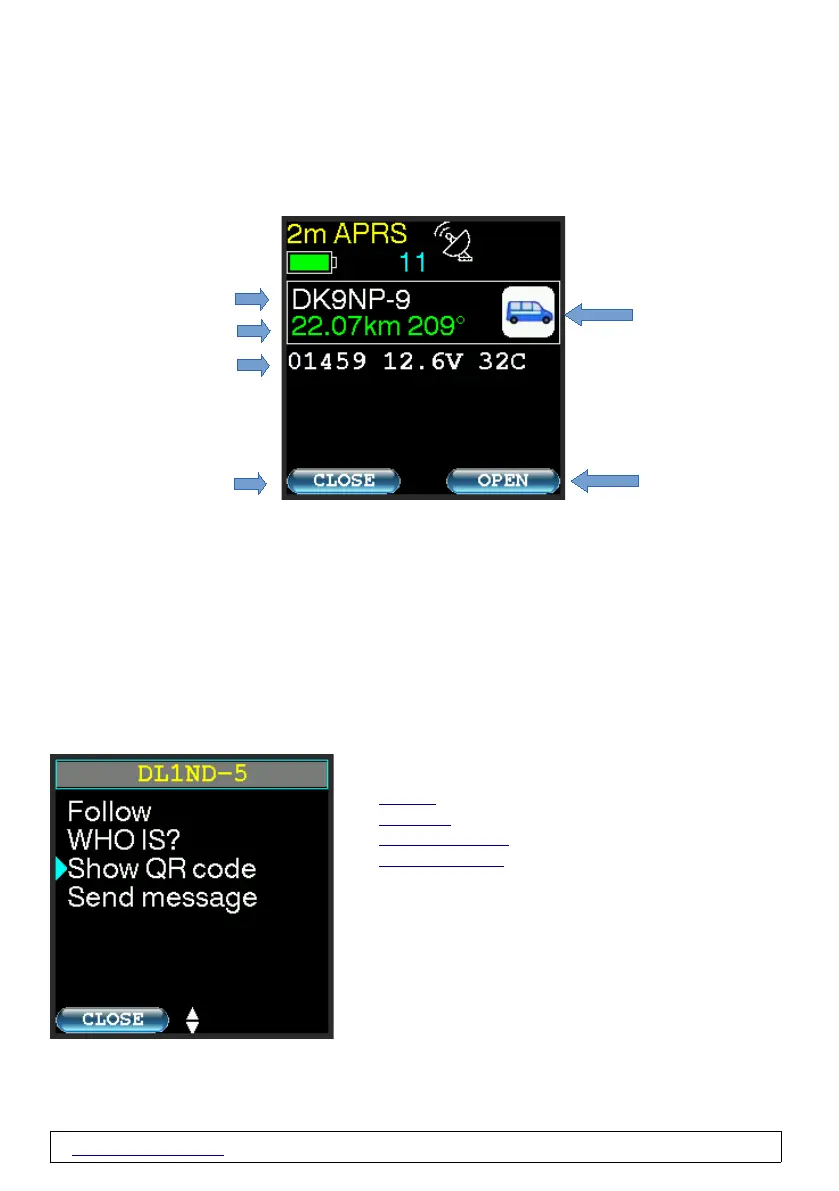
Automatic display of received APRS packets in APRS modes
When an APRS packet is received, the packet will automatically be displayed unless you
are within the menu or a message is displayed.
- Received position report
*Distance and direction to the displayed station in degrees.
Distance depending on the set unit either in km or miles.
The values appear in green if they are currently receiving a current GPS position.
If no valid GPS position is known (e.g. inside buildings, tunnels or if GPS is deactivated due
to energy saving functions), a "~" appears in front of the distance information and the data
is displayed in orange. Distance is then calculated using your last known GPS position.
OPEN
"OPEN" opens a page with three options
- „Follow“
- „WHO IS “
- „Show QR Code“
- „Send Message “
www.wimo.com - 13- ©Taner Schenker, 13. December 2022


 To Next Page