EasyManua.ls Logo

Winegard ConnecT 2.0 Plus WF2-95B - User Manual

Winegard ConnecT 2.0 Plus WF2-95B
12 pages
Print Icon
To Next Page IconTo Next Page
Loading...
Place label here
Register your product at winegard.com/myantenna
WINEGARD
®
ConnecT
2.0+
WF2-95B, WF2-695
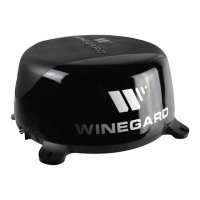
4G LTE + WIFI EXTENDER with TV/FM ANTENNA
WF2-85B, WF2-685
WIFI EXTENDER with TV/FM ANTENNA
OEM Installation / Operation Manual
www.winegard.com/connect
For help, email help@winegard.com
or call 1-800-320-9992
2452403
Rev1 4 /18

Questions and Answers

  • J
    Jonathan MartinezAug 15, 2025
    How to fix Winegard ConnecT 2.0 Plus WF2-95B Extender firmware update failed?
    • C
      cheryl52Aug 15, 2025
      First, connect to a WiFi source. Navigate to the Update Software drop-down and click select. Finally click on the Recover Modem button to reconfigure your modem.
  • K
    kathryn11Aug 18, 2025
    Why am I not seeing the SSID for my Winegard ConnecT system?
    • Q
      qmillsAug 18, 2025
      Check that the LED under the SIM Card/LED cover entry plate is on. If it's off, use a voltage meter to check that 12V is reaching the dome from the vehicle power. If the LED is on but you still don't see the SSID, reset the unit by holding the reset button under the SIM Card/LED cover plate for 30 seconds.
  • R
    Robert ChavezAug 21, 2025
    Why are web pages not loading when connected to Winegard ConnecT 2.0 Plus WF2-95B Extender WiFi?
    • A
      Angela AtkinsonAug 21, 2025
      Some WiFi sources might require you to agree to their rules or enter a password on a 'SPLASH' page before granting network access, even if no password was needed for the initial connection.
  • M
    monica20Aug 25, 2025
    What to do if 10.11.12.1 does not bring up the login screen for Winegard Extender?
    • L
      Lance OrtizAug 26, 2025
      First, ensure your device is connected to the correct Winegard ConnecT SSID. If connected to the correct network, try performing a factory reset, as the address may have been changed.
  • J
    Jason BryantAug 28, 2025
    What to do if my Winegard Connect 2.0+ is billing me every month?
    • H
      Heather WrightAug 28, 2025
      Log in to your account and click on “View Winegard ConnecT Subscriptions”. Then, verify that auto renew is “Off.”
  • A
    ayalajamesAug 31, 2025
    How to recover lost SSID or password for Winegard ConnecT 2.0 Plus WF2-95B Extender?
    • J
      Joan MyersSep 1, 2025
      If you haven’t changed your factory preset SSID or password, check the white label inside the SIM card/LED cover plate on the side of the dome for your factory preset SSID and password.
  • M
    Mary HallSep 3, 2025
    What to do if my Winegard ConnecT 2.0 Plus WF2-95B credit card is not processing?
    • Y
      ygraySep 4, 2025
      Make sure that the billing address you entered is the correct address associated with the credit card you are using.
  • J
    Justin HuntSep 7, 2025
    What to do if my Winegard ConnecT 2.0 Plus WF2-95B Extender device will not connect with the correct password?
    • L
      Laura RoseSep 7, 2025
      Try resetting the ConnecT 2.0+ to see if your device will then connect.
  • T
    Tiffany GibsonSep 12, 2025
    What to do if Winegard ConnecT 2.0 Plus WF2-95B Internet Status field will not connect?
    • K
      katiefoleySep 12, 2025
      Verify that your device is still connected to the ConnecT. When switching between 4G and WiFi, your device may have stopped the connection.

Summary

Exterior Installation of Winegard Connect

Exterior Installation Steps

Step-by-step guide for mounting the antenna on the vehicle roof.

Installing the Wall Plate Power Supply

Wall Plate Power Supply Warnings

Critical safety warnings for installing the power supply unit.

Wall Plate Installation Procedure

Detailed steps for wiring and connecting the wall plate power supply.

Winegard Connect WiFi and 4 G;LTE Operation

Connecting to WiFi and 4 G;LTE Networks

Guides users on connecting to local WiFi or 4G/LTE internet access.

Advanced Settings and Factory Defaults

Resetting to Factory Defaults

Instructions for returning the device to its original factory settings.

Swapping the SIM Card (4 G LTE Systems)

SIM Card Replacement Procedure

Step-by-step guide for physically swapping the SIM card.

Operating with a Custom SIM Card

Custom SIM Card Operation

Configuring the device to use a different cellular provider's SIM card.

Winegard Connect Support and Troubleshooting

Winegard Connect Troubleshooting Questions

Winegard ConnecT 2.0 Plus WF2-95B Specifications

General IconGeneral
Model NumberWF2-95B
CategoryExtender
TypeWi-Fi Extender
Wi-Fi Standard802.11ac
Frequency Bands2.4 GHz and 5 GHz
Maximum SpeedUp to 1200 Mbps
Ethernet Ports1
Power Supply12V DC
Operating Temperature60°C

Related product manuals