Page 30
Winkhaus STV
Operating Manual EAV 0124653 0505
Subject to technical changes
Winkhaus STV GmbH & Co. KG · Berkeser Str. 6 · D-98617 Meiningen · Germany · www.winkhaus.de · stv@winkhaus.de
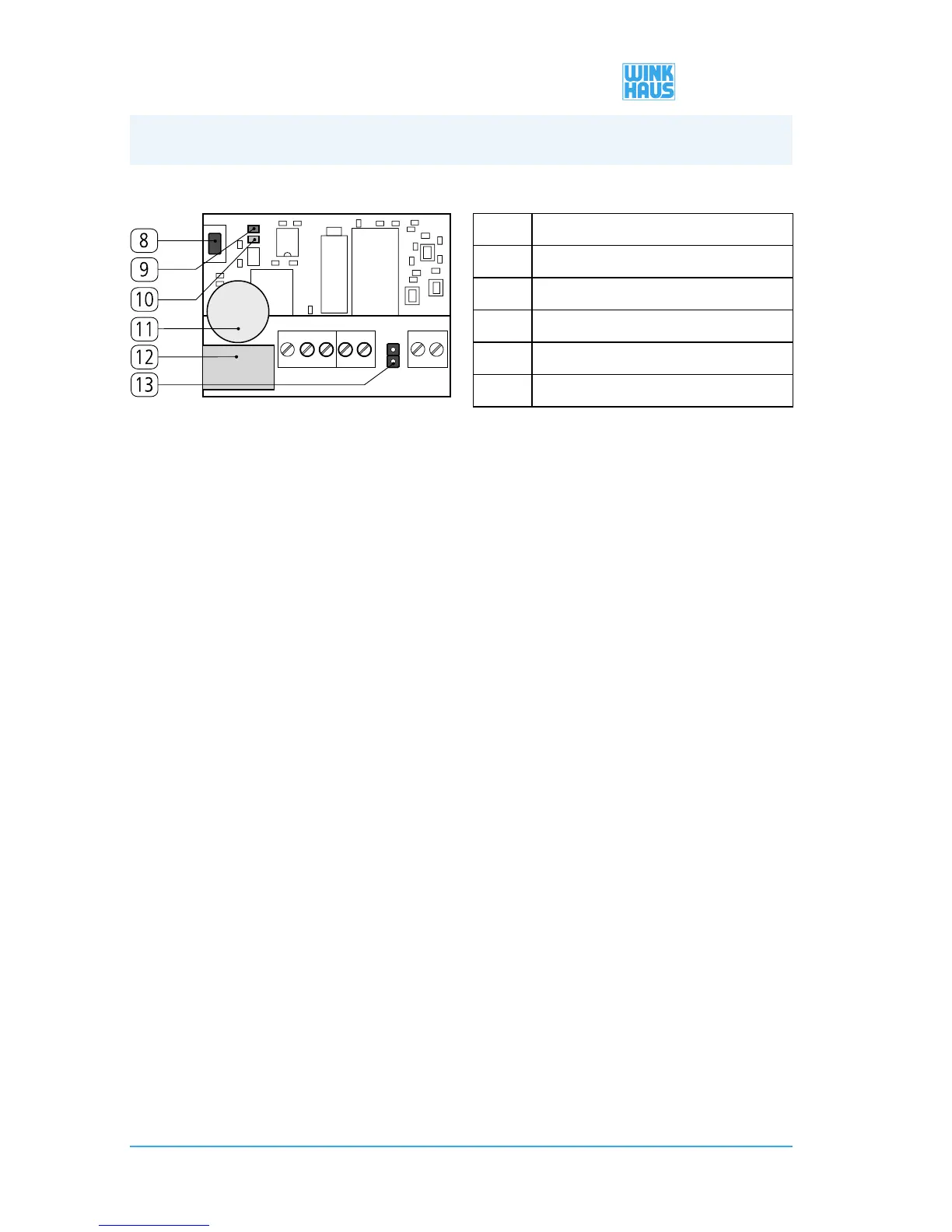
[8] „P1 key”
[9] „green LED”
[10] „red LED”
[11] „buzzer”
[12] „relay”
[13] „jumper”
Teaching wireless hand-held transmitters directly via the receiver
• If the programming is performed via the receiver, this one will have to be freely
accessible.
• Press the P1 key of the receiver until the green LED lights up.
• Release the key.
• Activate the desired key of the hand-held transmitter while the LED is lit up
• As long as the LED is lit, you can program additional hand-held transmitter keys.
Display Memory full:
The memory has been filled to capacity (max. 85 keys), if the teach-in key of a new
wireless hand-held transmitter is used and both LED displays of the receiver flash
simultaneously.
Deleting wireless hand-held transmitters directly via the receiver
Partial deletion:
• Press and hold the P1 key of the receiver until the green LED lights up.
• Release the key.
• Press the key of the wireless hand-held transmitter while the LED is lit up.
• A taught-in wireless hand-held transmitter will be deleted automatically.
• A wireless hand-held transmitter that has not been taught will be programmed
(analogue ”Teaching-in of wireless hand-held transmitters directly via the hand-held
transmitter”).
Delete-all:
• Press and hold the P1 key of the receiver until the green LED lights up.
• Release the key.
• Press the key again until the green and the red LED flash three times.
• Now, all hand-held transmitters are deleted.
4. Operation/Programming


 To Next Page