5.8 How to control output ports
If you connect relays to control board output ports,you
need some M macro code to control output ports ON or OFF.
Open our CD, ...English Manual>>macro folder, and cpoy all M
code to...C:/Mach3/macros/Mach3Mill folder.
M200 code:ActivateSignal (OUTPUT3) >>Output 3 ON
M201code:DeactivateSignal(OUTPUT3) >>Output 3 OFF
............
Other output ports M codes, and so on,You can change
the "3" to "5" or "6"(3 of OUTPUT3)and save as M2XX code,
then you can control other output ports by the M2XX code.
M930 is Z floating tool code.
In the MACH3 software input bar, manually enter M code,
you can open or close the output port,You can add M code to
your program and automatically open the output port.
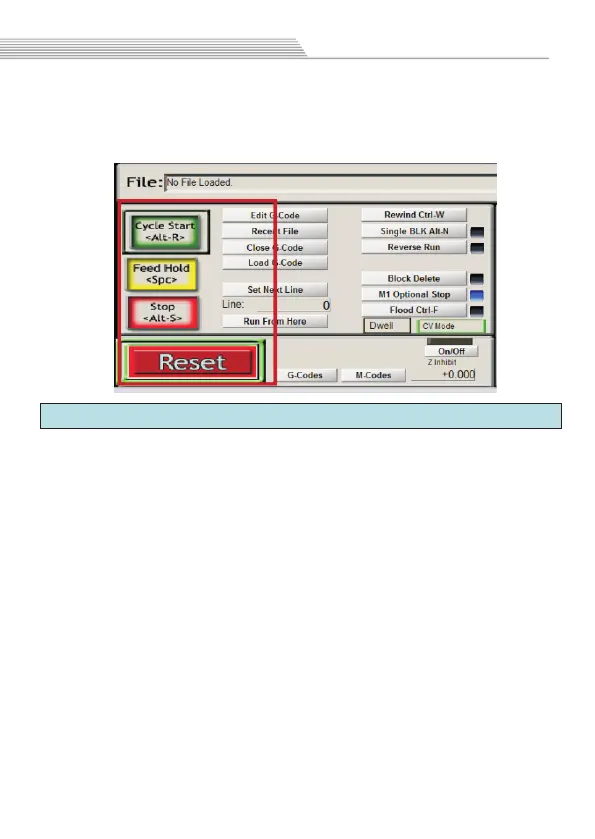
Software operation
After the program is loaded, click “Cycle Start”and the
program starts running;Click “Feed Hold” and program pause;
Click “Reset”and software emergency stop.
25


 To Next Page
 Loading...