Setup
Running the first test board
3
3-33 doc050624 Setup
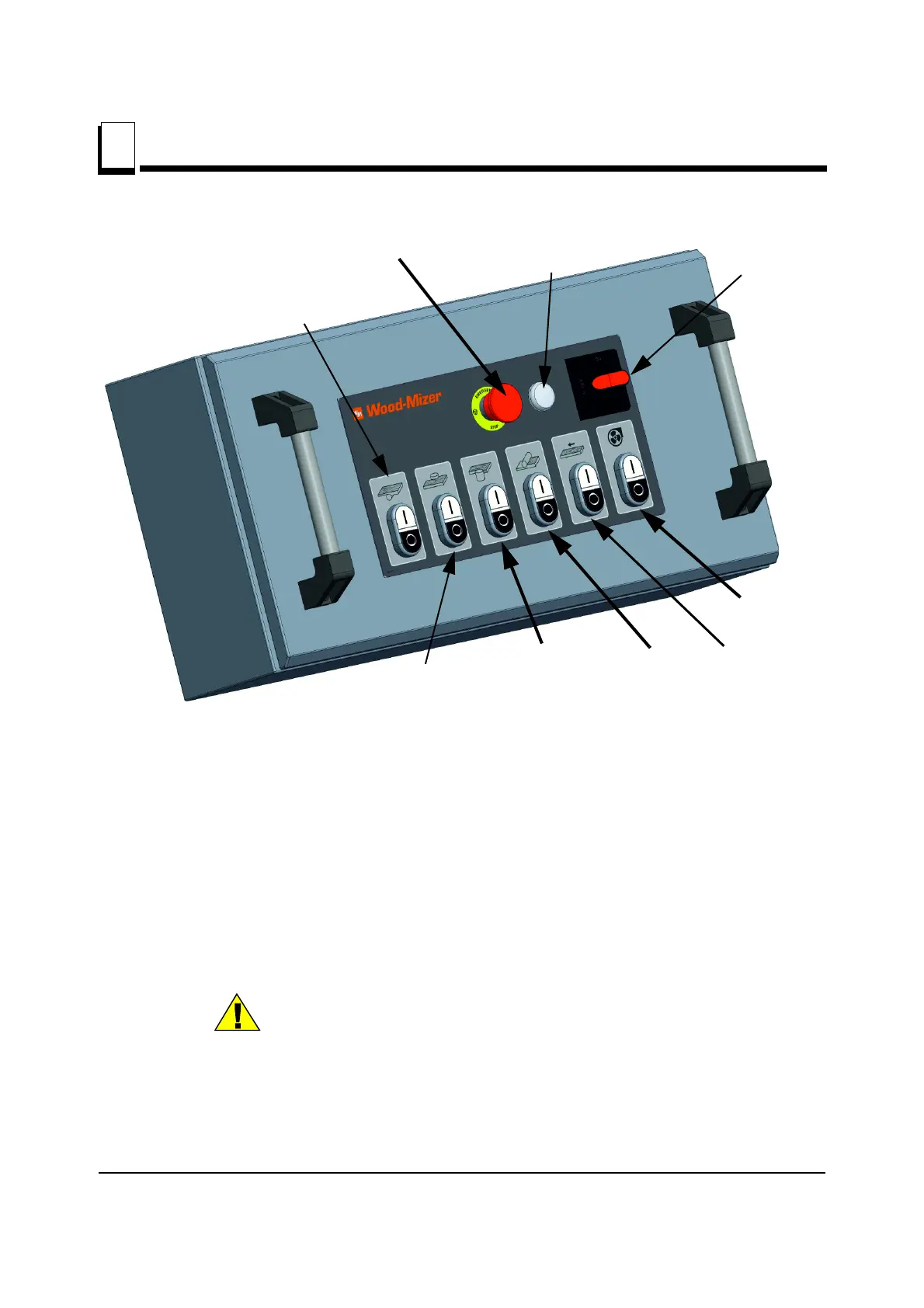
See Figure 3-24.
1. Turn on the power. Power On Indicator should illuminate.
2. Turn on the chip extractor.
3. Start the cutter heads one at a time.
4. Start the feed motor.
Start buttons should illuminate as the motors are started.
CAUTION! Do not adjust the feeding speed if the motor of the feed
rollers is not running. Equipment damage may occur.
5. Slow the speed of the feed rollers down using the knob on the planetary gear. Turn the
knob until you see the rollers slow down to their lowest speed.
FIG. 3-24
Power On
Indicator
Feed
Motor
On/Off
Power On/Off
Lower cutter
On/Off
Fixed side
cutter On/Off
Movable side
cutter On/Off
Upper
cutter
On/Off
Emergency Stop
Sawdust
extract
On/Off


 To Next Page
 Loading...