Owner Service 19
MAN1246 (04/10/2018)
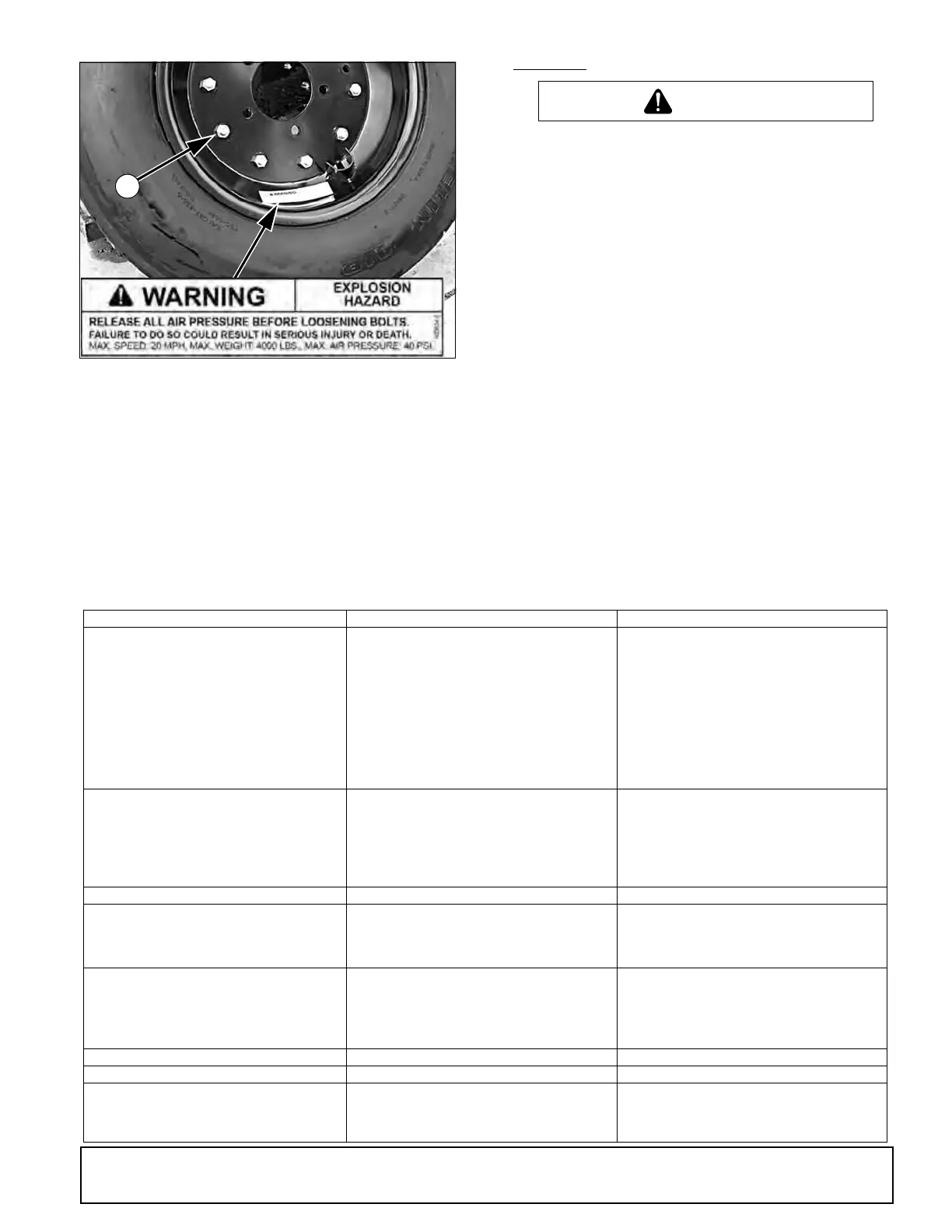
Figure 10. Split Rim Tire Servicing
CLEANING
• Never perform cleaning, servicing, or maintenance with engine running.
• Before cleaning, servicing, adjusting, repairing or unplugging: stop tractor
engine, place all controls in neutral, set park brake, remove ignition key,
and wait for all moving parts to stop.
After Each Use
• Remove large debris such as clumps of dirt, grass, crop residue, etc.
from machine.
• Inspect machine and replace worn or damaged parts.
• Replace any safety decals that are missing or not readable.
• Do not climb on machines or ladder to clean. Clean machine with wings
in lowered position only.
Periodically or Before Extended Storage
• Clean large debris such as clumps of dirt, grass, crop residue, etc. from
machine.
• Remove the remainder using a low-pressure water spray.
1. Be careful when spraying near scratched or torn safety decals or near
edges of decals as water spray can peel decal off surface.
2. Be careful when spraying near chipped or scratched paint as water spray
can lift paint.
3. If a pressure washer is used, follow the advice of the pressure washer
manufacturer.
• Inspect machine and replace worn or damaged parts.
• Sand down scratches and the edges of areas of missing paint and coat
with Woods spray paint of matching colour (purchase from your Woods
dealer).
• Replace any safety decals that are missing or not readable (supplied free
by your Woods dealer). See Safety Decals section for location drawing.
TROUBLESHOOTING
PROBLEM POSSIBLE CAUSE SOLUTION
Does not cut Dull blades Sharpen blades.
Worn or broken blades Replace blades. (Replace in pairs only.)
Incorrect PTO speed Set at rated PTO speed.
Ground speed too fast Reduce ground speed.
Drive not functioning (blades do not turn when
PTO is running)
Check drive shaft connection.
Check gearbox.
Gearbox malfunction Repair gearbox.
Excessive clutch slippage Adjust clutch.
Incorrect blade direction Check to be sure blade edge is correct for direc-
tion of rotation.
Streaks or ragged cut Broken or worn blades Replace or sharpen blades.
Attitude incorrect Level machine.
Ground speed too fast Reduce ground speed.
Excessive cutting height Lower cutting height. (Note: Set height so blades
do not frequently hit ground.)
Excessive lush and tall vegetation Re-cut at 90° to first pass.
Excessive side skid wear Running with skids continuously on ground Raise cutting height or adjust.
Excessive clutch slippage Clutch out of adjustment Adjust clutch.
Clutch discs worn; wear stops
contacting opposite plate
Replace discs.
Blades hitting ground Raise cutting height.
Vibration Broken blade Replace blades in pairs.
Bearing failure Check gearbox shafts for side play.
Hitch length incorrect Reset hitch length.
Universal drive Adjust pedestal bearing height to be parallel to
ground.
Blades hitting deck Bent blades or crossbar Replace bent blades or crossbar.
Unit will not raise Low oil Add hydraulic oil.
Unit doesn’t cut level Wing section cuts lower than
centre
Lengthen turnbuckle connecting centre yoke to
wing wheel yoke.
Wing section cuts higher than
centre
Shorten turnbuckle connecting centre yoke to
wing wheel yoke.



 To Next Page