Inspection and maintenance
Greenstar 8000 Style – 6720883864 (2019/02)
60
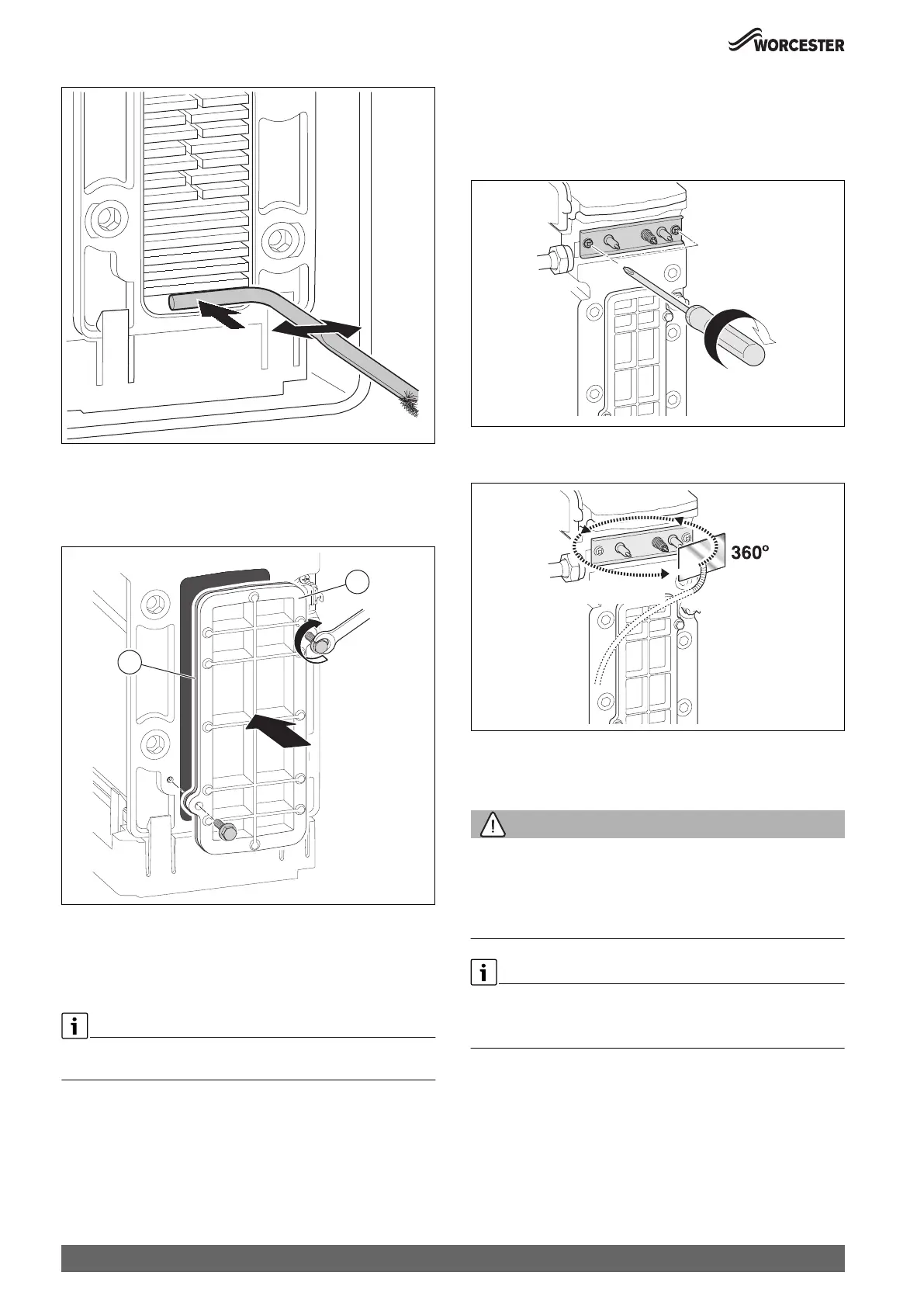
Fig. 86 Cleaning debris
▶ Refit the cleaning access cover assembly in reverse order the new
seal [2], and the access cover [1].
▶ Hand tighten the bolts and then use a spanner to tighten the bolts a
further half turn.
Fig. 87 Re-fitting the access cover
▶ Ensure that the convex side of the burner faces down into the heat
exchanger when re-fitting the burner.
▶ Ensure seal is replaced with new seal and is correctly fitted.
▶ Check the siphon unit is clean before refitting to appliance.
On completion of the heat exchanger cleaning and reassembly, perform
the fan pressure test.
8.9.5 Checking electrodes
▶ Remove the electrode set with gasket.
▶ Check electrodes for contamination.
▶ Clean or replace electrodes if required.
▶ Install electrode set with new gaskets.
Fig. 88 Installing electrode set
▶ Check tightness of electrode set.
Fig. 89 Checking for leaks
8.9.6 Cleaning the siphon
Cleaning the condensate trap
WARNING:
Danger to life due to poisoning!
If the condensate trap is not filled, poisonous flue gas can escape.
▶ Only turn off the siphon filling program during maintenance, and turn
it back on at the end of maintenance.
▶ Make sure that the condensate drains off properly.
Damages resulting from an insufficiently cleaned condensate trap are
excluded from the warranty.
▶ Clean the condensate trap regularly.
0 010 007 129-001
0010023584-001
1
2
0010023585-001
3 - 4 Nm
0010 007 499-002
Gas/Gaz?



 To Next Page