HANGZHOU WORLDE DIGITAL PIANO CO.,LTD HANGZHOU WORLDE MUSIC ELECTRONIC CO., LTD
WEBSITE: WWW.WORLDE.COM.CN EMAIL:SALES@WORLDE.COM.CN TEL:86 571 88730848
- 19 -
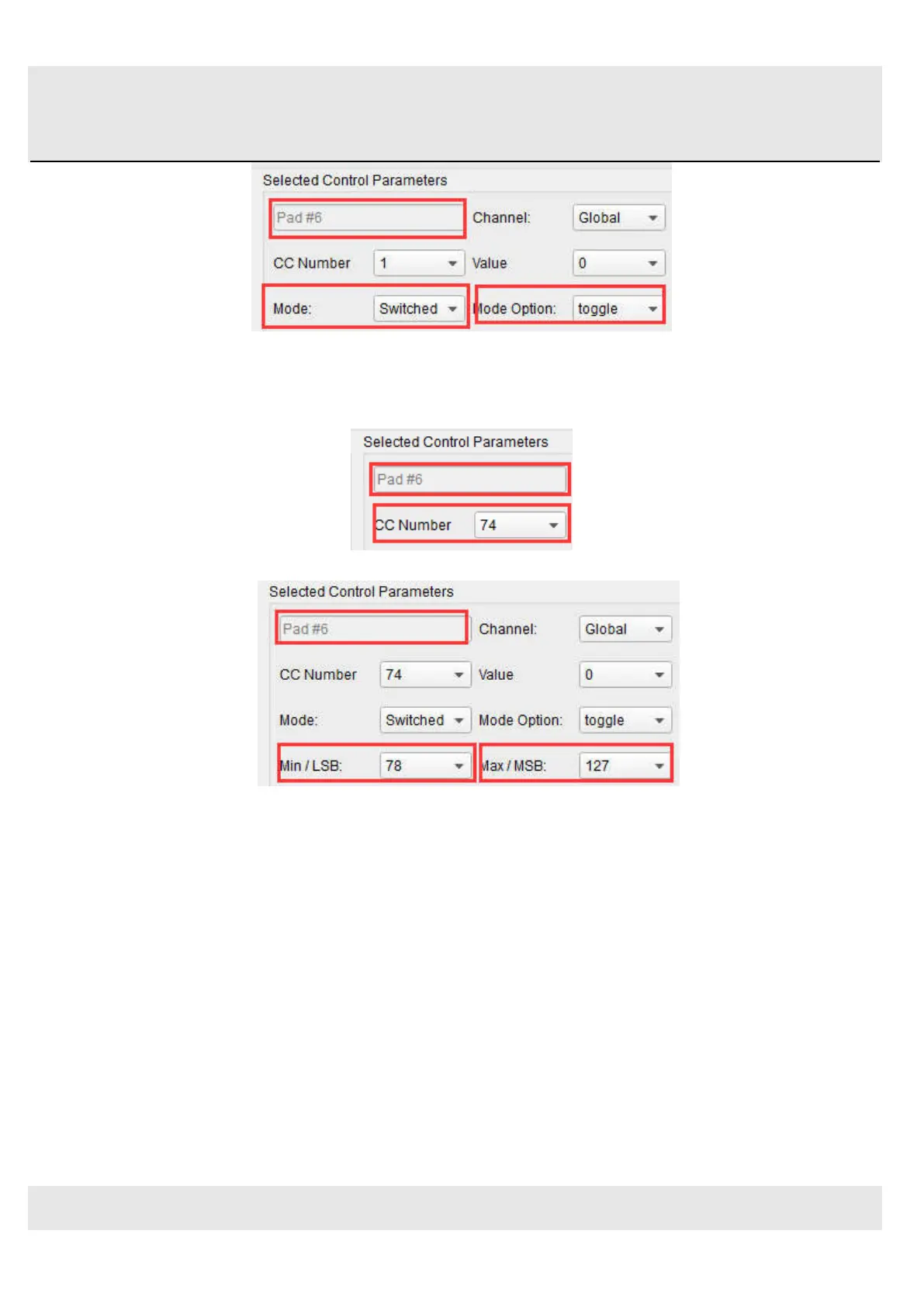
These settings will allow you to send two different values of a particular MIDI CC number each time you press the pad.
There are a couple of MIDI CC numbers that have been assigned the task of controlling filter brightness (CC# 74) or
harmonic content (CC# 71). We’ll use CC# 74 for this example.
Click on the CC number field and select the Brightness controller number as shown:
Next we’ll set some minimum and maximum values that might work (adjust them to suit the audio source):
The first press of Pad 6 will send a CC# 74 command with a value of 78, which will close the filter down part way but still let
a lot of the audio pass through. The second press of Pad 6 will send a value of 127, opening the filter completely.
Note: Be sure to check the MIDI Channel assignment to make sure it matches that of the receiving device.
5.1.5 Assign an Encoder to control a MIDI CC # between two values
The encoders are assignable using the same techniques described for the pads. Let’s give a quick example of an
interesting use: setting the rate of an LFO so it operates only within a certain range.



 To Next Page