HANGZHOU WORLDE DIGITAL PIANO CO.,LTD HANGZHOU WORLDE MUSIC ELECTRONIC CO., LTD
WEBSITE: WWW.WORLDE.COM.CN EMAIL:SALES@WORLDE.COM.CN TEL:86 571 88730848
- 20 -
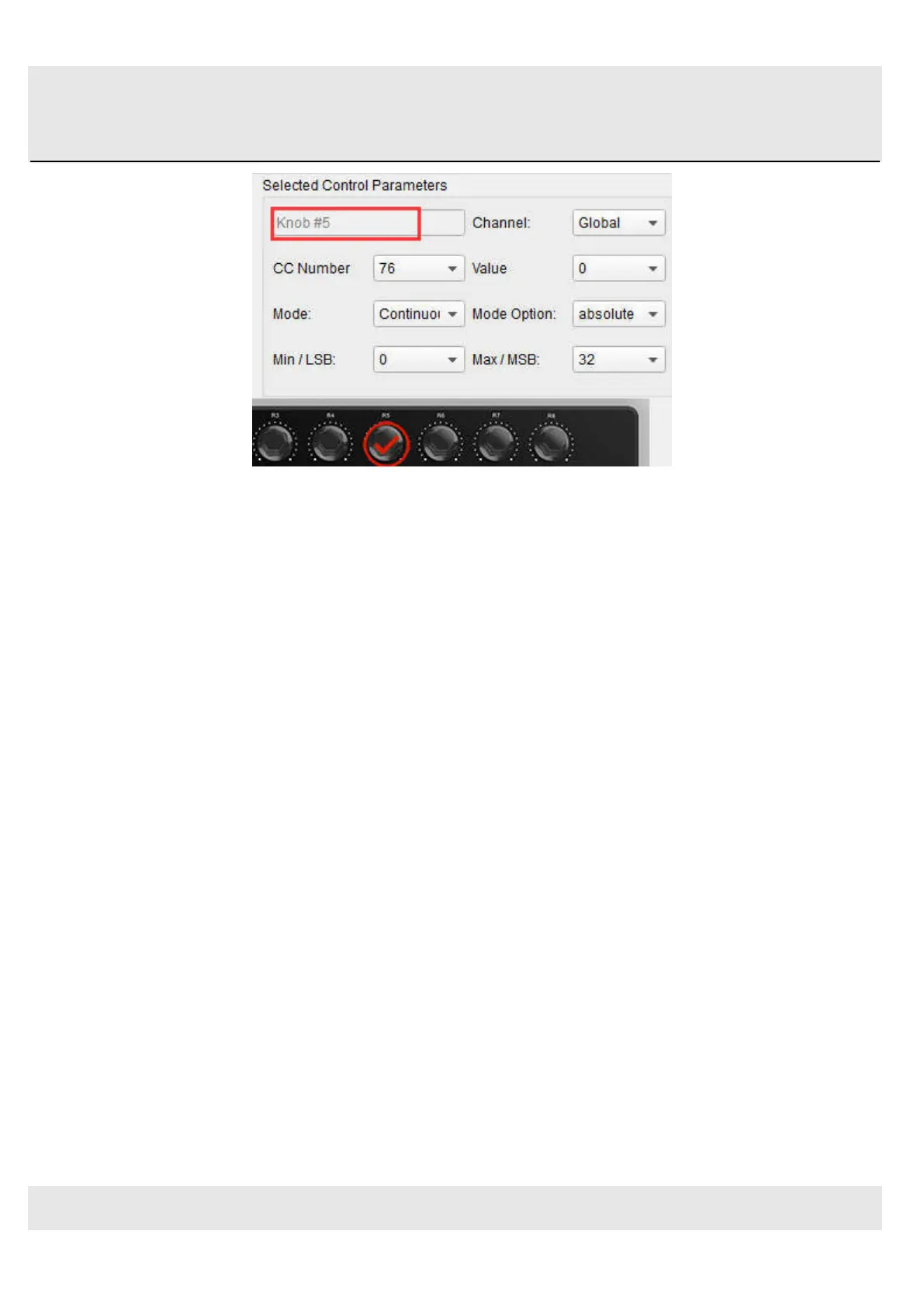
Looking at the picture above we see familiar information:
Encoder 5 has been selected. It is assigned to the Global MIDI channel; you can specify any MIDI channel from 1-16 or
leave it on the Global channel.
Its Mode is set to Continuous, which means it will transmit a MIDI Continuous Controller number when it is turned.
The second Mode field is set to Absolute, which means it will transmit in a linear fashion from fully counter-clockwise to
fully clockwise.
The CC number field shows CC# 76, the MIDI CC # that has been assigned to control Vibrato Rate.
The Min / LSB and Max / MSB fields are set in such a way as to limit Encoder 5 to operation only within a certain range.
To summarize, the settings seen above mean that Encoder 5 will control the Vibrato Rate of the target device, sweeping it
between the values of 10 and 32 only. The vibrato will not become too fast, nor will it become too slow.
Naturally you can choose settings that are appropriate for the MIDI device you are using.
Note: Some devices may not use standard MIDI controller assignments. Refer to the documentation for your device to
determine what settings to use for each purpose.
5.1.6 Save the changes to a Preset
So let’s review what we’ve done in section 5.1 so far: The pads have been set up to play kick and snare, toggle the filter
settings, and start / stop the song; one of the encoders is controlling the vibrato rate, and the Mod strip is controlling
Aftertouch. Not bad! There’s a lot more Orca PAD48 can do, but that’s a good start.
So the next thing to do is make sure this configuration is available when you want it. To do that, you need to save these
settings as a group into one of the eight memory locations in the Orca PAD48.
The upper right-hand section of the MIDI Control Center software has a button called “Send to Keyboard”. Right below that
is a pull-down menu that allows you to specify which of the TUNAMINI’s eight memory locations will be the repository for
the Preset you’ve created.



 To Next Page