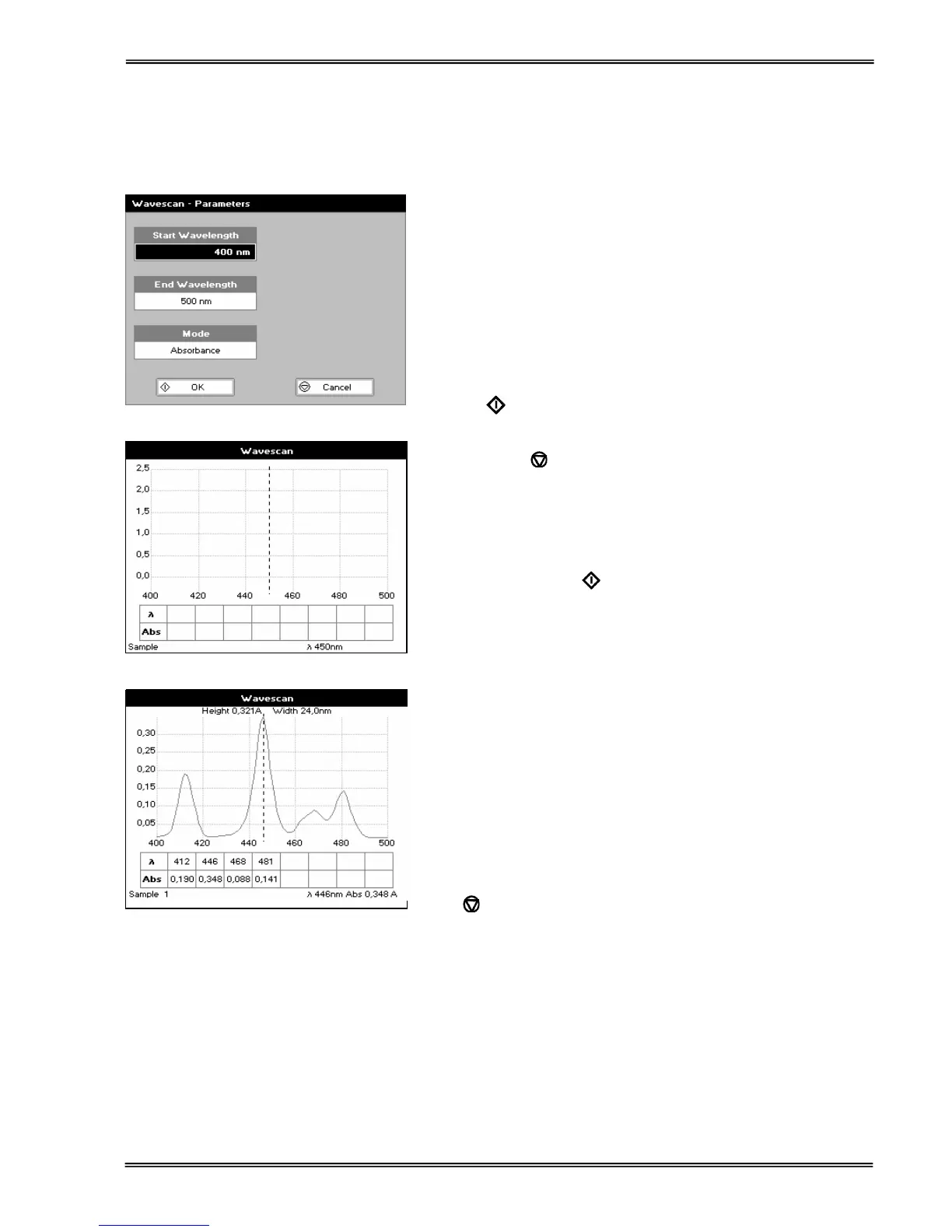
Set start wavelength by using keypad numbers or left and right
arrows.
Press the down arrow key.
Step 2
Set end wavelength by using keypad numbers or left and right
arrows.
Press the down arrow key.
Step 3
Select the mode, Absorbance or %T, using the left and right
arrows.
Step 4
To enter the measurements screen with the selected parameters
press OK
OR
Cancel the selections and return to the Applications Folder by
pressing Cancel
.
Step 5
Insert the reference. Press 0A/100% key. This will be used for all
subsequent samples until changed.
Step 6
Insert sample and press
.
Repeat step 6 for all samples.
Results
A graph of the wavescan is displayed, along with a table of
Absorbance/%T at each peak. Use the left and right arrows to
move the cursor along the graph. When it reaches a peak the
peak height and width of the peak is displayed at the top of the
screen.
To zoom in on the wavelength scale, use the up arrow. This
auto-scales on the Absorbance/%T scale (dependent on the
Graph Scale option) and this is retained for subsequent
measurements.
To zoom out again, use the down arrow.
Press
to return to the Applications Folder.
Press ::; to display available Options which are described
next.


 To Next Page
 Loading...