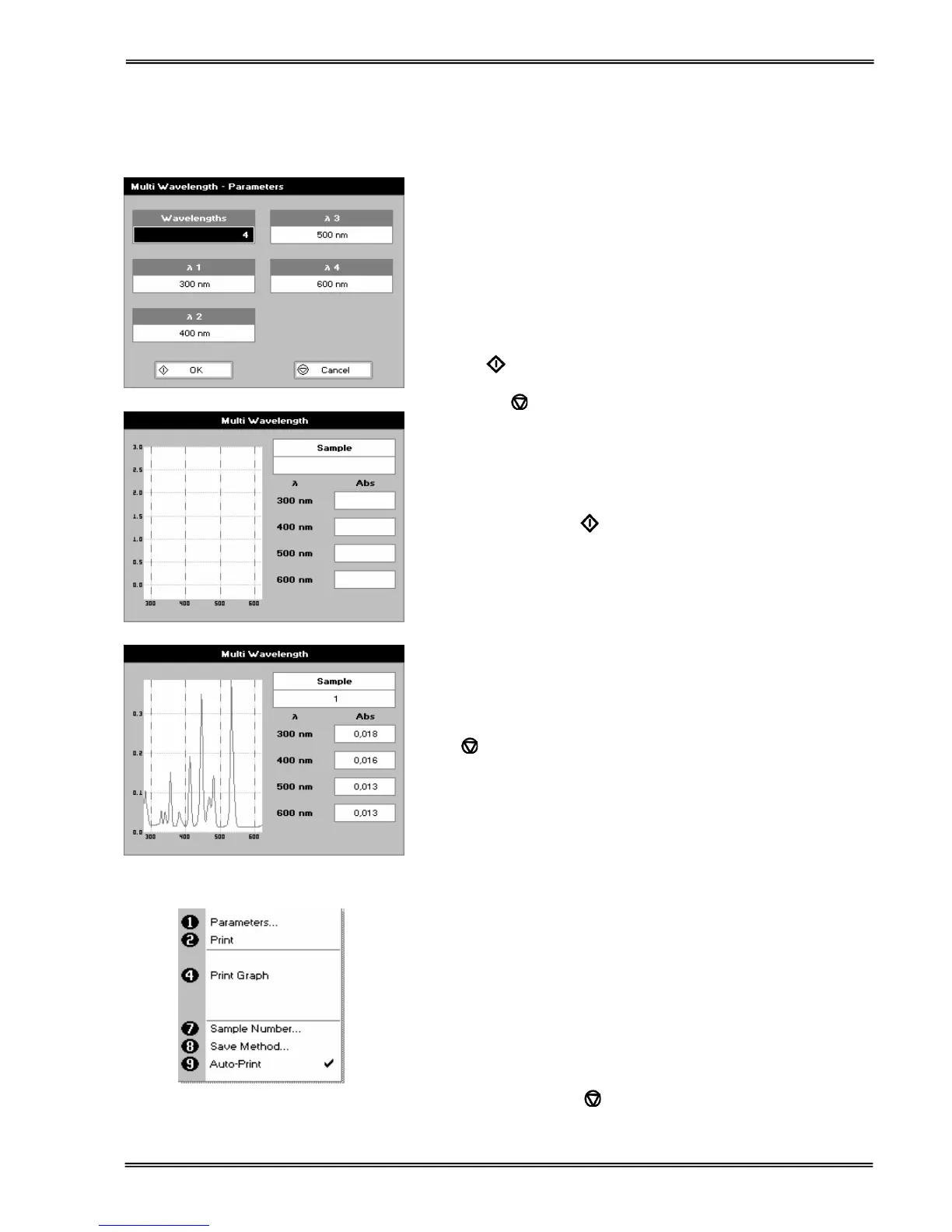
Select the number of wavelengths.
Press the down arrow.
Step 2
Enter the first wavelength using either the number keys or the
left and right arrows.
Press the down arrow.
Enter the second wavelength as above and repeat for the
number of wavelengths selected (up to 5).
Step 3
Press OK
to enter the results screen
OR
Press Cancel
to return to the Applications Folder.
Step 4
Insert the reference. Press 0A/100% key. This will be used for all
subsequent samples until changed.
Step 5
Insert sample and press
.
Repeat step 5 for all samples.
Results
A scan plot covering the range of wavelengths selected (with
cursors at the relevant wavelengths) and a table of values is
displayed.
Press
to return to the Applications Folder.
Press ::; to display available Options which are described
(select using key pad numbers)
1. Return to parameters screen (step 1 above).
2. Print result via selected method.
4. Print graph using selected method. Grayed out if no data are
available.
7. Sample number – add a prefix to the sample number and
reset the incrementing number to the desired value.
8. Save method –
to store in (Favourites/Methods 1-9), press the down arrow
and enter name.
9. Auto-print – toggles auto-print on/off.
Exit options by pressing
, or wait.


 To Next Page
 Loading...