Version 2.3 Page 26
FAVOURITES AND METHODS FOLDERS
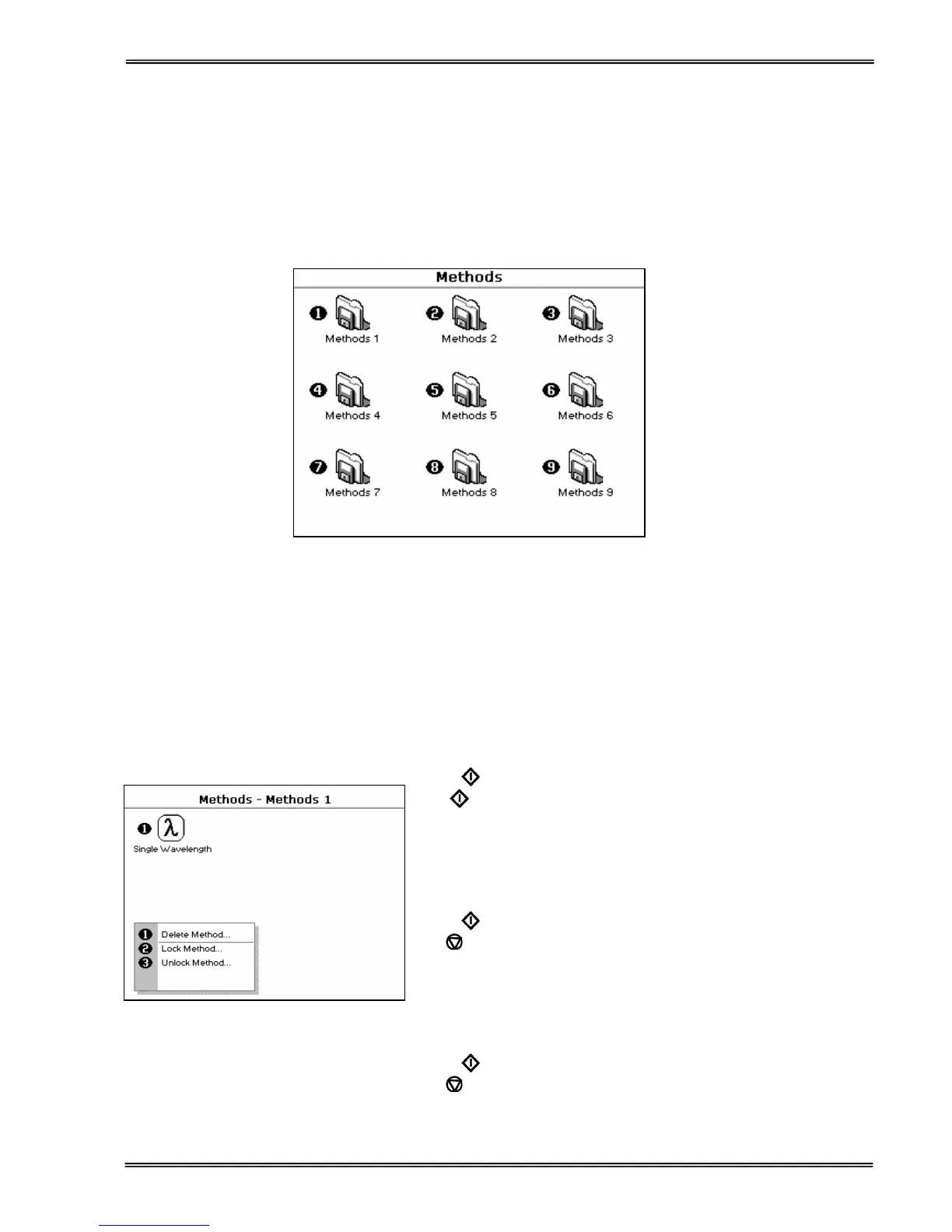
These folders are the storage locations for any user modified Applications (Methods) that are saved in the Options
menu. Both are accessible from the home folders page.
Favourites:
This folder enables the user to quickly select any frequently used Methods. Up to 9 Methods may be stored in the
folder.
Methods:
These are further storage folders enclosed in the top level Methods folder. Up to 9 Methods may be stored in each
folder.
Operation is identical to the Favourites Folder.
Saved methods can be locked, unlocked and deleted using the Options menu. Select the method by pressing the
relevant key pad number and then press the ::; key.
Press 1 to select delete method.
Select the method to be deleted using the left and right arrows.
Press
to delete the method
OR
cancel to return to Favourites/Methods folder.
Lock Method
Press 2 to select lock method.
Select the method to be locked using the left and right arrows.
Press the down arrow.
Select a pass code using the keypad numbers or left and right
arrows.
Press
to lock the method
OR
cancel to return to the Favourites/Methods folder.
Unlock Method
Press 3 to select unlock method.
Select the method to be unlocked using the left and right arrows.
Press the down arrow.
Enter the pass code using the keypad numbers or left and right
arrows.
Press
to unlock the method
OR
cancel to return to the Favourites/Methods folder.


 To Next Page
 Loading...