Version 2.3 Page 19
5: Standard Curve
The construction of a multi-point calibration curve from standards of known concentration to quantify unknown
samples is a fundamental use of a spectrophotometer; this instrument has the advantage of being able to store this
curve as a method, using up to 9 standards.
To include a zero concentration standard, include this in the number of standards to be entered and enter 0.00 for
concentration; use a reagent blank when required to enter the zero standard.
The procedure is as follows:
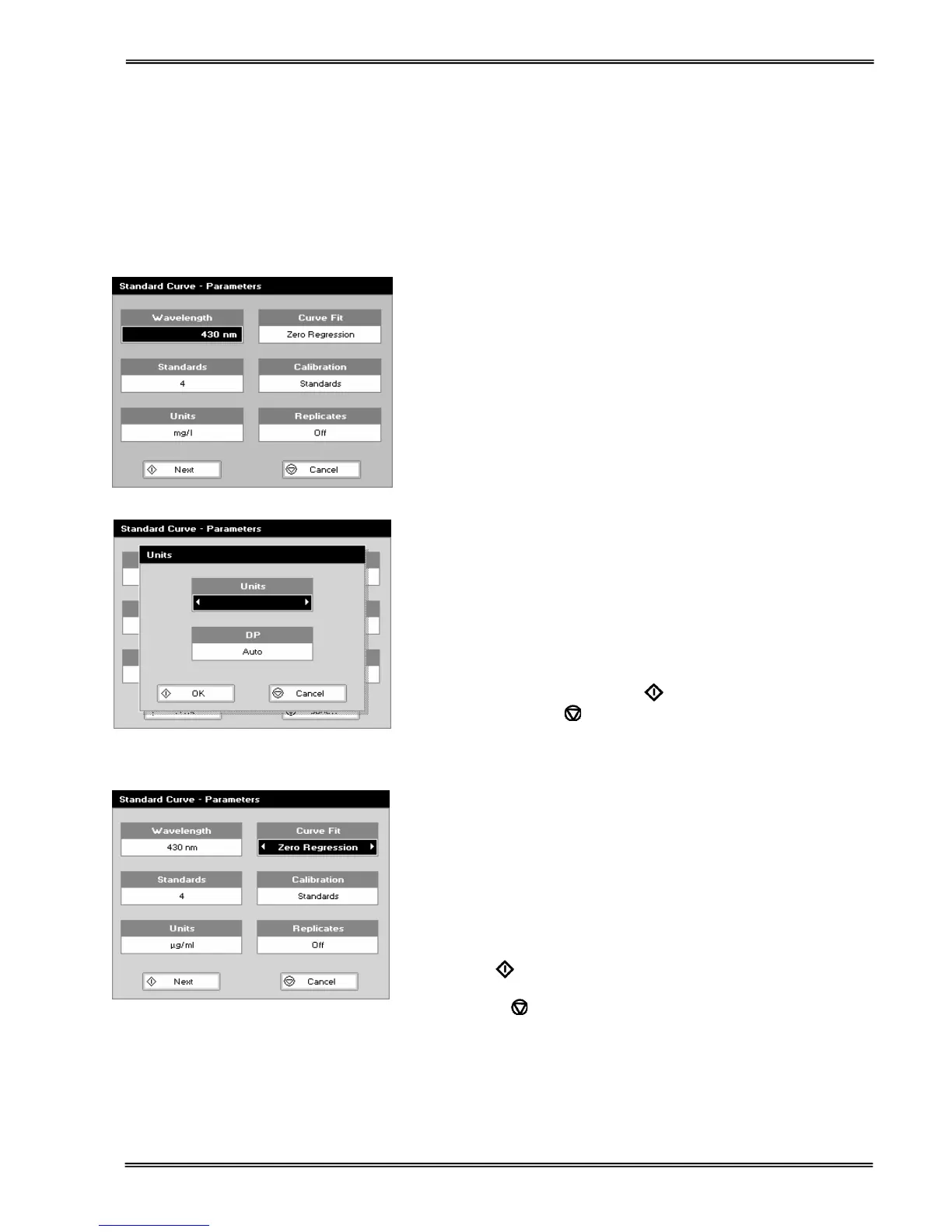
Step 1
Select the wavelength using the keypad numbers or left and right
arrows.
Press the down arrow.
Step 2
Enter the number of standard concentration points to be used in
the curve (1-9).
Press the down arrow.
Step 3
Units: The user can enter a text string up to 8 characters long.
To access a list of pre-defined units press the Options key ::;
and then use the left/right arrows (µg/ml, µg/µl, pmol/µl, mg/dl,
mmol/l, µmol/l, g/l, mg/l, µg/l, U/l, %, ppm, ppb, conc or none).
These units can also be edited once OK is pressed.
This screen also allows the number of displayed decimal points
(DP) to be selected, from 0 to 2 Note that the result will always
be fixed to 5 significant figures regardless of how many decimal
points are selected (so 98768.2 will display as 98768 even with 1
decimal point selected). Press OK
to store the chosen
parameters or Cancel
.
Step 4
Select the type of curve fit using the left and right arrows.
Options: straight line regression, a zero regression (this forces
the straight line through the origin), interpolated or cubic spline.
Step 5
Select the calibration mode: either Standards (measure prepared
standards) or Manual (keypad data entry).
Press the down arrow.
Step 6 (if standards has been selected in step 5)
Select the number of standards to be measured and averaged at
each standard concentration point. Can be OFF (1), 2 or 3.
Step 7
Press Next
to enter the Standards screen
OR
Press Cancel
to cancel selections and return to the
Applications Folder.


 To Next Page
 Loading...