Operation pH 330i/340i
48
Setting the resolution
10 Set the date of the current day with <▲> <▼>.
11 Confirm with <RUN/ENTER>.
The date (month) flashes in the display.
12 Set the current month with <▲> <▼>.
13 Confirm with <RUN/ENTER>.
The year appears on the display.
14 Set the current year with <▲> <▼>.
15 Confirm with <RUN/ENTER>.
The hours flash on the display.
16 Set the current time with <▲> <▼>.
17 Confirm with <RUN/ENTER>.
The minutes flash on the display.
18 Set the current time with <▲> <▼>.
19 Confirm with <RUN/ENTER>.
The measuring instrument automatically switches to the pH
measuring mode.
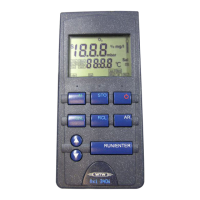
1 Press the <RUN/ENTER> key and hold it down.
2 Press the <M> key.
The measured values are displayed with a high resolution, e.g.
pH = 4.012.
3 Press the <RUN/ENTER> and <M> keys once more.
The measured values are displayed with a low resolution, e.g.
pH = 4.01.



 To Next Page