http://xim.tech
XIM NEXUS
Minimum Start
Jump into gaming with your XIM NEXUS
XIM NEXUS has a wide range of features ready for you to explore.
To get gaming as quickly as possible, follow these steps. For more detail, check out our Getting Started Guide.
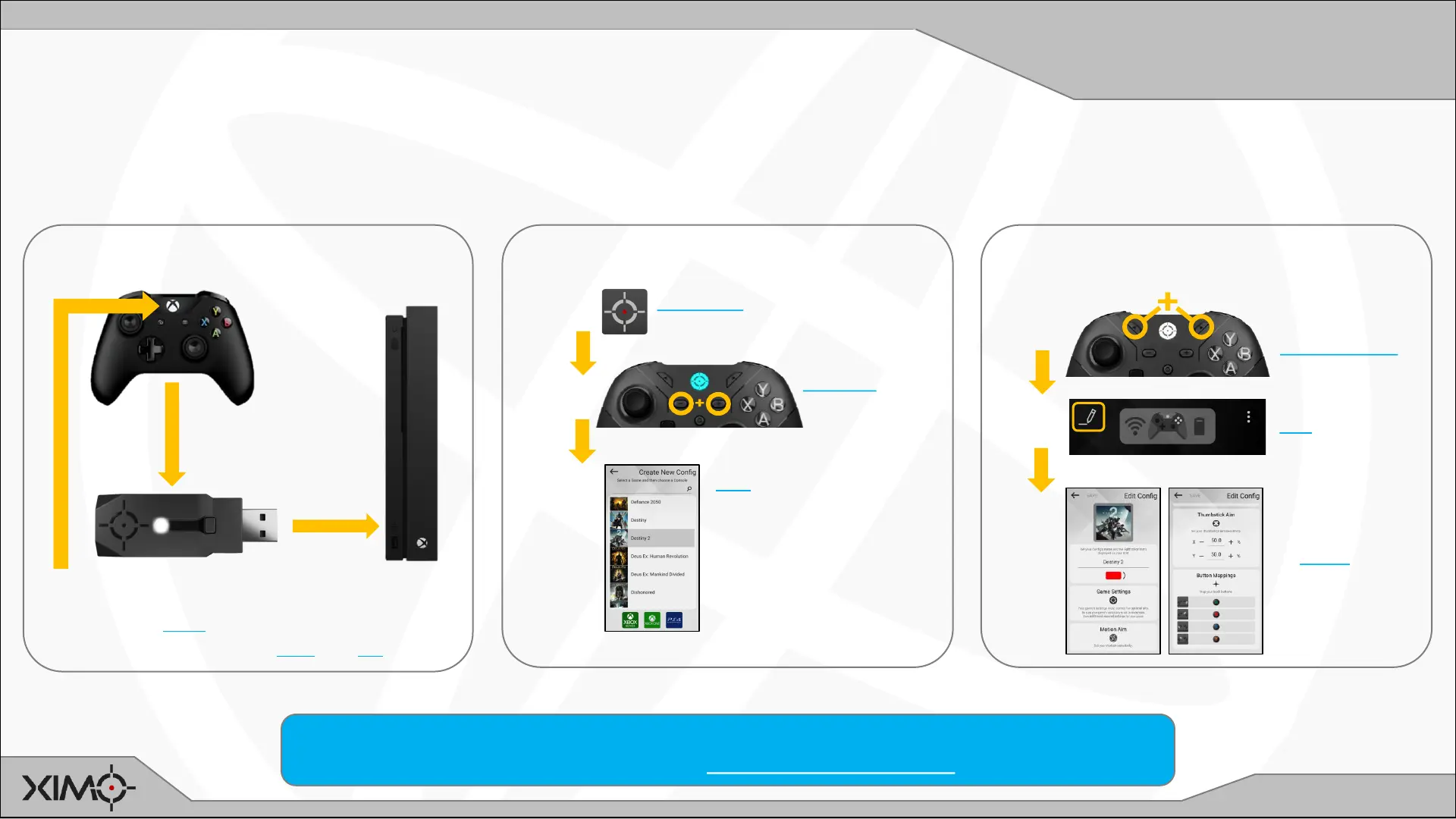
CONNECT ADAPTER TO CONSOLE
2
1
Console controller
(included cable)
Xbox steps shown.
Additional steps for PS4 and PC.
ADD CONFIG TO CONTROLLER
1
Download XIM
NEXUS Manager App
2
Connect to
Manager
3
DIAL IN SETTINGS
Add Game Config
and follow app
instructions for in-
game settings
1
Disable
Classic Mode
2
Edit Config
3
Follow app
instructions
to dial in
preferred
settings
For more in-depth information about everything related to XIM NEXUS, please refer to this User
Guide and also visit our Community Support Forum.
3
Press Guide
Plug in


 To Next Page