XP3 PLC/HMI Hardware Manual Page 22 of 42 LMAN007_R2V2
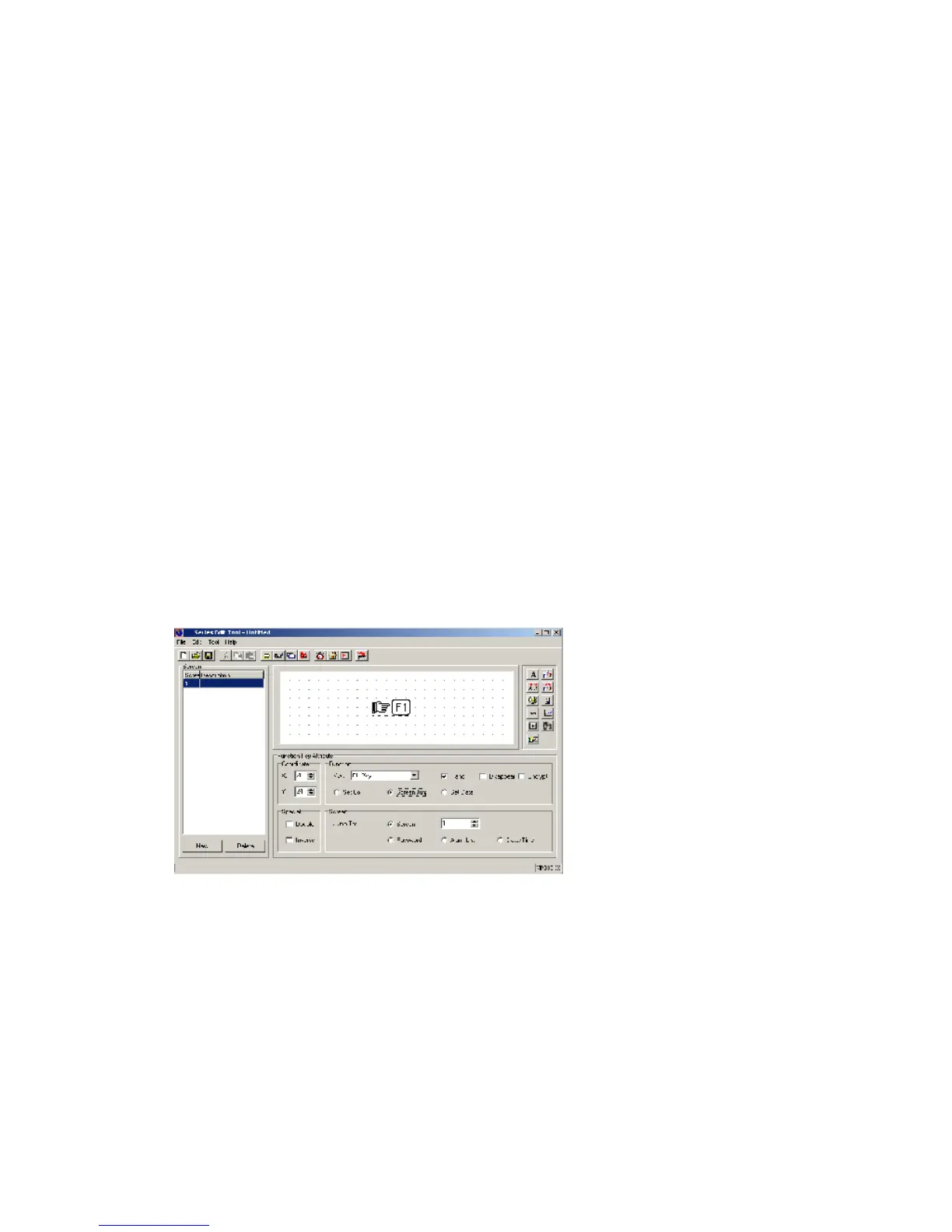
Hand: Display the hand diagram or not, the defaulted format is display.
Disappear: Display this key or not. When choosing this key, the key’s function is the same,
just not displayed in the screen.
Encrypt: Need to input password or not. If choosing this item, you should input the
password before you execute the set functions.
Function item: set coil, screen jump, set data, the defaulted is “Set coil” function
Coil:
PLC station ID: The address of the device, which is connected with the panel.
Coil number: PLC’s internal coil number corresponds with this function key.
Function items:
1. Set ON: the coil is on ON status.
2. Set OFF: the coil is on OFF status.
3. Inverse: the coil alternate state.
4. Momentary ON: make the coil momentarily activate a program cycle.
Screen jump function:
Function:
If choose “Screen Jump” function, you could see in the property area changed.
1. Screen Jump: Jump to the object screen’s screen number.
2. Password: Jump to the password “open/close” screen.
3. Alarm list: Jump to the alarm list screen.
4. Data/Time: Jump to the time screen.


 To Next Page
 Loading...