Magnetic Calibration Manual
Xsens MTi User Manual Repository
Magnetic Calibration Manual
Copyright © 2021 Xsens Page 31
As a use case example, consider a scenario in which the MTi sensor is rigidly mounted on a
car. The user can perform an MFM in a homogeneous environment by performing a circle
with the car. Probably it would result in an almost 2D path (e.g. roll and pitch values <
10°). After that, the user can exploit the ICC feature to improve the calibration during the
application. In this case, when the MTi reaches orientations that were not yet reached during
the MFM (e.g. roll and pitch values > 10°), ICC will use this data to improve the
magnetometer calibration.
How to enable ICC
ICC is disabled by default. The user can enable ICC in various ways:
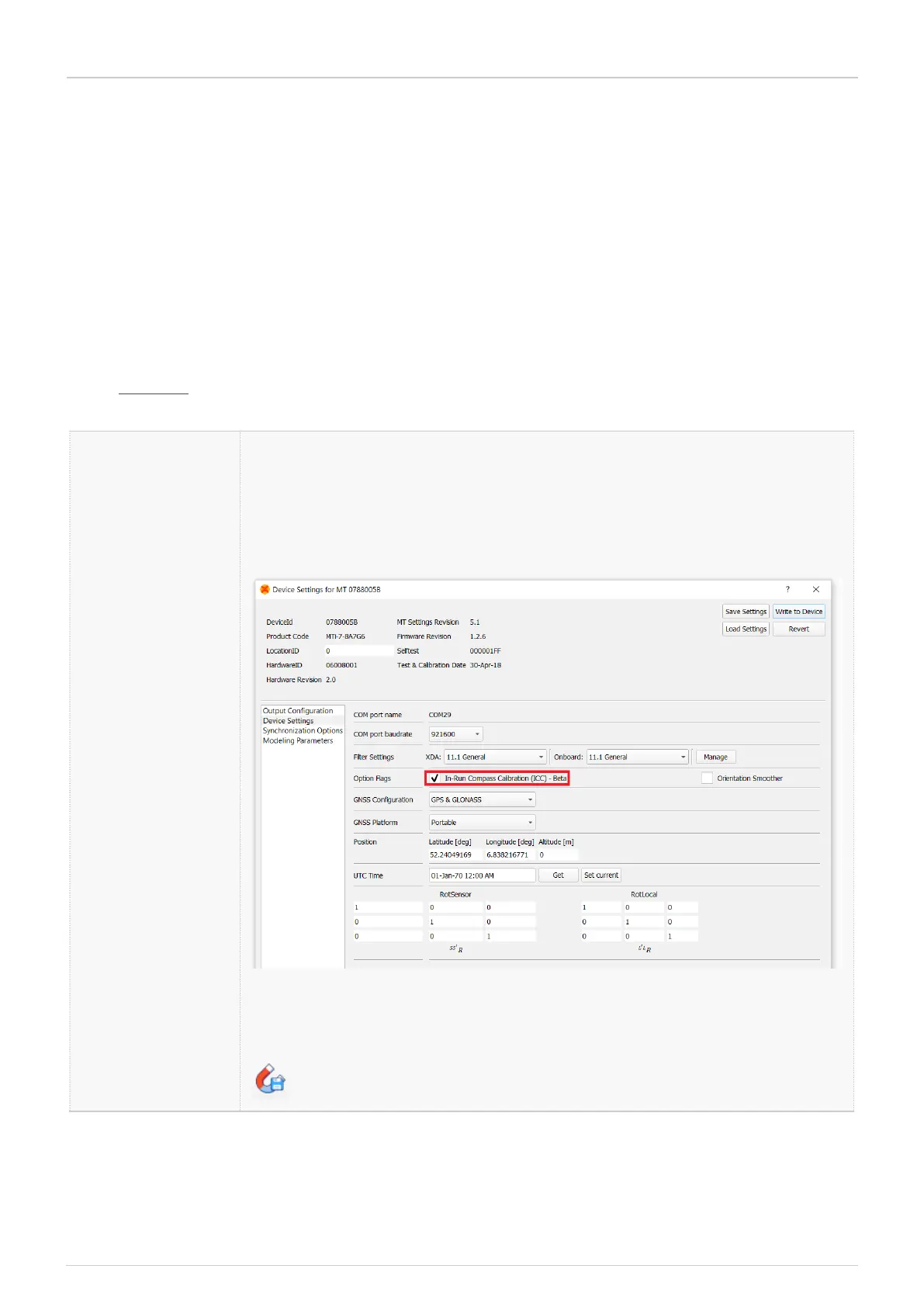
MT Manager
•
Go to Device Settings -> Device Settings.
•
Tick "In-Run Compass Calibration (ICC)".
•
Click "Write To MT".
ICC is now continuously active in the background. After some time
(several minutes minimum), the newly generated ICC results can be
stored to MT memory by clicking the corresponding icon:


 To Next Page