Page 48 FT-2000D OPERATING MANUAL
ROTATOR CONTROL FUNCTIONS
When using a YAESU model G-800DXA, G-1000DXA, or G-2800DXA rotator (not supplied), it is possible to control it
from the front panel of the FT-2000D.
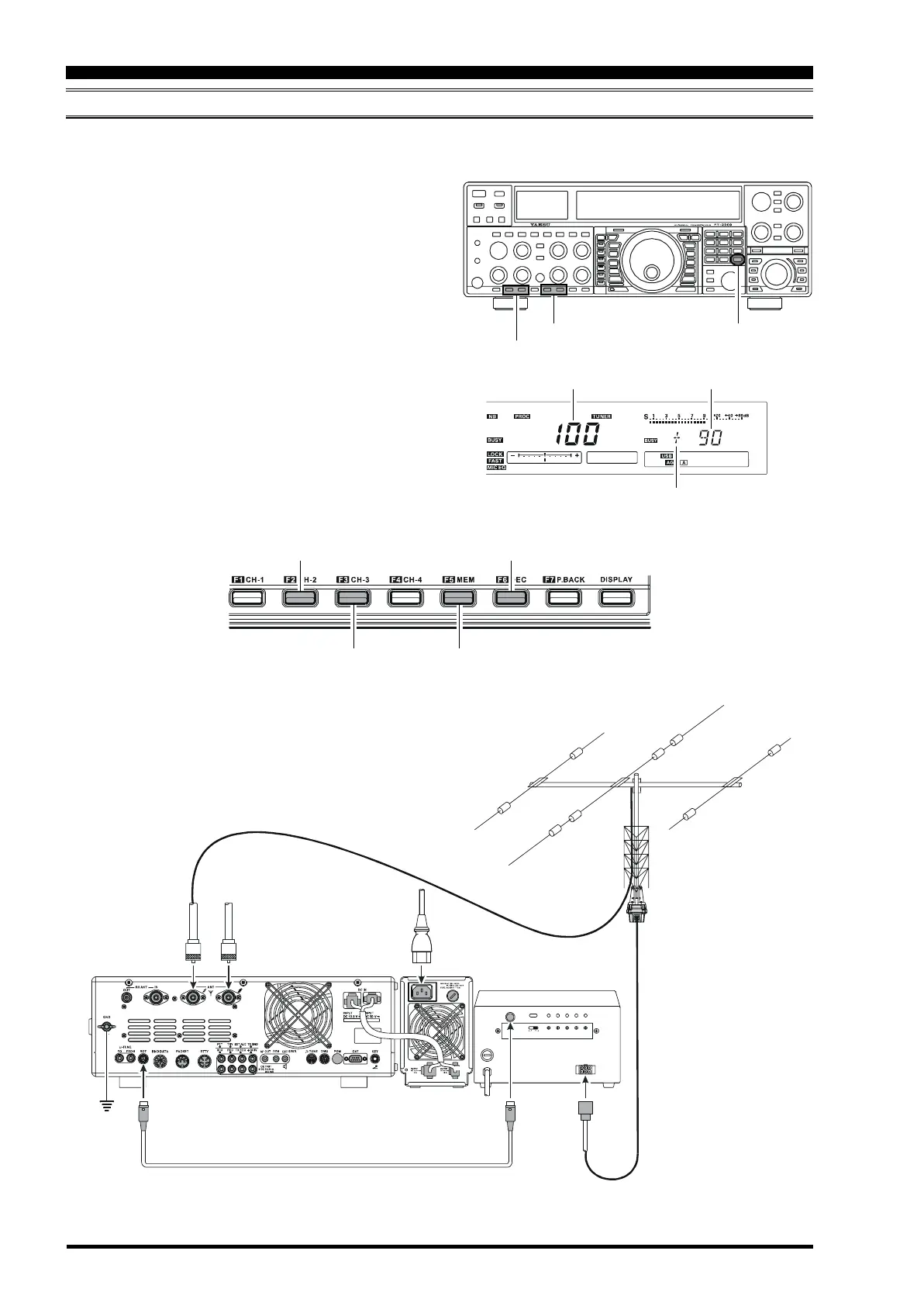
1 Press and hold in the
[
ENT
]
button (one of the
[
BAND
]
button) for two seconds. The frequency display area
will change over to the “Rotator Control” configura-
tion.
2 Press either the
[
F2
(
CH-2
)]
button or the
[
F3
(
CH-3
)]
button to rotate the antenna. Pressing the
[
F2
(
CH-2
)]
button will cause rotation to the left (counter-clock-
wise), while pressing the
[
F3
(
CH-3
)]
button will cause
rotation to the right (clockwise).
3 Press the
[
F5
(
MEM
)]
button or the
[
F6
(
DEC
)]
button
to control the speed of rotation. Pressing the
[
F5
(
MEM
)]
button will cause slower rotation, while
pressing the
[
F6
(
DEC
)]
button will speed up rotation.
Usually, you will be using the “100%” setting.
When you are through exercising rotator control, press the
[
ENT
]
button momentarily. The frequency display will
return to the main display field.
[
F2
(
CH-2
)]
,
[
F3
(
CH-3
)]
Button
[
F5
(
MEM
)]
,
[
F6
(
DEC
)]
Button
[
ENT
]
Button
CONVENIENCE FEATURES
Counter-clockwise Rotation
Clockwise Rotation Speed Down
Speed Up
Speed
(
0 % ~ 100 %
)
Direction
(
0° ~ 360°
)
“Overlap” Indicator
~
A
C
I
N
A
N
T
1
A
N
T
2
E
X
T
C
O
N
T
R
O
L
R
E
M
O
T
E
C
O
N
T
R
O
L
R
O
T
EXT
CONTROL
SELECT
SWITCH
PRESET
ADJ
OPERATION
MODE
ADJ. MOD E FULL
SCALE
ADJ
OVERLAP
LED ADJ
OUT VOL
ADJ
AB
OPTIONAL CONNECTION CABLE
()
T9101556









 To Next Page