Page 84 FT-2000D OPERATING MANUAL
A number of interesting and useful features are available during Electronic Keyer operation.
Setting the Keyer Weight (Dot/Space:Dash) Ratio
The Menu may be used to adjust the Weight for the built-in Electronic Keyer. The default weighting is 3:1 (a dash is
three times longer than a dot or space).
USING THE BUILT-IN ELECTRONIC KEYER
CW MODE OPERATION
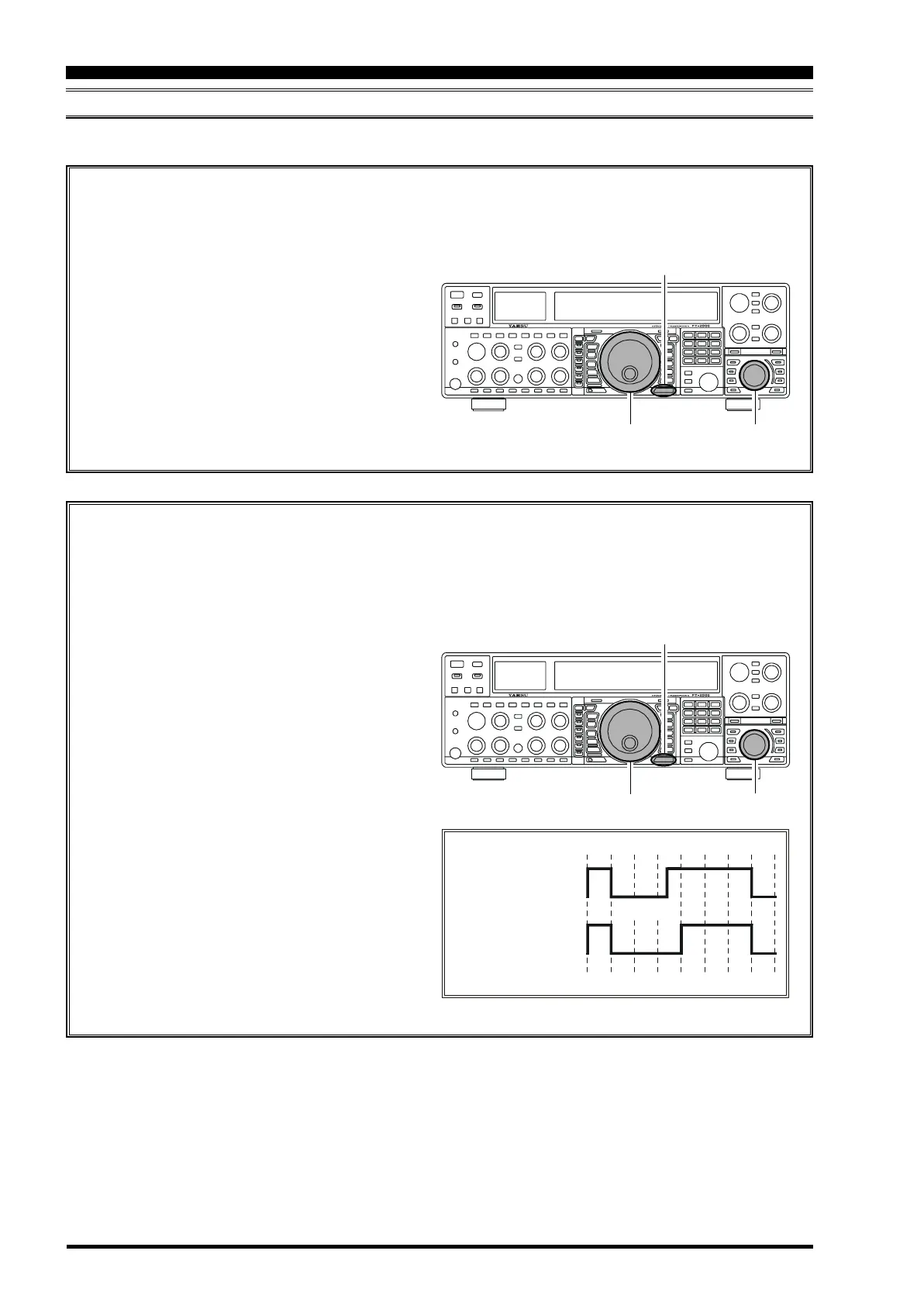
1. Press the
[
MENU
]
button to enter the Menu mode.
2. Rotate the Main Tuning Dial knob to select Menu
item “060 AIA WEIGHT.”
3. Rotate the
[
SUB VFO-B
]
knob to set the weight
to the desired value. The available adjustment range
is for a Dot/Space:Dash ratio of “2.5” ~ “4.5” (de-
fault value: “3.0”).
4. When you are finished, press and hold in the
[
MENU
]
button for two seconds to save the new
setting and exit to normal operation.
Main Tuning Dial Knob
[
SUB VFO-B
]
Knob
[
MENU
]
Button
Selecting the Keyer Operating Mode
The configuration of the Electronic Keyer may be customized independently for the front and rear KEY jacks of the
FT-2000. This permits utilization of Automatic Character Spacing (ACS), if desired, as well as the use of the
electronic keyer via the front jack and a straight key or computer-driven keying line via the rear panel.
1. Press the
[
MENU
]
button to enter the Menu mode.
2. Rotate the Main Tuning Dial knob to select Menu
item “052 A1A F-TYPE” (for the front KEY jack)
or “054 A1A R-TYPE” (for the rear-panel’s KEY
jack).
3. Rotate the
[
SUB VFO-B
]
knob to set the keyer to
the desired mode. The available selections are:
OFF: The built-in Electronic Keyer is turned off
(“straight key” mode).
buG: Dots will be generated automatically by the
keyer, but dashes must be sent manually.
ELE: Both dots and dashes will be generated au-
tomatically when you use your paddle.
ACS: Same as “ELE” except that the spacing be-
tween characters is precisely set by the keyer
to be the same length as a dash (three dots in
length)
4. When you are finished, press and hold in the
[
MENU
]
button for two seconds to save the new
setting and exit to normal operation.
Main Tuning Dial Knob
[
SUB VFO-B
]
Knob
[
MENU
]
Button
Inter-character
spacing to short
Morse
“E” & “T”
Morse
“E” & “T”
ACS “ON”
ACS “OFF”









 To Next Page