50 CVP-509/505/503/501 Reference Manual
Songs – Recording Your Performances and Creating Songs –
4
Before starting, make sure the [AUTO FILL IN] button is set to off.
1 Enter the chords for the Main A section.
1-1 Press the STYLE CONTROL [MAIN A] button.
1-2 Press the [5 ▲▼] button to select the half-note length.
1-3 Play the chord C, F and G in the chord section of the keyboard.
2 Enter the chords for the Break section.
2-1 Press the STYLE CONTROL [BREAK] button.
2-2 Press the [6 ▲▼] button to select the quarter-note length.
2-3 Play the chords F, and G7 in the chord section of the keyboard.
NOTE To enter fill-ins, turn the [AUTO FILL IN] button to ON, and simply press the desired MAIN VARIATION [A]–[D] button.
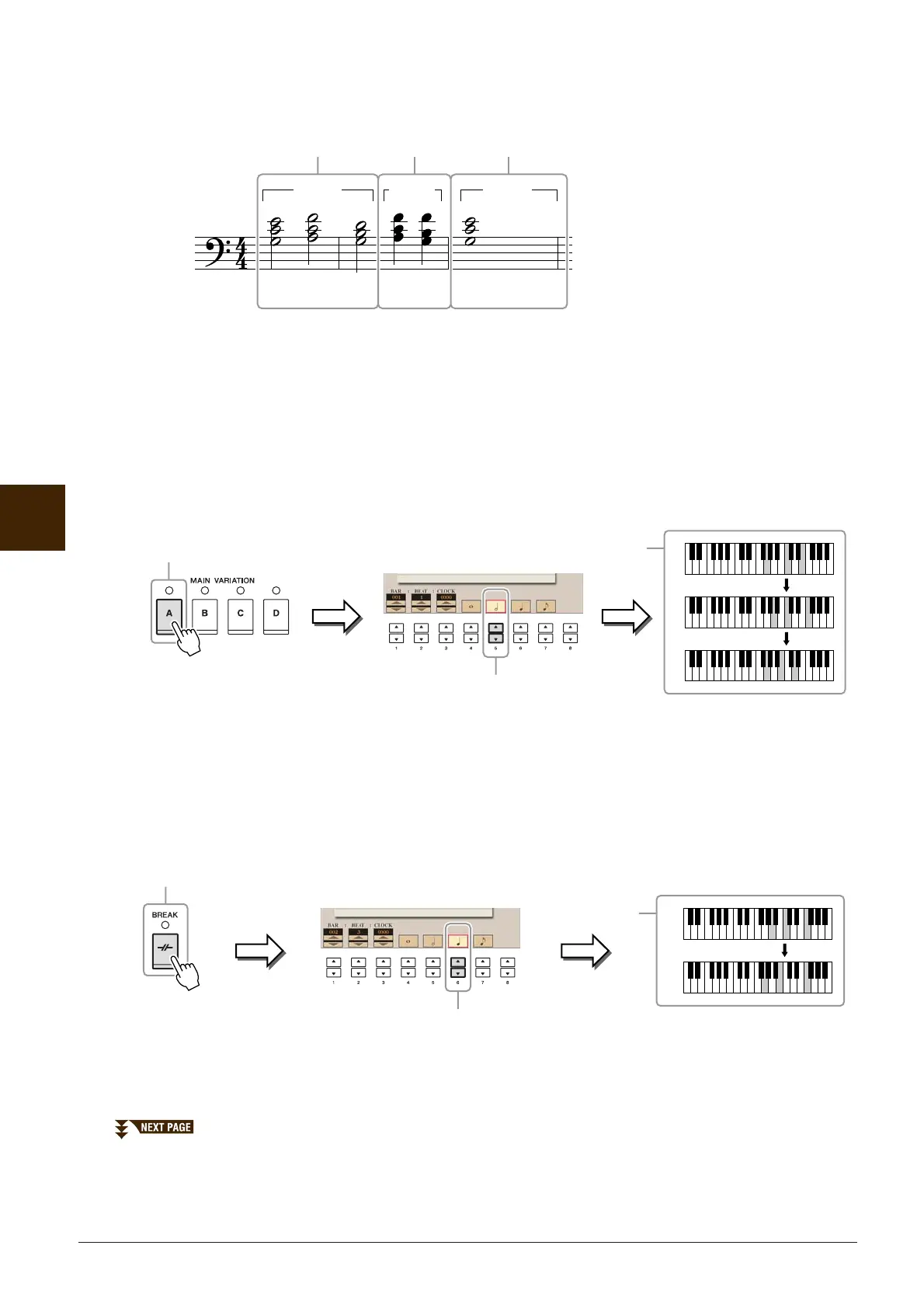
CF GFG7 C
1 2 3
* The numbers shown in the illustration corre-
spond to the following operation step numbers.
Example of Step Recording—Chords
MAIN A BREAK MAIN B
NOTE This example uses a Style in 4/4 time.
1-2
1-3
1-1
C
F
G
2-2
2-3
2-1
F
G7






 To Next Page