14
CD-S700
CD-S700
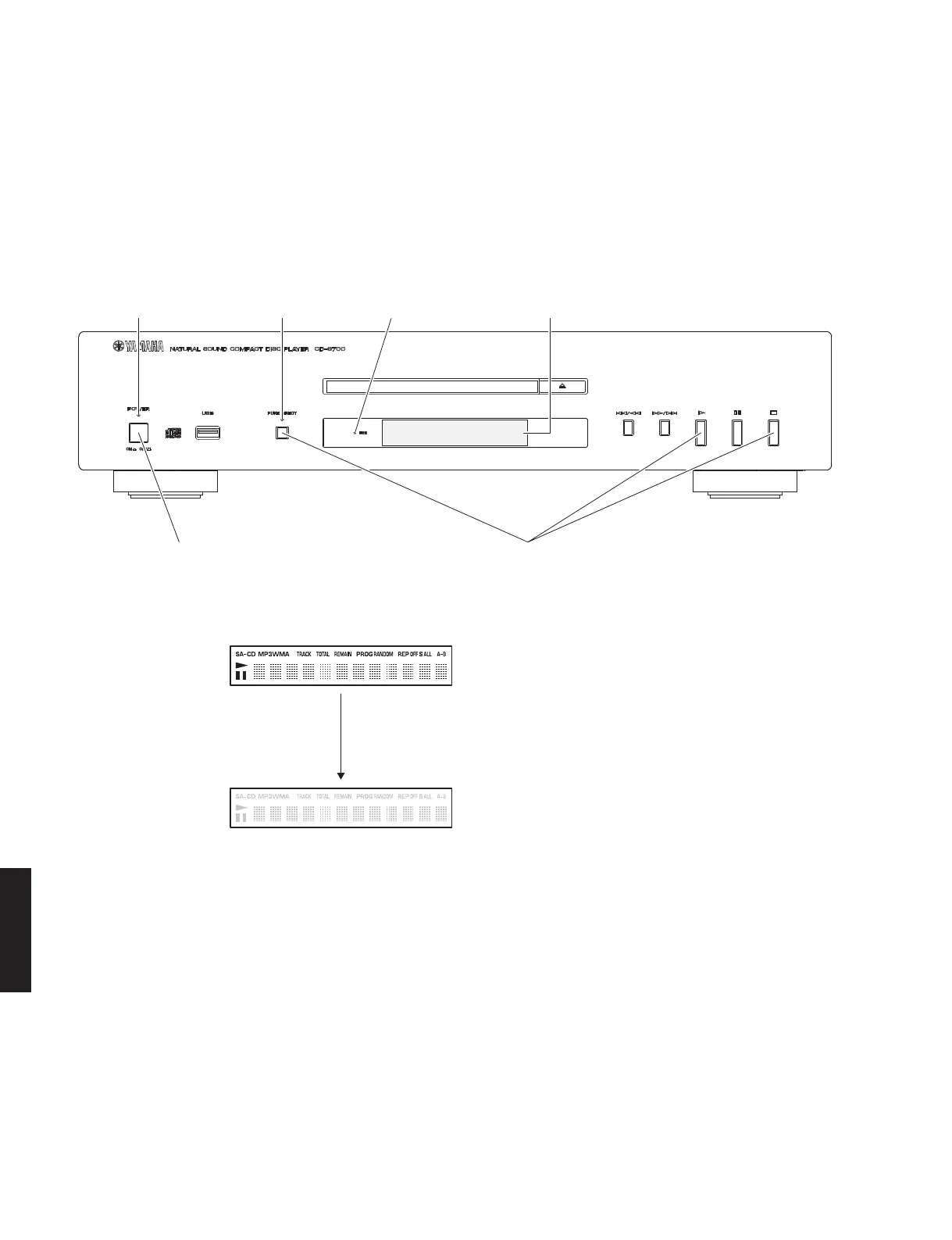
"POWER ON/OFF" switch
"POWER" indicator
Press the "POWER ON/OFF" switch inward to the ON position while pressing these keys.
これらのキーを同時に押しながら、“POWERON/OFF” スイッチを押してオンにします。
"USB" indicator"PURE DIRECT" indicator FL display
Release the key
キーを離す
■ TEST MODE /
テストモード
All segments ON
全セグメント点灯
All segments OFF
全セグメント消灯
FL display /
FL ディスプレイ表示
FL ディスプレイとインジケーターの表示状態をチェック
します。
● FL ディスプレイとインジケーターの確認
1. 本機の下図に示す 3 つのキーを同時に押しながら
“MASTERON/OFF” スイッチを押してオンにし、3 つ
のキーを押し続けます。
Check the FL display and indicators for display/indication
condition.
●
Check the FL display and Indicators
1. Press the “POWER ON/OFF” switch inward to the
ON position while simultaneously pressing those
3 keys of this unit as indicated in the figure below,
and keep pressing those 3 keys.
2. 3 つのキーを押したまま、全てのインジケーター
(POWER、PUREDIRECT、USB)が点灯しているこ
とを確認します。
同時に、FL ディスプレイの全セグメントが点灯し
ていることを確認します。
3. 3 つのキーを離します。
全てのインジケーター(POWER、PUREDIRECT、
USB)と、FL ディスプレイの全セグメントが消灯
していることを確認します。
4. テストモードが起動します。
2. With these 3 keys pressed continuously, check
that all indicators (POWER, PURE DIRECT, USB)
are lit. At the same time, check that all segments
of the FL display are lit.
3. Release these 3 keys. Then check that all indica-
tors (POWER, PURE DIRECT, USB) as well as all
segments of the FL display are turned off.
4. The Test Mode is activated.



 To Next Page