EasyManua.ls Logo

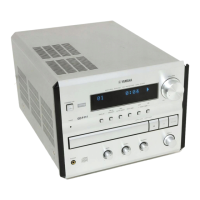
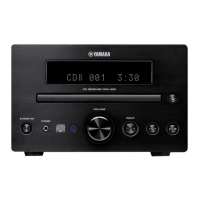
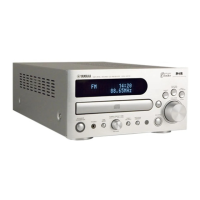
Yamaha CRX-E150 - User Manual

Yamaha CRX-E150
28 pages
Print Icon
To Next Page IconTo Next Page
Loading...
YAMAHA ELECTRONICS CORPORATION, USA 6660 ORANGETHORPE AVE., BUENA PARK, CALIF. 90620, U.S.A.
YAMAHA CANADA MUSIC LTD. 135 MILNER AVE., SCARBOROUGH, ONTARIO M1S 3R1, CANADA
YAMAHA ELECTRONIK EUROPA G.m.b.H. SIEMENSSTR. 22-34, 25462 RELLINGEN BEI HAMBURG, F.R. OF GERMANY
YAMAHA ELECTRONIQUE FRANCE S.A. RUE AMBROISE CROIZAT BP70 CROISSY-BEAUBOURG 77312 MARNE-LA-VALLEE CEDEX02, FRANCE
YAMAHA ELECTRONICS (UK) LTD. YAMAHA HOUSE, 200 RICKMANSWORTH ROAD WATFORD, HERTS WD1 7JS, ENGLAND
YAMAHA SCANDINAVIA A.B. J A WETTERGRENS GATA 1, BOX 30053, 400 43 VÄSTRA FRÖLUNDA, SWEDEN
YAMAHA MUSIC AUSTRALIA PTY, LTD. 17-33 MARKET ST., SOUTH MELBOURNE, 3205 VIC., AUSTRALIA
Printed in Malaysia V707660
BASS
+
+
L
R
MIN
MIN MAX
HOUR
TREBLE BALANCE
INPUT
VOLUME
PRESET/BAND PRESET/TURING
CRX-E150
OWNER’S MANUAL
MODE D’EMPLOI
CD Receiver
UCA
Ampli-Tuner CD

Other manuals for Yamaha CRX-E150

Questions and Answers

  • L
    lesliemartinSep 2, 2025
    Why are stereo broadcasts noisy on my Yamaha CRX-E150 Car Receiver?
    • J
      Jessica MartinezSep 2, 2025
      If stereo broadcasts are noisy and the STEREO indicator blinks on and off on your Yamaha Car Receiver, it indicates insufficient antenna input. Install an antenna appropriate for the electric field strength of your area.
  • V
    Veronica ChavezSep 1, 2025
    Why does noise increase during stereo broadcasts on my Yamaha Car Receiver?
    • J
      Jeffrey TorresSep 1, 2025
      If you're experiencing noise increases during stereo broadcasts on your Yamaha Car Receiver, the antenna input might be too weak due to obstructions or excessive distance from the broadcasting station. Check the antenna connection. If possible, install a multi-element type FM antenna.
  • N
    Nancy ShermanAug 31, 2025
    Why does the sound skip on my Yamaha CRX-E150 Car Receiver?
    • J
      James JohnsonAug 31, 2025
      If the sound “skips” on your Yamaha Car Receiver, it could be due to vibrations or impacts affecting the unit. Try relocating it. Alternatively, the disc may be dirty, so try cleaning it.
  • L
    lthomasAug 30, 2025
    How to reduce static in FM broadcasts on my Yamaha CRX-E150 Car Receiver?
    • D
      David MccannAug 30, 2025
      If you're experiencing excessive static in FM broadcasts on your Yamaha Car Receiver, it could be interference from the starting motor of a nearby car. Try positioning the FM antenna as high and as far away from nearby roads as possible, and connect it using a coaxial cable.
  • B
    bowmanreginaldAug 29, 2025
    Why is there buzzing or static during AM broadcasts on my Yamaha CRX-E150?
    • M
      mwardAug 29, 2025
      If you're experiencing buzzing or static during AM broadcasts on your Yamaha Car Receiver, it's likely due to interference from sources such as lightning, fluorescent lights, electric motors, or thermostats. While difficult to eliminate, grounding the AM loop antenna can lessen the problem. Also, move away from any nearby TVs or microprocessors.
  • M
    Matthew MartinAug 28, 2025
    How to fix Yamaha CRX-E150 Car Receiver that does not switch on?
    • L
      Lauren CrawfordAug 28, 2025
      If your Yamaha Car Receiver does not switch on when you press the STANDBY/ON switch, the AC power cord might not be properly connected. Make sure to securely connect the power cord.
  • J
    Joshua NicholsAug 27, 2025
    What to do if there is no sound from an external unit connected to my Yamaha CRX-E150 Car Receiver?
    • A
      Ashley PerezAug 27, 2025
      If you're not getting any sound from an external unit connected to your Yamaha Car Receiver, or if play doesn't begin, the cords may not be connected properly. Ensure the cords are correctly connected. If the problem continues, the cords might be defective. Also, verify that the input source selection is correct.
  • A
    Anthony JacksonAug 27, 2025
    Why is the sound distorted on my Yamaha CRX-E150 Car Receiver?
    • D
      Debbie LuceroAug 27, 2025
      If you're experiencing sound distortion with your Yamaha Car Receiver, the component connected to the unit may be disconnected from the AC outlet. Ensure the AC power cord of the component is connected to an AC outlet.
  • S
    Susan DennisAug 25, 2025
    Why the remote control of my Yamaha CRX-E150 does not work?
    • S
      Samantha ThompsonAug 26, 2025
      If the remote control for your Yamaha Car Receiver isn't working, the batteries might be too weak. Try replacing them with new ones. Also, ensure you are within 6 meters and a 60-degree radius of the unit. Direct sunlight or certain types of lighting may also interfere; try changing the unit's position.
  • C
    Christopher LoveAug 25, 2025
    What to do if my Yamaha CRX-E150 does not work normally?
    • F
      Felicia RuizAug 25, 2025
      If your Yamaha Car Receiver is not working normally, it could be due to the internal microcomputer freezing from an external electric shock or a low voltage power supply. To resolve this, unplug the AC power cord from the wall outlet, wait about one minute, and then plug it back in.

Summary

Safety Precautions and Warnings

General Safety Guidelines

Essential safety instructions for unit operation, placement, and handling.

Detailed Operational Safety

Operating Environment and Placement

Precautions for installation, environment, and avoiding hazards.

Remote Control Functions

Remote Control Button Layout

Details the location and function of each button on the remote control.

Getting Started: System Connections

Connecting Speakers and Antennas

Step-by-step guide for connecting speakers, AM/FM antennas, and optional subwoofer.

Getting Started: Component Integration

Connecting External Components

Instructions for linking the cassette deck and MD recorder to the system.

Compact Disc Operations

Basic CD Playback Controls

Steps for playing, pausing, stopping, ejecting, and navigating CD tracks.

Built-in Timer Functions

Timer Play and Recording Setup

Steps to configure timer-based playback or recording.

Recording and Dubbing Guide

Setting Dubbing Modes

Details the various component combinations for dubbing.

Additional Information and Support

Troubleshooting Common Issues

Solutions for common operational problems, symptoms, and causes.

Advanced Troubleshooting Scenarios

Resolving Reception and Control Issues

Addresses problems with radio reception, static, and remote control functionality.

Product Specifications

Technical Details and Ratings

Comprehensive technical specifications for the unit's components.

Yamaha CRX-E150 Specifications

General IconGeneral
Tuner BandsAM/FM
CD PlayerYes
BluetoothNo
Aux InputYes
Remote ControlYes
DisplayLCD
MP3 PlaybackYes
WMA PlaybackYes
Detachable FaceplateYes
Number of Channels4
Channels4.0 channels
Frequency Response20Hz - 20kHz
Preset Stations18 FM, 6 AM
Playback FormatsCD-R, CD-RW
InputsAUX
Dimensions178mm x 50mm x 159mm

Related product manuals