38
DTX-PRO Owner’s Manual
Changing the Drum Set Sound (Building Your Own Drum Set)
Basic Guide
4.
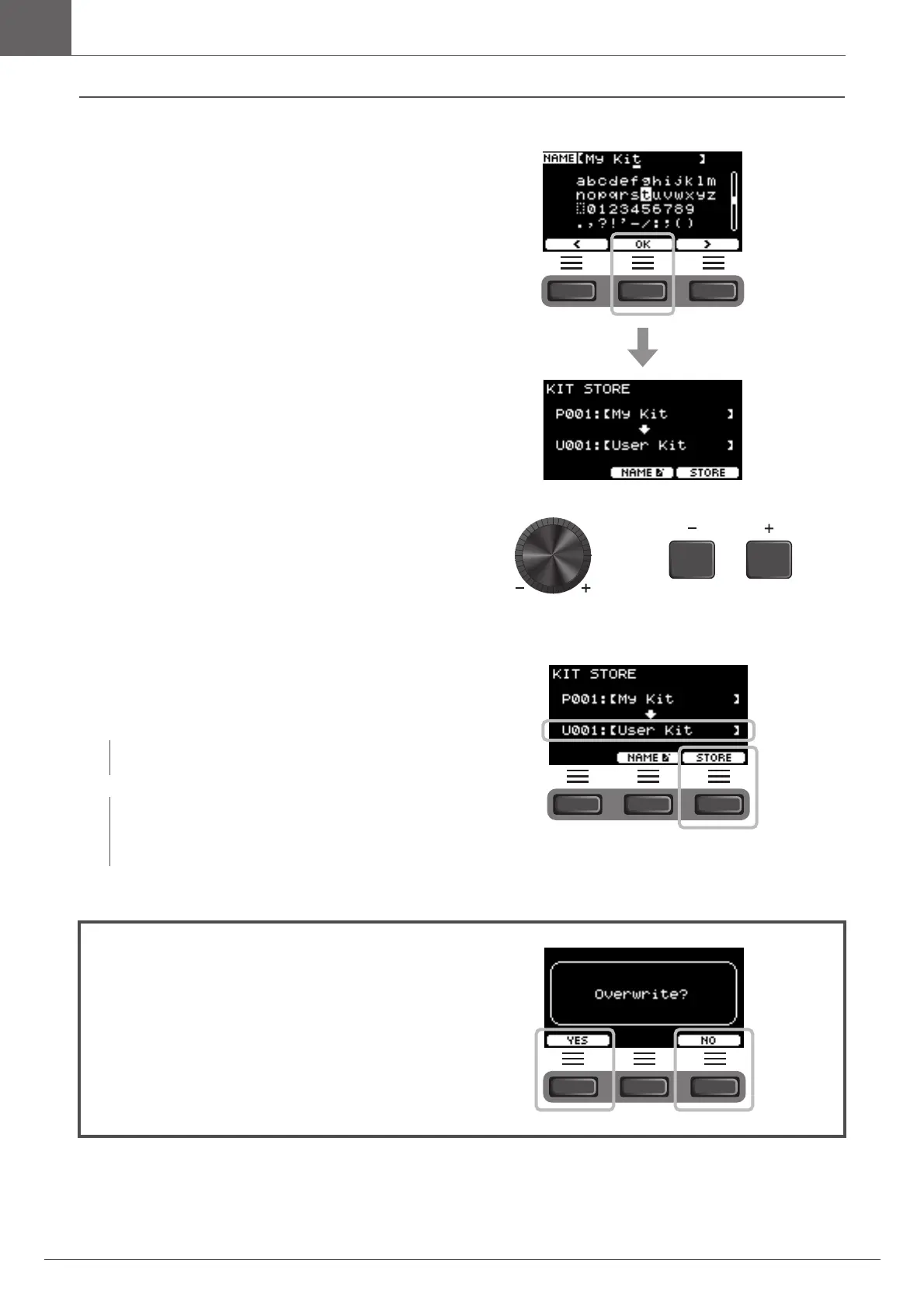
After entering all characters, press the button
below “OK” ([F2]) and return to the STORE
screen.
5.
Use the [–] [+] controllers to select a User Kit
Number to store your Kit to.
6.
After confirming the new Kit Number and Kit
Name, press the button below “STORE”
([F3]).
When the Kit operation is complete, the display returns to the Kit screen.
NOTE
You cannot save an edited Kit to a Preset Kit.
NOTICE
When overwriting a Kit, the current Kit settings are
replaced with the new settings. Before overwriting a Kit,
ensure that the Kit contains no irreplaceable settings.
“Overwrite?” appears when the selected Kit Number already
contains a Kit.
If you want to overwrite to save the Kit, press the button below
“YES” ([F1]).
If you do not want to overwrite, press the button below “NO”
([F3]) and return to the previous screen where you can select
another Kit number.



 To Next Page